


In 2026, a virtual card will be needed primarily for international subscriptions, purchases from foreign online stores, reservations, and payments abroad. You can usually apply for a virtual card entirely online, without a physical card and without visiting a branch.
- For some international services, a basic virtual card with foreign account details is sufficient.
- For ChatGPT, Netflix, the App Store, Steam, travel, and mobile payments, it’s not the term “virtual” itself that matters, but rather whether a specific card is compatible with the service you need.
- If you need a full-fledged bank account, a SWIFT code, a way to receive income, or a place to store large sums of money, a single virtual card may not be enough.
One option for paying for international services is Yello Card. This is a virtual card issued by a foreign provider that you can apply for online and top up with rubles via the SBP. As of September 2026, the service offers two cards: Standard and Ultima+.
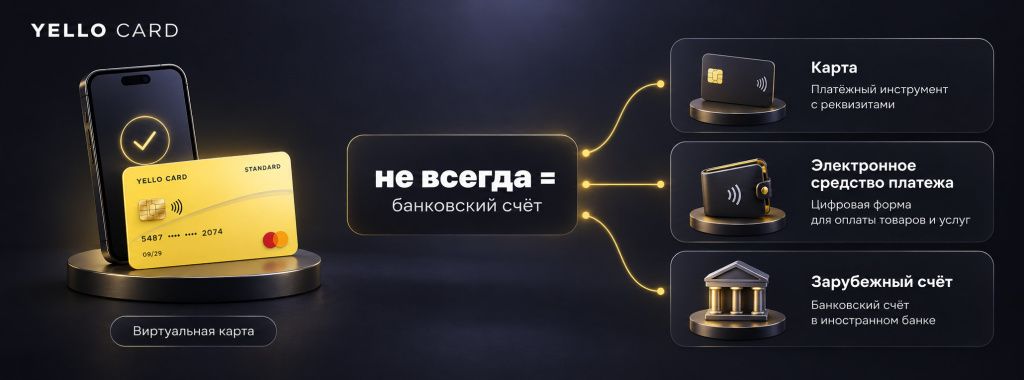
The main confusion stems from the word “card.” The terms “virtual bank card,” “digital card,” “foreign card,” and “card from a foreign bank” are often used interchangeably, even though they do not always refer to the same product. In some cases, the user receives only card details for making payments, while in others, a full-fledged account is opened along with the card. When it comes to taxes, transfers, and spending limits, the difference is fundamental.
What Is a Virtual Card
A virtual card is a payment card that does not require a physical plastic card. It has a number, an expiration date, and a security code. You can use these details to pay online, and some cards can be added to Apple Pay, Google Pay, or another mobile wallet and used at regular terminals.
The term “digital card” is often used as a synonym. But in practice, the products differ:
- A bank’s virtual card. It is issued linked to a bank account or within a banking app. It can be a Russian or foreign card.
- Virtual card from a fintech service. The user receives the details of a foreign card through a service that works with a foreign payment infrastructure.
- A full-fledged card from a foreign bank. In addition to the card, the customer has a bank account, a contract with the bank, and sometimes an IBAN and the ability to receive transfers.
Therefore, an “online virtual card,” an “online bank card,” and an “online bank card” can refer to products that differ in structure. Behind these similar names lie different legal structures: ranging from individual card details to a full-fledged bank account. First, determine your goal, and only then choose the method of application.
Who Needs a Virtual Card and Why
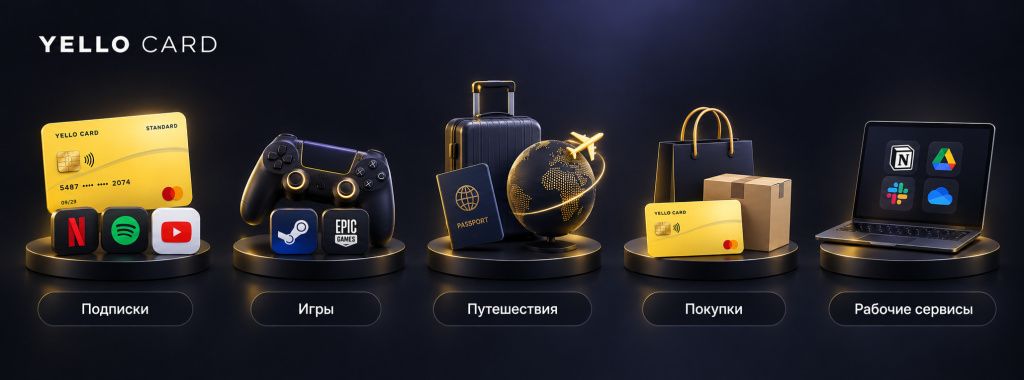
Most often, people want to get a virtual card not for the card itself, but for a specific payment:
- Paying for international subscriptions: ChatGPT, Claude, Spotify, Netflix, Adobe, Figma, Canva, Midjourney, cloud services, and productivity software.
- Games and digital content: Steam, PlayStation Store, Xbox, Epic Games, game subscriptions, and in-game purchases.
- Travel. Booking, Airbnb, airline tickets, rentals, taxis, restaurants, and purchases abroad.
- Purchases from foreign online stores. A virtual payment card works if the store accepts cards from the corresponding payment system and BIN.
- A separate card for recurring payments. It’s convenient to keep only the amount needed for subscriptions on this card, without revealing your primary card’s details.
To avoid overpaying, choose a scenario first.
| Task | What is usually needed | Credit card | A foreign bank account | What to Look For |
|---|---|---|---|---|
| Subscriptions and online services | Virtual card for payments | No | Usually not required | Service compatibility, BIN, fees |
| Purchases and Reservations Abroad | International virtual card with a mobile wallet | Optional | Optional | Apple Pay / Google Pay, Geography, Limits |
| Receiving payments from international customers | Foreign bank account and card | Depends on the situation | Yes | IBAN/SWIFT, documents, Federal Tax Service |
| Living Abroad | Full-featured international bank card | Recommended | Yes | Account, transfers, ATMs, compliance |
Virtual Cards and Foreign Cards: What’s the Difference?
An international card means that the payment instrument is linked to a foreign payment infrastructure or a foreign issuer. A virtual card refers to the form of the card: it has account details, but may not exist as a physical plastic card.
Therefore, a foreign virtual card can be both a foreign card and exist only in digital form. However, a “bank virtual card” does not always imply a full-fledged bank account. The same applies to the terms “foreign bank card” and “international bank card”: it’s important to check who exactly issues the card and whether an account is opened with it.
If you need a foreign bank card for Russians, ask the service four questions: who is the issuer, is a bank account opened, is there an IBAN or other account number, and what documents does the cardholder receive? The answers are more important than the product’s promotional name.
And what is the “Mir” virtual card?
A “Mir” virtual card is a digital card from the Russian payment system. It’s convenient for domestic payments in Russia and can be issued by a bank without a physical card, but it’s not the same as a foreign card for paying for international services.
If you’re looking to use it for Netflix, ChatGPT, a foreign online store, or a card for payments abroad, don’t focus on the fact that it’s a digital card—instead, look at the payment system, the issuer’s country, the BIN, and whether the specific merchant accepts it.
Yello Card: What Is This Virtual Card?
Yello Card positions itself as a service offering virtual cards from a foreign issuer for subscriptions, purchases, and travel. The user agreement states that the solution provider itself is not the card issuer: the digital payment instrument is issued and serviced by a foreign issuer or a member of the partner infrastructure, which is determined at the time of issuance.
As of September 2026, two options are available:
- Standard – a basic virtual card for compatible online services.
- Ultima+—a more expensive card with broader compatibility and claimed support for mobile payments via Apple Pay, Google Pay, and Alipay.
Top-ups are made in rubles via the SBP. The Yello Card website states that there is no separate fee for the top-up itself via the SBP, but a transaction fee is charged.
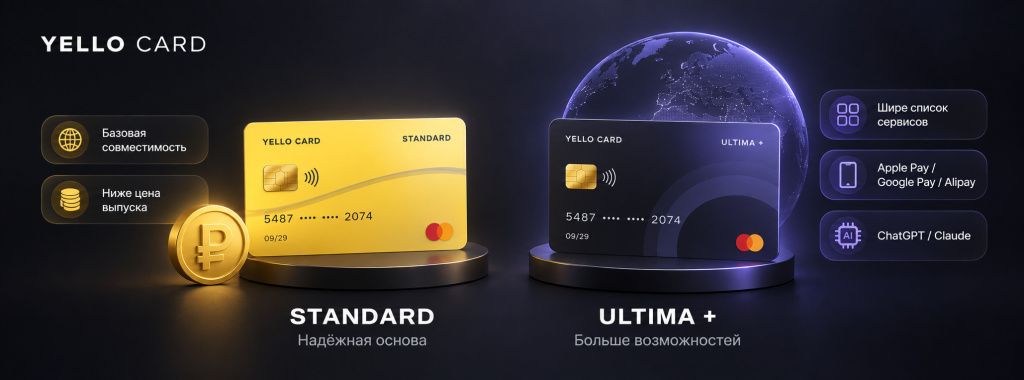
Yello Card terms and conditions as of September 2026:
| Parameter | Standard | Ultima + |
|---|---|---|
| Issue cost | 1,699 ₽ | 2,999 ₽ |
| Top-up | Rubles via SBP | Rubles via SBP |
| Transaction fee | $0.80 | $0.40 |
| ChatGPT and Claude | Not listed as compatible | Listed as compatible |
| Apple Pay / Google Pay / Alipay | Not the primary use case for this plan | Support is listed |
| Why choose it | If the service you need is on the compatibility list | If you need a wider range of services and the ability to pay with your phone |
Don’t choose Standard just because it’s cheaper. Check the specific service first. According to the published compatibility table, Yello Card Standard works with, for example, Spotify, Booking.com, Patreon, Discord Nitro, Google One, Midjourney, Adobe, Canva, Figma, JetBrains, and a number of other platforms. However, ChatGPT, Claude, Steam, Netflix, the App Store, Airbnb, and some other popular services are marked as incompatible with Standard. Ultima+ has a broader list.
How to Apply for a Yello Card Virtual Card Online
If you need a virtual card online without visiting a bank, here’s how it works with Yello Card:
- Open a Yello Card and review the current terms and conditions.
- Decide what type of service or payments you need: subscriptions, games, travel, reservations, or purchases.
- Check whether the service you want is compatible with Standard and Ultima+. This is important: the two cards differ in more than just price.
- Sign up. On the service’s website, you’ll need to enter your first name, last name, email address, and password to register.
- Select a card and pay the issuance fee. As of September 2026, the Standard card costs 1,699 ₽, and the Ultima+ card costs 2,999 ₽.
- After the card is issued, top up your balance with rubles via the SBP. The total amount is displayed before payment.
- To pay online, use the card details. If you selected Ultima+ and need to pay by phone, add the card to a supported mobile wallet following the service’s instructions.
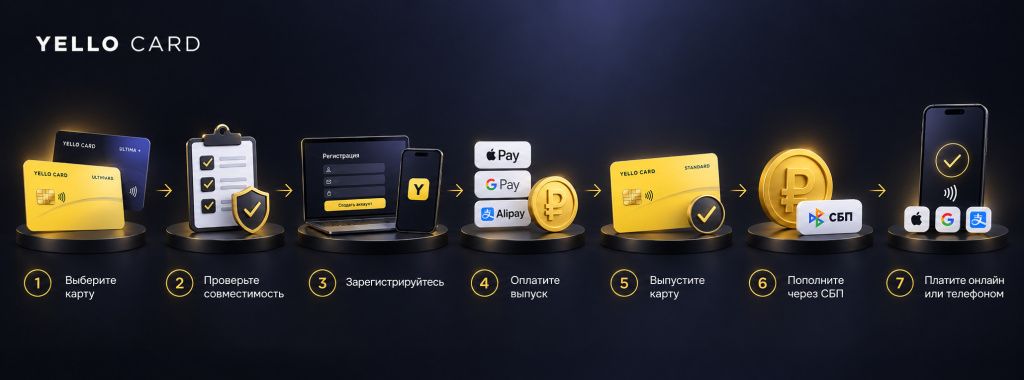
This is the “open a virtual card online without visiting a bank” process: registration, plan selection, issuance, and top-up are all done remotely. This format is suitable for those who need a virtual bank card online without visiting a branch.
Do you need a passport and KYC?
The Yello Card public registration page lists the first name, last name, email address, and password. However, the user agreement specifically reserves the right for the service and its partners to request identification, verification, and additional documents if required by law, internal policy, or the service provider’s rules.
Therefore, the phrase “virtual card without visiting a bank” should not automatically be interpreted to mean “you’ll never need any documents.” While a branch visit is indeed not required, additional identity verification may be necessary.
If you absolutely need an instant virtual card, check two things before making a payment: how long it takes to issue the card as of the application date, and whether additional verification will be required in your case.
What You Can Pay For With a Yello Card
Yello Card has a public compatibility chart. The service shows whether the Standard or Ultima+ plan is suitable for a specific platform and when compatibility was last verified.
The Yello Card compatibility table lists hundreds of international services: neural networks, games, streaming, design, education, hosting, cloud services, marketplaces, travel, music, communications, and other categories.
For the Standard plan, compatible examples include Spotify, Booking.com, Patreon, Discord Nitro, Google One, Midjourney, GitHub Copilot, JetBrains, Adobe, Canva, Figma, Trello, iHerb, Freepik, Zoom, Udemy, Agoda, Etsy, Shopify, and a number of other services.
The Ultima+ service is billed as a more versatile plan. According to the published compatibility table, services listed for it include ChatGPT, Claude, the App Store, Google Play, Airbnb, Steam, Netflix, YouTube Premium, the PlayStation Store, Epic Games, airlines, and travel services.
However, the compatibility chart is not a lifetime guarantee. Overseas platforms change their anti-fraud measures, BIN rules, and payment partners. Before signing up for a subscription or traveling, check the status again.
How to Choose Between Standard and Ultima+
The choice depends on your use case.
- Standard. Choose this if your specific service is explicitly listed as compatible and you don’t need mobile payments.
- Ultima+. Choose this if you need ChatGPT, Claude, the App Store, Steam, Netflix, Airbnb, a wider range of international platforms, or mobile payments.
The difference in the issuance fee is 1,300 rubles. However, Standard has a higher transaction fee: $0.80 versus $0.40. If you plan to use the card frequently, you should compare not only the issuance fee but also the costs of future transactions.
How Much Does It Actually Cost to Use a Virtual Card?
The issuance fee is just the first line item. Before applying for a virtual card online, calculate:
- the issuance fee;
- the fee for each transaction;
- the exchange rate from rubles to the card’s currency;
- any currency conversion fees charged by the merchant;
- fees for refunds or disputed transactions, if provided for in the terms and conditions;
- fees for additional services, if they appear in your account dashboard.
With Yello Card, the final top-up amount is displayed before payment via the Secure Payment System (SPS), and the terms of service allow providers to change fees and introduce new ones. Therefore, before making a large top-up, check the calculation in your account dashboard rather than relying solely on an outdated overview.
Can I use a virtual card abroad?
Yes, if the specific card supports the desired payment method and the merchant accepts its payment system. A virtual card is especially convenient for travel when you can add it to your phone.
The Yello Card for Ultima+ supports Apple Pay, Google Pay, and Alipay. The process is simple: add your payment details to the wallet, and then you can use your phone to pay at terminals that support the corresponding system.
However, you should verify your card for international use before traveling. It’s not just about Apple Pay or Google Pay—you also need to consider the country, merchant restrictions, refund policies, spending limits, and a backup payment method.
For international payments, it’s practical to have at least two independent payment methods: a primary international card and a backup. It’s best to verify a bank card for international use in advance, especially if you plan to use it to pay for hotels, tickets, and deposits.
Cards for making payments abroad can be virtual or physical. If you need a card for making payments abroad as a Russian citizen that can be applied for remotely, be sure to check separately whether it can be issued from Russia, topped up with rubles, and used with a mobile wallet. A single card should not be your only payment method while traveling.
A virtual card or a full-fledged card from a foreign bank
A virtual card is simpler for subscriptions. For daily life, work, and large transfers, you’ll usually need a real bank account.
| Feature | Virtual Fintech Card | Full-featured card from a foreign bank |
|---|---|---|
| Paying for international subscriptions | Yes, if the service is compatible | Yes |
| Physical card | Usually not | Usually yes |
| Cash withdrawal | Usually not without a card | Yes, at the bank's rates |
| Receiving wire transfers | Depends on the product | Yes, if the account supports transfers |
| Can be processed without visiting a branch | Often yes | Depends on the country and bank |
| Federal Tax Service | Depends on the legal structure of the product | When opening a foreign account, a reporting obligation may arise |
Federal Tax Service: Is it necessary to report a virtual card?
This cannot be answered with a simple “yes” or “no.” The tax authority is not concerned with the marketing term “virtual card,” but rather with what has been legally issued to the user.
If a resident of the Russian Federation opens an account or deposit with a bank or other financial market organization outside of Russia, the Federal Tax Service requires that the tax authority be notified no later than one month from the date of opening, closing, or changing the account details.
There are also separate rules for foreign electronic payment instruments that do not require opening a bank account. Therefore, before signing up, it is important to clarify exactly what the service provides: only card details, an electronic payment instrument, or a full-fledged foreign account.
According to Yello Card’s public terms and conditions, the service is described as a “digital instrument” issued by a foreign issuer, with the specific issuer determined at the time of issuance. If currency control is a matter of principle for you, ask customer support for details about the legal structure of your specific card and keep the documents on file.
What to Look for Before Issuing a Virtual Card
- Issuer. Who actually issues the card and in which jurisdiction.
- BIN. The first digits of the card identify the bank and the issuer’s country. For some services, this affects whether the payment goes through.
- Compatibility. Not just “does it work abroad in general,” but whether your specific service is supported.
- Fees. Issuance, transactions, top-ups, currency conversion, refunds, inactivity, and maintenance.
- Limits. Per transaction, per day, per month, and on the balance.
- Mobile wallets. Apple Pay, Google Pay, and Alipay are only needed if you plan to make offline payments with your phone.
- Verification. What information is required during registration, and can the service request documents later?
- Support. It’s best to check the response before making a purchase: ask a specific question about the service you’re considering.
- Refunds. How long does it take to receive a refund after canceling a reservation or returning an item?
Is it safe to keep money on a virtual card?
A virtual debit card is convenient as a standalone payment method, but you shouldn’t automatically consider it a replacement for a bank deposit.
For subscriptions, a practical approach is to maintain a working balance: the amount needed for upcoming payments plus a small buffer for fees or exchange rate fluctuations. This minimizes the impact of a hold, a disputed transaction, or the discontinuation of a specific service.
Do not purchase pre-made card details from unknown sellers. If you need to purchase a virtual card, it’s important to distinguish between an officially issued card and the resale of someone else’s accounts or cards. It’s safer to register a virtual card in your own name through a service with clear terms and conditions and a personal account.
Free virtual bank cards: what’s the catch?
Free virtual bank cards do exist: Russian banks can issue digital cards without charging a separate fee. But if you need a foreign virtual card, a free issuance doesn’t mean there are no costs associated with using it.
The service may generate revenue from exchange rates, transactions, top-ups, maintenance fees, or additional charges. Therefore, compare the total cost, not just the “Issue for Free” button.
With Yello Card, there’s a fee for issuance: 1,699 ₽ for Standard and 2,999 ₽ for Ultima+. Transaction fees are listed separately, so you can estimate the total cost of use based on your expected payment frequency.
Yello Card Reviews: What to Look For
Reviews of Yello Card and service overviews are already available on various platforms. For a new fintech product, it’s best to use them as a supplementary source of information rather than as a substitute for checking the terms and conditions and compatibility.
A useful review answers specific questions: what type of card was issued, what service was paid for, when the payment was made, what amount was charged, and how the refund and customer support handled the situation. A comment like “Everything’s great, I recommend it” tells you almost nothing about whether the card is right for you.
For Yello Card, it’s more practical to start with their compatibility chart and check the test date for the service you need. Then look at reviews specific to your needs: Booking separately, ChatGPT separately, Steam separately.
Yello Card Promo Code
If you need a Yello Card promo code, check for current promotions right before you sign up. Promo terms change faster than base rates, so you should only use a code that’s confirmed as of the sign-up date. Check the final price on the sign-up page before paying.
Common Issues with Virtual Cards
- The card is not accepted. Check whether the specific service supports your plan and BIN.
- The repeat charge fails. Make sure you have enough balance to cover the fee and any currency conversion charges.
- The payment went through, but the seller canceled the order. This may be due to the store’s anti-fraud measures. Refunds depend on the seller and the payment processor.
- The mobile wallet cannot be linked. Check whether your specific plan, account region, and device support it.
- The service has requested documents. This is not inconsistent with the online card format itself: the terms and conditions may require additional identification.
- The card used to work but has stopped. Compatibility changes over time. Check the current compatibility matrix and contact support before trying again.
Who is the Yello Card suitable for?
Yello Card is a good fit for anyone who needs an international virtual card for online payments and doesn’t want to deal separately with a crypto exchange, P2P platforms, or a trip to a foreign bank.
Standard is suitable for a specific scenario: you’ve already found the service you need in the compatibility list and want a more affordable option. Ultima+ makes sense when you use multiple services—such as ChatGPT, Netflix, Steam, the App Store, or Airbnb—or if you want to use the card to make payments abroad via your phone.
However, if your goal is to receive a salary or fees from abroad, accept bank transfers, withdraw cash, or use the card as your primary financial account, look for a full-featured card from a foreign bank and check the account terms and conditions separately.
The Bottom Line
A virtual card isn’t a single product—it’s a format. For one person, it’s a digital card from a Russian bank; for another, it’s a foreign card for subscriptions; for a third, it’s part of a full-fledged foreign bank account.
If your goal is to open a virtual card online, load it with rubles, and pay for foreign services, Yello Card can be considered one of the options. The Standard plan is cheaper but requires checking compatibility with the desired platform. The Ultima+ plan is more expensive, but the service offers a wider range of compatible platforms and the option to pay by phone.
Before applying, check the specific service, the total cost of loading the card, and the current terms and conditions. For the latest card information and to apply, click here: Yello Card.
Frequently Asked Questions
It’s a card that doesn’t necessarily come in physical form. It has a card number, expiration date, and security code. You can use it to pay for purchases online, and some virtual cards can be added to a mobile wallet.
Can I get a virtual card online?
Yes. Many services allow you to apply for a virtual card online without visiting a bank. Registration and verification requirements depend on the specific issuer and service.
How do I get a virtual card?
Choose a product that suits your specific needs, check the fees and compatibility, sign up, pay the issuance fee if necessary, and retrieve your account details in your personal account.
Is it possible to apply for a virtual card without visiting a bank?
Yes. Fintech cards and some digital bank cards can be issued remotely. However, the service may request identification or documents.
Which is better: a virtual card or a regular foreign bank card?
A virtual card is usually sufficient for subscriptions and online purchases. For SWIFT transfers, receiving income, withdrawing cash, and full-service banking, you’ll often need an account at a foreign bank.
Will a virtual card work for payments abroad?
Yes, if it supports a mobile wallet or another payment method accepted by the specific merchant. Yello Card states that the Ultima+ plan offers this feature.
Can Russians apply for a card to make payments abroad entirely online?
A virtual card—yes, through a number of services. A full-fledged foreign bank card with an account is issued according to the rules of the specific bank and country.
What kind of card is needed for ChatGPT?
You need an international card with a compatible BIN and authorized transactions. According to Yello Card’s published compatibility chart, ChatGPT is supported by the Ultima+ card, while the Standard card is not compatible with it.
Can I use a Yello Card to pay on Booking and Spotify?
Booking.com and Spotify are listed by the service as compatible with both Standard and Ultima+. Be sure to check the current status in the compatibility chart before making a payment.
Does the Yello Card work with Steam and Netflix?
According to the published Yello Card compatibility table, Steam and Netflix are listed as compatible with Ultima+. For the Standard version, they are marked as incompatible.
How do I add funds to my Yello Card?
With rubles via SBP. The service displays the total amount before payment. According to the published terms, there is no separate fee for topping up via SBP, but a transaction fee applies.
How much does it cost to get a Yello Card?
As of September 2026, the Standard card costs 1,699 ₽, and the Ultima+ card costs 2,999 ₽. The transaction fees are $0.80 and $0.40, respectively.
Is Yello Card a bank?
No. In the Yello Card user agreement, the operator describes itself as a solution provider. The digital tool itself is issued and serviced by a foreign issuer or a member of the partner infrastructure.
Do I need to notify the Federal Tax Service about a virtual card?
It depends on the legal structure of the product. If a foreign bank account or an account with another foreign financial market organization has been opened, a Russian Federation resident may be subject to reporting obligations. This cannot be determined based solely on the label “virtual card.”
Is it possible to have multiple virtual cards?
Technically, many services allow this, but the specific number depends on the issuer’s terms and conditions. Do not create additional accounts to circumvent the service’s restrictions.
Are a virtual debit card and a virtual bank card the same thing?
Not always. “Debit” describes the principle of spending funds, while “bank” implies a connection to a banking product. A fintech service can issue a payment instrument through a partner’s infrastructure without a traditional bank account, under the same terms as a regular bank.
Can you buy a virtual card?
It’s more accurate to say “apply for” or “issue” a virtual card in your own name. Buying pre-made card details and accounts from others is risky: the service may block the card, and the origin of the funds and the owner will remain unclear.
Which banks offer the best virtual cards?
For domestic payments in Russia, choose digital products from Russian banks. For international services, what matters most isn’t the bank’s name, but the issuer’s country, the BIN, fees, and compatibility with the specific merchant.