
You can buy cryptocurrency via SBP on Bitbanker in two steps: first, fund your account with rubles through your bank’s app, then exchange the credited RUBR for USDT, BTC, or another available asset. You don’t need to select a P2P seller or coordinate the transfer with them.
On Bitbanker, payments via SBP are confirmed in the banking app. Before making a payment, the user sees the fee and the amount to be credited, and checks the exchange rate separately before purchasing cryptocurrency. This allows you to estimate the total cost of the transaction: from the debiting of rubles to the receipt of the selected asset.
- Set up your account: register and complete identity verification.
- Fund your account: select RUBR and the “Via SBP” method, review the calculation, and confirm the payment.
- Buy cryptocurrency: after the funds are credited, select an asset and complete the exchange within Bitbanker.
Terms verified based on the official information as of September 25, 2026. Before making a transfer, check your available limit, the fee, and the total amount in your personal account.
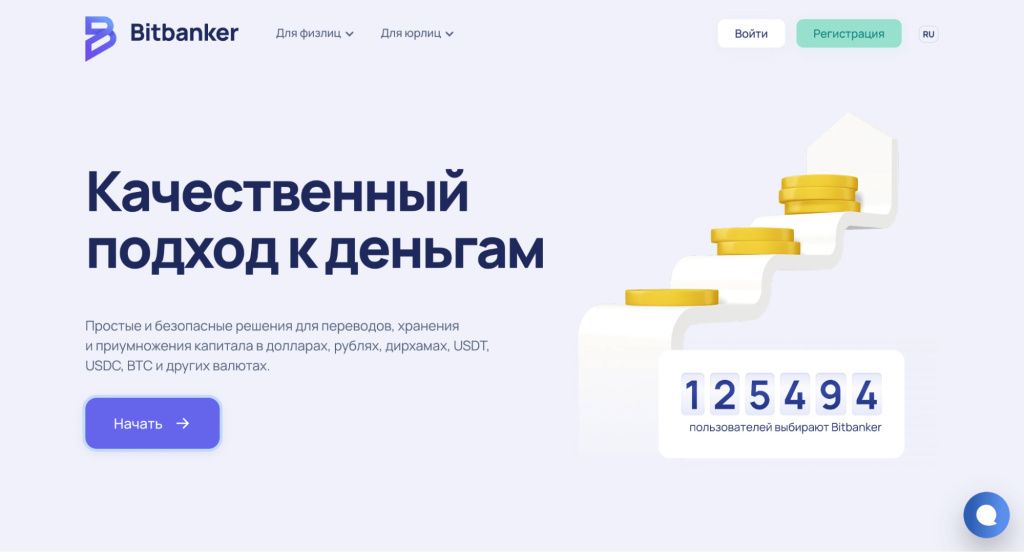
Bitbanker website. Illustration from the service’s published instructions; page layout is subject to change.
How Bitbanker Deposits Work via the SBP
Three different types of funds are involved in this transaction: rubles in your bank account, RUBR on the platform, and the cryptocurrency you plan to purchase. Understanding this sequence helps you avoid the most common mistake: expecting that USDT or bitcoins will automatically appear in your balance after paying via the QR code.
RUBR, or Ruble Coin, is Bitbanker’s digital currency on the BNB Chain. According to the platform’s description, its exchange rate is pegged to the Russian ruble at a 1:1 ratio. A fee is charged for deposits, so the amount of RUBR credited will be less than the amount of the bank transfer.
RUBR should not be confused with the Bank of Russia’s digital ruble or a ruble bank account. It is a separate asset on the platform that is used, among other things, for subsequent exchange.
| Stage | What's happening | What to check |
|---|---|---|
| Bank Transfer | You confirm the ruble payment via the SBP. | The amount, the recipient, and the account from which the funds will be debited. |
| Crediting on the platform | RUBR appears in your balance, including the fee. | The credited amount and the top-up status. |
| Buying Cryptocurrency | You exchange RUBR for the selected asset separately. | Currency pair, exchange rate, fee, and number of coins purchased. |
Therefore, the phrase “top up a crypto wallet with rubles via the SBP” here refers to depositing funds into the platform. A bank transfer alone does not send cryptocurrency to an external blockchain address.
Deposits via SBP: Fees, Limits, and Crediting
Bitbanker’s official SBP instructions list the following terms:
| Parameter | Terms as of September 25, 2026 |
|---|---|
| Deposit fee | 1.9%, minimum 190 ₽ |
| Minimum amount | 1,000 ₽ |
| Maximum amount per transaction | 100,000 ₽ |
| Daily limit | 100,000 ₽ |
| Monthly limit | 600,000 ₽ |
| Number of QR codes | No more than 3 per day |
| Crediting | According to the service, immediately after payment |
| Sender’s information | Full name and phone number must match KYC information |
The QR code limit is calculated separately from the transfer amount. Do not create multiple requests for a single purchase: first determine the amount, then proceed to payment.
How much will remain after the fee: calculation examples
For small transfers, the minimum fee is the determining factor. For example, 1.9% of 1,000 ₽ is 19 ₽, but the rate deducts 190 ₽. The actual cost of such a transfer will be 19% of the amount sent.
| Bank Transfer | Deposit fee | Deposit to RUBR | Commission percentage |
|---|---|---|---|
| 1,000 ₽ | 190 ₽ | 810 RUBR | 19% |
| 5,000 ₽ | 190 ₽ | 4,810 RUBR | 3.8% |
| 10,000 ₽ | 190 ₽ | 9,810 rubles | 1.9% |
| 50,000 ₽ | 950 ₽ | 49,050 RUBLES | 1.9% |
The calculations are based on the published deposit fee schedule: the greater of the two amounts—1.9% of the payment or 190 ₽. The purchase of cryptocurrency and its potential withdrawal are not included in these examples.
The threshold at which the percentage-based fee is equal to the minimum fee is 10,000 ₽. Below this amount, the percentage fee is higher than 1.9%. This is not a reason to increase your purchase budget; these figures are provided so you can understand the cost of your chosen method in advance.
How to Fund Your Bitbanker Account via SBP: Step-by-Step Instructions
1. Register and verify your identity
Go to the official Bitbanker website and create an account. In the KYC section, select standard verification: fill out your personal information, upload a document, complete the camera verification, and verify your phone number. Wait for the verification result.
Immediately enable two-factor authentication in the security settings. Keep your recovery data separate from the device you use to log in to your account.
2. Select RUBR and the “Via SBP” deposit method
In the “Deposits and Withdrawals” section, click “Deposit,” select Ruble Coin (RUBR), then choose the “Via SBP” method. The service’s help section also refers to this as “Deposit via SBP.”
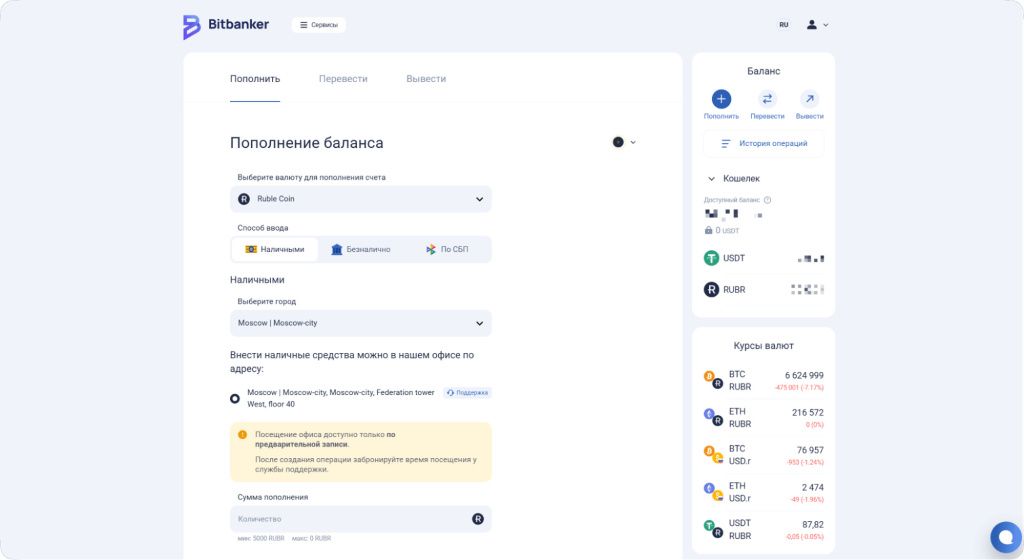
Deposit method selection screen: After selecting Ruble Coin, click “Via SBP.” In the illustration, this method has not yet been selected.
3. Enter the amount and check how much you’ll receive
In the “Amount Paid” field, enter the payment amount in rubles. The “Amount Received” field shows the amount credited in RUBR after the fee is deducted. Verify both amounts before confirming.
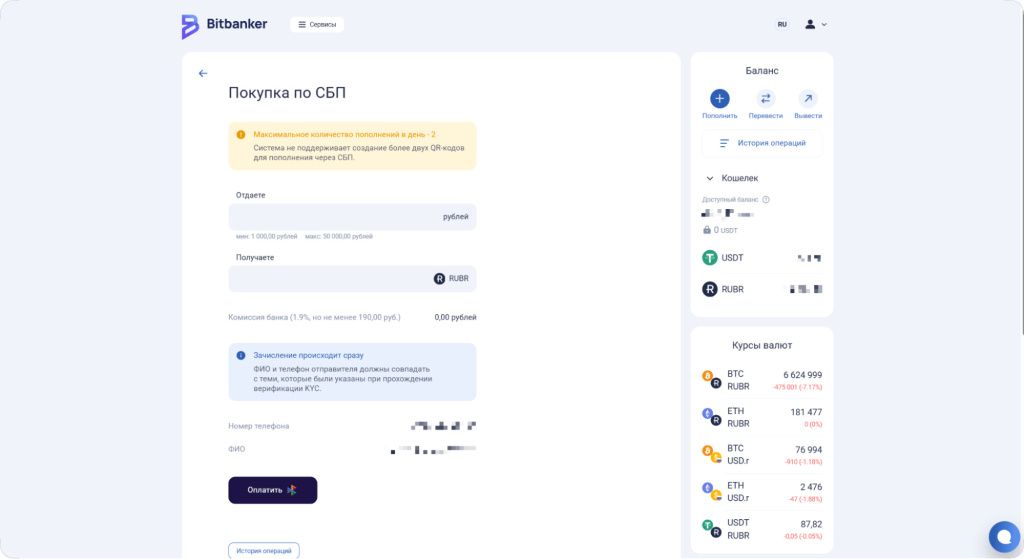
Form taken from the published instructions. The previous limits remain in place in this and the following screenshots: 50,000 ₽ and 2 QR codes. The help section as of September 25, 2026, specifies a limit of 100,000 ₽ per transaction and 3 QR codes per day. Check the terms for a specific payment in your account.
The example in the following image shows the difference between the amount sent and the amount credited: for a payment of 50,000 ₽, the fee is 950 ₽, and 49,050 RUBR is credited to the balance.
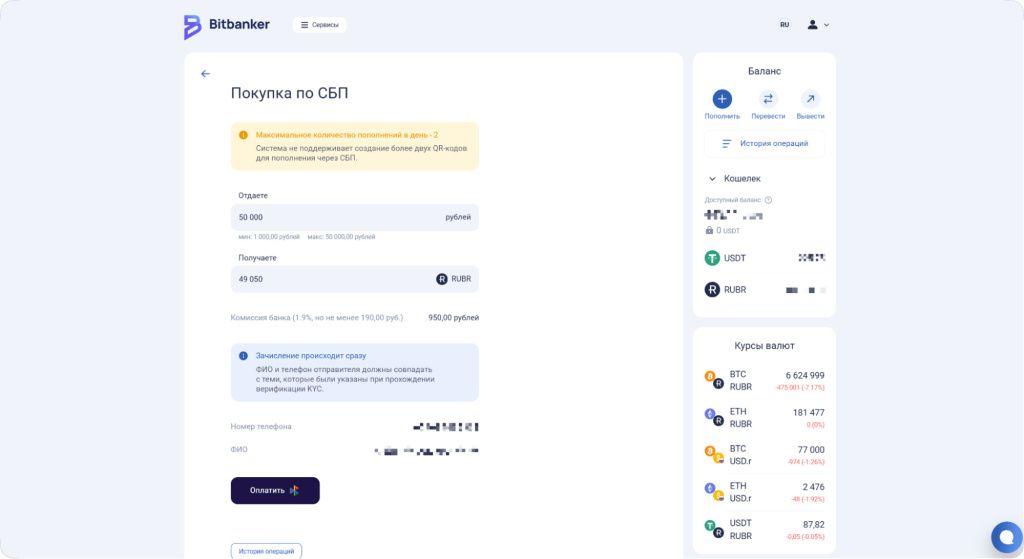
Example of a fee calculation in the Bitbanker interface. The cryptocurrency exchange rates shown in the sidebar are as of the time the screenshot was taken.
4. Confirm the payment with your bank
Click “Pay.” On a computer, use the QR code by opening the scanner in your banking app. On a phone, open your banking app by tapping the “Pay” button. Before confirming, check the recipient and the amount to be debited.
5. Make sure the deposit is complete
Return to your account and check for the “Completed” status in your transaction history, then check your RUBR balance. Save the bank’s payment confirmation.
How to Buy Cryptocurrency with Rubles After Depositing
The next step depends on which asset you need. To buy USDT, use the RUBR-to-USDT exchange. If you need a different asset, first check the available currency pairs and the minimum transaction amount.
- Open the exchange service or the buy/sell section.
- Select what you’re giving up and what you’re receiving. To buy USDT, the deposited RUBR must be the payment currency.
- Enter the amount and view the total amount of cryptocurrency.
- Check the exchange rate and transaction fees, then confirm the purchase.
- Verify that the transaction has been executed and check the balances for both assets.
The platform offers instant exchange and order-based trading. When working with orders, distinguish between buying at the available market price and placing an order with a custom price. In the latter case, the outcome depends on the availability of a matching offer and the order execution conditions.
How to Calculate the Total Cost of Buying USDT
To compare purchase methods, it’s more useful to look at how many rubles were debited from your bank account and how much USDT you actually received after the exchange. A low commission alone doesn’t give the full picture without considering the exchange rate.
The actual cost of 1 USDT = total rubles spent / total amount of USDT received.
Let’s say 50,000 ₽ were debited from your bank account, and after all transactions on the platform, you received 550 USDT. In that case, the actual price was 90.91 ₽ per 1 USDT. This is a hypothetical example of a calculation, not Bitbanker’s current quote.
If you need the cryptocurrency in a different wallet, be sure to check the withdrawal fee, minimum amount, and available network separately. Purchasing within the service and sending to an external address are separate transactions.
SBP and Bank Transfer via QR Code: What’s the Difference?
The presence of a QR code does not necessarily determine the payment method. Bitbanker has a separate “Cashless” option where the QR code helps you fill in your bank details. It has a different processing procedure and its own fee structure.
| What We're Comparing | "Via SBP" Top-Up | "Non-cash" → "Via QR code" |
|---|---|---|
| Purpose of the QR code | Payment for a transaction created via SBP. | Filling out bank transfer details. |
| Service fee | 1.9%, minimum 190 ₽. | 1.5%, minimum 150 ₽; additional bank fees may apply. |
| Processing | The service indicates immediate crediting. | Within one banking day, on business days. |
| What’s particularly important | Sender details and available SBP limits. | Correct payment description with account ID. |
If you choose a bank transfer, use the account details and payment description from your account dashboard. Do not copy them from someone else’s instructions: the ID determines which account the funds should be credited to. The fees and procedure for this type of deposit are published in a separate guide on non-cash deposits via QR code.
Buying Cryptocurrency via the SBP Without P2P: What Changes for the User
In this scenario, there’s no need to search for a listing from a private seller, negotiate terms, or send payment confirmation via the P2P transaction chat. The deposit is created in your Bitbanker account, and the purchase of the desired asset is processed after the funds are credited.
At the same time, the bank transfer, identity verification, and transaction execution remain the same. The convenience of this method lies in the sequence of steps within a single service. Using the SBP alone does not guarantee the absence of verification checks or that the cryptocurrency exchange rate will remain unchanged.
This option is worth considering if you want to pay from your bank account, are willing to complete KYC, and understand the total costs in advance. To make your choice, simply compare the purchase amount, available limits, and the total amount of the asset you will receive.
Security: Official Website, KYC, and Account Protection
The service’s official website is located at bitbanker.org; the Russian-language section is at bitbanker.org/ru/. The web app for managing your account is at app.bitbanker.org. Simply typing the brand name into a search engine does not in itself confirm the authenticity of the page found.
- KYC verifies your identity. The information in your profile must be your own; do not use someone else’s account.
- Two-factor authentication protects your login. Enable it before making a deposit, and do not share one-time codes with anyone.
- Contact support through the service’s website. Do not transfer funds to a “reserve” or “secure” wallet at the request of someone who contacted you via a messaging app.
- Keep records of your transactions. Bank confirmation, the request number, and your transaction history will help you reconstruct the sequence of events in the event of a disputed deposit.
The SBP describes the method for transferring rubles, not the conditions for storing digital assets. Before making a purchase, review the service’s terms and conditions, including restrictions and the process for contacting support.
Bitbanker: Reviews and Service Verification Before Funding Your Account
When reviewing feedback about Bitbanker, focus first and foremost on the specifics: the transaction date, the deposit or withdrawal method, the issue, and the outcome of the inquiry. A review about a cash exchange at a branch says little about how a purchase went through the SBP.
It’s helpful to distinguish between a delay in a deposit, waiting for a buy order to be filled, and waiting for a withdrawal to be processed on the blockchain. These are different stages with different reasons for the delay. A message saying “the money hasn’t arrived” without specifying which stage it refers to doesn’t allow you to assess the situation. A platform’s rating also does not replace checking the current terms and conditions.
What to Do If the Funds Were Debited but the Balance Wasn’t Credited
First, determine where the transaction is stuck: at the bank, during RUBR crediting, or already during the cryptocurrency purchase. Do not repeat the payment simply because the desired asset is not yet displayed.
- Check your banking history. It’s important to distinguish between a successful debit and a transaction that was rejected or is still being processed.
- Open your Bitbanker transaction history. Compare the amount, time, and status of this specific deposit.
- Check your RUBR balance. If your account has been credited but there is no USDT, verify whether you initiated an exchange and whether the order was executed.
- Prepare a support ticket. Include the transaction number, time, and amount, and attach the bank confirmation. Submit the information through the official support channel.
If the error occurred before the funds were debited, check the message in the payment form and any applicable restrictions. If the debit has been confirmed, resolve the current request first: making a duplicate payment will create an additional transaction and complicate the reconciliation process.
Frequently Asked Questions About Bitbanker and Buying Cryptocurrency via SBP
Can I buy cryptocurrency via SBP directly to an external wallet?
In the scenario described, your Bitbanker balance is topped up first. After purchasing cryptocurrency, you can initiate a separate withdrawal if the service supports the desired asset and network. Before sending, verify the address, network, minimum amount, and fee.
Does the SBP lock in the USDT exchange rate at the time of the deposit?
Depositing RUBR and exchanging it for USDT are separate transactions. Calculate the total purchase amount based on the exchange rate at the time of confirmation, not the rate you saw before making the bank transfer.
Can I deposit funds into Bitbanker without verification?
KYC is required for this ruble-based scenario. The terms for certain cryptocurrency transactions without verification should not be applied to ruble deposits.
Can I pay for a deposit using a relative’s account?
Use your own account. The requirement that the sender’s information match the profile means that a transfer from a relative cannot be considered a standard substitute for a payment made by the account holder.
Can I then withdraw the funds back to a bank account?
Bitbanker offers a separate service for non-cash RUBR withdrawals. If your balance contains a different cryptocurrency, you’ll need to exchange it first. The payment details, fee, and final payout amount are verified when you process the withdrawal.
Is it mandatory to buy cryptocurrency immediately after depositing funds?
Depositing funds does not automatically trigger an exchange order. You select the asset and amount separately. Keep in mind that the available exchange rate at that moment may differ from the initial calculation.
What to check before buying
To buy cryptocurrency via SBP, determine the bank transfer amount, check the credited balance after the fee is deducted, and evaluate the terms of the subsequent exchange. If you need an external wallet, include the withdrawal fee in your calculation. This way, your comparison will account for all stages, not just the deposit fee.
You can get started on the Bitbanker website: after verifying your identity, open the RUBR deposit page, select “Via SBP,” and review the calculation. Once the funds are credited, complete the purchase of the desired asset. Confirm each step after verifying the amount and terms.
This article describes how the service works and the transaction fees. It does not contain a recommendation to buy a specific cryptocurrency; the value of digital assets may fluctuate.