Bybit P2P is a marketplace where one user buys or sells cryptocurrency to another user while the exchange holds the seller's coins until the payment is completed. Fiat money is transferred to the counterparty using the details shown in the order, not to Bybit itself. The buyer therefore needs to check the advertisement, recipient name, limits and the advertiser's statistics before sending money.
USDT is the most common asset in P2P orders. Other coins and payment methods may also appear depending on the country, fiat currency, verification status and current Bybit rules. This guide explains a standard P2P transaction. It does not cover grey-market schemes, third-party cards or attempts to circumvent platform restrictions.
If the account has not been created or verified yet, start with our Bybit overview. P2P access normally requires verified account details, security checks and a payment account held in the same legal name.
How Bybit P2P works
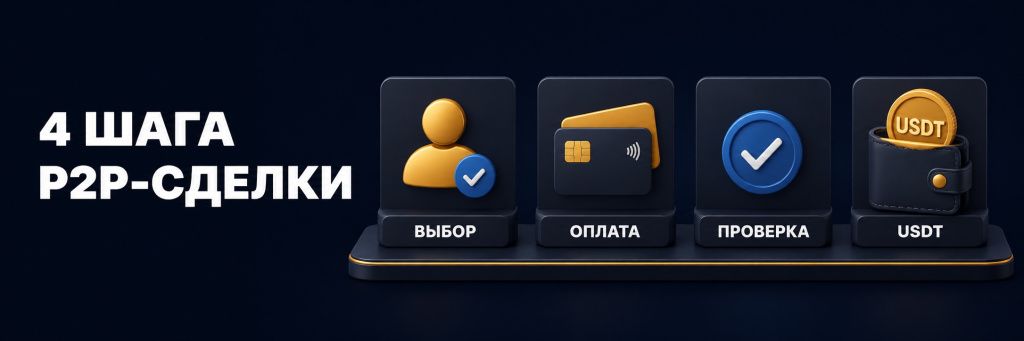
Bybit does not publish the buy and sell offers itself. It displays user advertisements and reserves the seller's cryptocurrency while an order is active. The buyer manually sends fiat money using the details shown in the order, marks the payment as completed, and the seller releases the coins after confirming that the funds have actually arrived.
- The user selects an advertisement with a suitable price, limit and payment method.
- Once the order is created, the amount is fixed and the seller's crypto is reserved.
- The buyer manually transfers the fiat payment through a bank or payment app.
- The seller checks the account balance and releases the reserved coins.
- The cryptocurrency is credited to the buyer's Funding Account.
The “Payment Completed” button does not send money. It only tells the seller that the bank transfer has been made. A buyer must never click it before paying. A seller must not release USDT on the basis of a screenshot, receipt image or text message; the incoming transaction must be visible in the bank account's available balance.
What to prepare before the first order
- A Bybit account with current identity verification.
- Access to the linked phone, email and security confirmation method.
- A bank account or supported payment method in the account holder's name.
- The official website or app, with no passwords or codes shared with anyone.
- A small test amount if the payment method has not been used before.
The bank account name must match the identity verified on Bybit. A payment from a relative, colleague or company account may be rejected and can trigger a review. Never agree to send funds to payment details that are not displayed inside the active order.
A payment method can be added in the P2P User Center. Select the method, enter the details and review them before saving. Use the exact method accepted by the advertiser. A bank transfer listed in the advertisement should not be replaced with another channel without an official order flow.
How to choose an advertisement
The highest quoted rate is not always the best order. Set the fiat currency, coin, amount and payment method first, then compare several details.
| Indicator | What to check | Why it matters |
|---|---|---|
| Price | The final rate per USDT | Compare the same amount and payment method |
| Limits | Minimum and maximum order amount | Your amount must fit the displayed range |
| Completed orders | Recent 30-day activity | Shows whether the counterparty is active |
| Completion rate | Share of successfully completed orders | Frequent cancellations may cause delays |
| Terms | The advertiser's written conditions | They may specify accepted banks and payment rules |
For a first purchase, an active counterparty with many orders, a high completion rate and clear terms is usually a better choice than an untested advertiser offering an unusually attractive rate. A status badge is useful, but recent statistics still need to be checked.
How to buy USDT through Bybit P2P
- Open Buy Crypto → P2P Trading and select the Buy tab.
- Choose USDT, the fiat currency, the amount and the payment method.
- Compare the price, limits, statistics and terms of several offers.
- Click Buy USDT for the selected advertiser and enter the amount.
- After the order is created, verify the recipient and payment details again.
- Send the exact amount from your own named account before the timer expires.
- Return to the order and click Payment Completed.
- Wait for the seller to release the coins and check the Funding Account.
Do not mention “cryptocurrency”, “USDT”, “Bybit” or similar terms in the payment note. Follow the rules shown by the platform and the payment provider. Do not split one payment into several transfers without an approved procedure, and do not pay after the order timer has expired.
If the timer expires before payment, create a new order. If the money has already been sent, do not cancel the order at the seller's request. Record the payment in the order chat and open an appeal. Moving the discussion to an external messenger weakens the evidence available to both parties.
Where USDT arrives after a P2P purchase
Once the seller releases the coins, the purchased asset is credited to the Funding Account. This balance is used for deposits, withdrawals, P2P and certain payment functions. If the USDT is needed for spot or derivatives trading, it can be moved between internal accounts without a blockchain transaction.
Check Assets and the P2P order history. There is no need to make an external withdrawal merely to move funds between Funding and a trading account. The account structure is explained in our Bybit guide.
How to sell USDT and receive fiat money
An available balance is required before selling. Bybit can process P2P orders from the Funding Account and, for eligible assets, from Flexible Earn. Check which balance will be reserved before confirming the order.
- Open P2P Trading and select the Sell tab.
- Choose USDT, the fiat currency, the amount and an added payment method.
- Review the buyer's advertisement, limits and statistics.
- Enter the amount in USDT or fiat and confirm the order.
- Wait until the buyer marks the payment as completed.
- Open the bank app yourself and verify the actual credit.
- Check the amount and sender name, then release the USDT.
A screenshot, chat receipt or SMS is not proof that money has settled. Check the available balance and the transaction in the banking app. If the payment comes from another person, the amount is different or the transfer is pending, do not release the coins until the issue has been resolved through the order chat and appeal process.
P2P fees and the effective exchange rate
Fees depend on the user's role, fiat currency, advertiser level, advertisement type and current tariff. A bank or payment service may charge separately. Compare the final amount received or paid, not only the number shown in the Price column.
To evaluate an order, divide the fiat amount by the number of USDT and compare the result with nearby offers. Include the provider's fee and the cost of any subsequent transaction. Bybit's current rates should be checked immediately before placing an order.
What to do when a dispute occurs
Start by writing to the counterparty in the order chat. Do not switch to a messenger and do not send an identity document, password, 2FA code or remote access credentials. If the problem remains unresolved, use the dispute or appeal control inside the order.
- The buyer paid but the coins were not released. Do not cancel the order. Keep the bank evidence and submit an appeal.
- The seller cannot see the payment. Check the transaction status, amount and details. Do not send a second payment without an official instruction.
- The payment came from a third party. Do not release crypto automatically; record the mismatch in the chat.
- The wrong amount was sent. Do not arrange an off-platform refund; open a dispute and follow the platform procedure.
An appeal may require a screen recording of the banking app, the account holder's name, transaction number, time and amount. Cancel an appeal only after the problem is genuinely resolved. Premature cancellation can limit the ability to dispute the same order again.
How to become a Bybit P2P advertiser
A taker selects an existing advertisement. A maker or advertiser publishes an offer with a price, limits and payment methods. Eligibility levels depend on account age, completed orders, completion rate, trading volume, unique counterparties and the absence of unresolved disputes.
At the time of review, the General Advertiser levels required a linked phone and email, standard identity verification and a P2P history. Minimum account age, order count, volume and completion rate vary by level. The system may require a USDT security deposit and evidence of the source of funds. Current personal thresholds appear under P2P User Center → Advertiser Privileges and may change.
| Requirement | What Bybit evaluates |
|---|---|
| Account security | Linked phone and email, valid identity verification |
| History | Account age, completed orders and unique counterparties |
| Order quality | Completion rate, reviews, disputes and cancellations |
| Volume | P2P turnover during the control period |
| Risk control | Source-of-funds checks and a possible security deposit |
Do not buy an account with an advertiser status and do not publish offers in another person's name. Payment history and bank accounts must belong to the profile owner. Mismatched data, repeated cancellations and unresolved disputes can remove advertising privileges.
Safe P2P checklist
- Keep all messages and confirmations inside the Bybit order.
- Use only payment accounts held in your own legal name.
- Verify the payment details for every new order.
- Do not click Payment Completed before sending the money.
- Do not release USDT before the funds appear in the available balance.
- Do not accept additional payments or refunds outside the order process.
- Never share a password, 2FA code, SMS code or remote access.
- When details do not match, open a dispute instead of rushing to finish.
P2P does not remove banking or market risks. A payment provider may request supporting documents, and the exchange may conduct an additional review. Keep evidence of the legitimate source of funds and do not use P2P to process third-party transfers or circumvent restrictions.
Frequently asked questions
How do I buy USDT through Bybit P2P?
Select USDT, the fiat currency, amount and payment method, choose an advertisement, create an order, send the money to the displayed details and mark it as paid. The USDT is credited after the seller releases it.
How do I sell USDT and receive money in my bank account?
Open the Sell tab, select an advertisement and your named payment method, then create the order. Release the coins only after the money is visible in your bank's available balance.
Which account receives the purchased crypto?
Coins purchased through P2P are normally credited to the Funding Account. They can then be transferred internally to the account needed for trading.
Can I pay from someone else's bank account?
No. The payment account should belong to the verified Bybit account holder and have the same legal name. Third-party payments may be rejected or reviewed.
What if I paid but the seller did not release USDT?
Do not cancel the order. Contact the seller in the order chat, keep the bank evidence and submit an official appeal inside Bybit.
Does Bybit charge a P2P fee?
The rate depends on the fiat currency, role, advertiser level and advertisement type. The payment provider may also charge a separate fee. Review the final order terms before confirming.
How can I become a P2P advertiser?
Open Advertiser Privileges in the P2P User Center. Bybit typically evaluates verification, account age, order count and volume, completion rate, counterparties and unresolved disputes.