


You can exchange BTC for USDT or USDT for BTC without using an exchange through an online exchange service: select the exchange direction and the receiving network, compare the total amount, submit a request, send the assets using the details provided in the request, and wait for the payment. The main verification takes place before the transfer: check whether the address, network, minimum amount, reserve, exchange rate locking policy, and refund terms match. To initially compare offers, it’s convenient to open Exnode, but you should read the final terms on the website of the exchange service you’ve chosen. This material is for informational purposes only and does not constitute individual investment or financial advice. An online exchange performs a specific transaction upon request: it accepts one asset and sends another to the specified address. To exchange BTC for USDT, you don’t need to place an order in a trading terminal, navigate the order book, and then separately withdraw the received asset. This saves time if you need a single, predefined pair rather than engaging in regular trading. Exchanges and exchange platforms display prices differently. On an exchange, you can see buy and sell orders, and the outcome of a market order depends on the depth of the order book. An exchange platform typically displays the calculation for the selected pair and the amount to be received in advance. The calculation follows the rules of the specific order: the rate may be locked in upon creation, after a required number of network confirmations, or for a limited time. Therefore, it is not possible to simply compare figures “per BTC” without considering the conditions. Exchanging without an exchange does not mean exchanging without identity verification. The service may request documents in accordance with AML/KYC regulations, especially if the transaction is subject to additional verification. And the absence of registration in your personal account does not make the transfer reversible: a transaction sent to the blockchain cannot be canceled with a button on the exchange’s website. Before creating a request, read the service’s rules and the procedure for handling delays. For a one-time exchange, choose the route that best suits your needs. BTC → USDT is suitable when you need tokens on a specific network as the output. USDT → BTC requires you to specify a Bitcoin wallet address and verify that the service accepts the specific type of USDT you’ve selected. If you’re comparing CEX and DEX platforms, MSG has a separate article on the types of cryptocurrency exchanges. This guide focuses on orders placed through an online exchange, not on trading via an exchange or a smart contract.When an online exchange is more convenient than a trading platform
How to Choose an Online Cryptocurrency Exchange for Your Pair
First, set the same parameters for all transactions: what you’re sending, how much, which network the USDT is on, and what you want to receive. For example, BTC → USDT TRC20 and BTC → USDT ERC20 are two different transaction types. Even if the token name is the same, the receiving addresses, network fees, and set of available services will differ. Tether lists the supported networks for USD₮; the network in your request must match the one in your wallet.
When reviewing the list of exchanges, don’t just look at the exchange rate. Check the minimum and maximum amounts, the available reserve for the target asset, the processing time, reviews with dates, how to contact support, and the rules for exchange rate changes. In the MSG online crypto exchange directory, you can view the services themselves; then open their terms and conditions and compare the calculations for your amount.
Reserve refers to the available volume of the asset that the exchange displays for a given pair. If you want to receive 2,000 USDT but the reserve shown on the page is lower, your request may be rejected or require approval. If the reserve only slightly exceeds the amount you need, keep in mind that other customers are using it at the same time. You should check it right before placing the order, not based on a screenshot from yesterday.
There’s a specific catch with the minimum amount: it may be calculated based on the asset being sent, the asset being received, or after network fees are deducted. If you send an amount below the minimum, the exchange may flag the request for manual processing or refund the funds according to its policies. The upper limit is also not equal to the reserve: a service may have a large reserve but still limit the size of a single request.
| Parameter | What to look for | What Can Affect the Result |
|---|---|---|
| Pair and Network | BTC → USDT TRC20, USDT TRC20 → BTC, and other pairs separately | Mismatch in the sending or receiving network |
| Total Amount | How much will be credited to the wallet for the specified amount | Spread, service fee, and transfer fee |
| Reserve | Available amount of the asset you receive | Other orders and data updates |
| Limits | Minimum and maximum per request | Incomplete amount or unavailable volume |
| Rate | When and for how long is it fixed? | Network delay and recalculation rule |
| Support | Domain, communication channel, and dispute resolution procedure | Inability to retrieve details without a ticket number and TXID |
You don’t need “the most profitable online cryptocurrency exchange” at all for this transaction. You need an exchange that accepts your specific asset on the right network, sends the desired asset to your address, and clearly shows the final amount for your transaction. If two services appear to offer the same exchange rate, compare how much USDT or BTC you’ll actually receive after all deductions. The calculation of spreads and fees is explained in detail in the MSG article on cryptocurrency exchange rates.
What to Prepare Before Creating a Request
Prepare the sender’s wallet and the recipient’s address. For BTC → USDT, the recipient’s address must support the selected USDT network. For USDT → BTC, you’ll need a valid Bitcoin wallet address; first, make sure the source wallet has the network’s native coin to cover the USDT transfer fee, if required. The transaction fee isn’t always deducted from the USDT itself.
Copy the recipient’s address from your wallet, then check the first and last characters after pasting it into the form. For USDT, also verify the network. TRC20, ERC20, and other networks cannot be used interchangeably just because the asset is called USDT in both cases. Sending to a network that the recipient does not support may result in the loss of access to your funds.
Before making a payment, read the exchange’s terms and conditions regarding these four points: when the exchange rate is locked in; how many confirmations are required; what happens in case of underpayment, overpayment, or late payment; and how refunds are processed. The rule regarding confirmations is especially important for BTC. Bitcoin.org explains that the first transaction entry into a block and subsequent confirmations take time, and the timeframe is not guaranteed. The service sets the specific number of confirmations required for payment.
For large amounts, check in advance whether there are sufficient funds available and whether a single transfer is permitted instead of multiple ones. If the exchange allows only one transaction per request, splitting the payment into parts without prior approval may disrupt automatic processing. Do not change the amount or payment method after creating a request until support confirms that it is permissible.
How to Exchange BTC and USDT Online: Transaction Process
Start by comparing exchange platforms on Exnode: select the online option, choose the exact currency pair, network, and amount. Go to the page for the appropriate service and check the current reserves, available amount range, and order rules directly on its website. Monitoring helps you narrow down your options, but it does not replace the exchange platform’s form, where the final details are entered.
- Select a pair. Specify the asset you’re sending and the one you’re receiving—for example, BTC → USDT TRC20. Don’t just choose the receiving network out of habit; open your wallet and make sure it’s supported.
- Enter the amount and the payout address. Check the total amount to be received, the included fees, the minimum, the maximum, and the reserve. If the site only shows an estimate, find the rule for the final calculation.
- Create a request and save its number. Record the payment address, exact amount, network, timer, and exchange rate lock-in method. A screenshot of the request will come in handy if you need to contact support.
- Send the assets from your wallet using the details from the order you created. Before confirming, double-check the address and amount in your wallet. Do not use the details from a previous transaction, and do not accept new addresses from a private message from a “manager.”
- Save the transaction identifier—TXID or hash. Check in a blockchain explorer that the transfer was sent to the specified address, then track the order’s status. Do not create a second request or send a duplicate payment just because the first one has not yet been confirmed.
- After receiving a payment notification, check the incoming transaction and your wallet’s actual balance. Verify the asset, network, and amount against the order’s terms; simply seeing the “completed” status in the exchange’s dashboard is not enough.
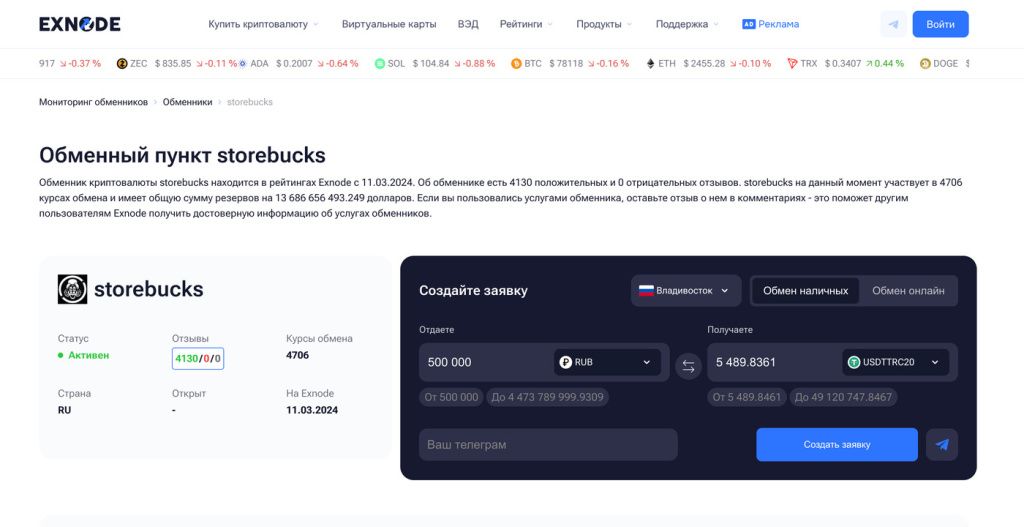
The screenshot of the Exnode card shows the exchange format selector and the order fields. For an online transaction, select the online format and your destination; the amounts shown in the screenshot do not apply to your order.
An important distinction: the blockchain transfer time and the exchange’s processing time are cumulative but do not necessarily occur immediately one after the other. The service may detect the transfer before the first confirmation but may send the payment later, after the required confirmations and an internal verification. A promise of “exchange in five minutes” without specifying the network, fees, or verification status does not describe your specific transaction.
If the service asks you to send cryptocurrency “to a support address,” pay for an additional unlock to a third-party wallet, or enter your seed phrase, stop right there. To follow up on an existing ticket, use the contact information on the service’s website and the ticket number. Save the correspondence, payment address, TXID, and a screenshot of the terms and conditions in effect at the time of the transaction. Before making your first transfer, verify the crypto exchange using the MSG checklist.
How Reserves, Limits, and Exchange Rate Fixing Work
The reserve is tied to what you’re receiving. For BTC → USDT, check the available USDT on the relevant network; for USDT → BTC, check the BTC balance. The service may display one “reserve” value on the dashboard and a different number in its own form due to data updates and pending orders. Verifying the information before a transfer is more important than relying on a saved card.
The limit may depend on the direction, the receiving currency, the payment method, and the customer’s status. If the amount falls outside the available range, do not split it automatically: ask the service how it processes multiple orders and whether the exchange rate will change for the second one. Sometimes it makes more sense to choose a different currency pair with a sufficient margin.
Exchange rate locking varies. With a fixed option, the exchange service specifies the conditions under which the rate is valid and what delay is permissible. With a floating rate, the total is recalculated according to the rule specified in the request, usually after funds are received or confirmations are provided. In both cases, check the rules of the selected service for the exact procedure. The phrase “rate is fixed” means very little without specifying the time and event of the fix.
| Application Requirements | What Happens | Pre-payment Verification |
|---|---|---|
| The exchange rate is locked in upon creation | The quote is valid within the service’s time limits and rules | Timer and acceptable delay in receipt |
| Floating exchange rate | The result is determined based on the specified event after submission | Timing and recalculation formula |
| The amount is less than the stated amount | Manual processing, additional payment, or refund may be required | Minimum and underpayment rule |
| The reserve has changed | The service may suggest waiting or a new calculation | Sufficient reserve at the time of the request |
The BTC network fee depends on network congestion and the transaction parameters in your wallet. The exchange may charge a separate fee for processing the transaction, include its profit in the exchange rate, or display a separate fee. Therefore, compare the total amount to be credited, as well as any fees you’ll pay outside of the request. A detailed breakdown of how the service itself works can be found in the MSG article on how crypto exchanges operate.
What to do if the funds have been sent but the exchange is delayed
First, check the TXID in the explorer for the relevant network. If the transaction hasn’t been confirmed yet, the exchange may be waiting for confirmations. If confirmations are already available, verify that the destination address, amount, and network match the request. Next, check the request status: the exchange may have been awaiting manual verification, clarification of details, or a limit may have been reached.
Contact support using the request number, not a random chat link from a search result. Provide the TXID, transfer time, amount, and selected currency pair. Do not post private keys or seed phrases. If the service requests documents for AML/KYC, first compare the request with its published rules and make sure you’re communicating on the correct domain.
If the transfer was for less than the requested amount, arrived after the timer expired, or was sent on the wrong network, automatic completion may not work. The possibility of making an additional payment, recalculating the amount, or receiving a refund depends on the service’s rules and the technical feasibility of returning a specific asset. Do not assume you will automatically receive a refund: review the terms before sending and resolve any issues through support while keeping evidence on hand.
After the exchange is complete, make sure the result has actually been credited to your wallet—not just shown as completed in the exchange’s status. For the incoming transfer, verify the network, the USDT token contract, and the amount. If your wallet doesn’t display the token automatically, find the transaction in your explorer and add the official network token using a verified address; do not import a contract from a message sent by an unknown person.
A quick check before your next exchange
Even if the first transaction was successful, do not copy its details for a new transaction. The service’s address, exchange rate, reserves, or minimum amount may have changed. Open a new request and double-check the network, address, and total amount. Before proceeding to the exchange, compare offers once more using Exnode’s monitoring tool for the same direction and volume.
Evaluate a completed exchange based on the assets actually received and the amount remaining after all fees, not on the attractive exchange rate listed in the catalog. Save the order number and TXID until the funds are finally credited: this information helps resolve disputes if the service and your wallet show different statuses.
Questions About Online Cryptocurrency Exchanges
Do I need to register on an exchange to exchange BTC for USDT?
No, if you choose an online exchange that accepts BTC and sends USDT directly to your wallet. However, the exchange itself may require registration or identity verification according to its own rules. Be sure to review them before making the transfer.
Can I pay for a transaction in two separate transfers?
Only if this is explicitly permitted in the terms of the application or confirmed by support. The automated system may look for a single transaction for the specified amount; a second transfer made without prior approval may not be recognized.
Why is the USDT amount received less than the preliminary calculation?
Check whether the exchange rate was fixed, whether the funds were received on time, whether you changed the amount, and what network or transaction fee was applied. If there is a discrepancy, request a recalculation using the order number before attempting the transaction again.
What confirms that the exchange is complete?
An incoming transaction on the correct network and your wallet balance. The “completed” status on the exchange’s website is helpful, but you should verify it against the actual deposit.