


You should verify a crypto exchange before sending coins or money. First, open the service’s exact domain, then review its history, recent reviews, AML/KYC policies, reserves, limits, and exchange rate locking rules. Next, create a request and verify the details against the website’s address. Exnode’s monitoring tool helps you view the exchange’s profile and find alternatives offering the same services, but it does not replace checking the terms and conditions on the service’s own website. This material is for informational purposes only and does not constitute individual investment or financial advice. A fake website can look almost exactly like a real exchange service. The difference might be just one letter in the domain, an extra hyphen, or an unusual ending. Therefore, access the service from a saved bookmark or a monitoring card and compare the page address before entering any data. The logo, design, and even the padlock icon in the browser do not, by themselves, confirm the website’s owner. Check to see if you’re automatically redirected to a different domain when filling out the application. The payment address should appear within the application you’ve created on a verified website. Do not send cryptocurrency to the details provided in a private message from an “operator,” and do not pay for “expedited processing” to a separate wallet. Customer support may explain a delay, but should never ask for your wallet’s seed phrase or private key. If the service offers the transaction only via a messaging app and does not provide a page with the request number, exact amount, destination, exchange rate, and refund policy, it will be more difficult for you to prove the terms of the transaction. For your first transaction, choose a method that allows you to save the order page and your support chat history. On Exnode, specify the exact currency pair and open the service’s profile. Check its history, reviews, available currency pairs, reserves, and transaction amount range. This information is needed to evaluate a candidate, not to automatically deem the exchange service safe. Compare the profile with the exchange’s website: the name, domain, support contact information, and terms and conditions must match.Start with the domain name, not the promised exchange rate
What to Look for in an Exchange Provider’s Profile
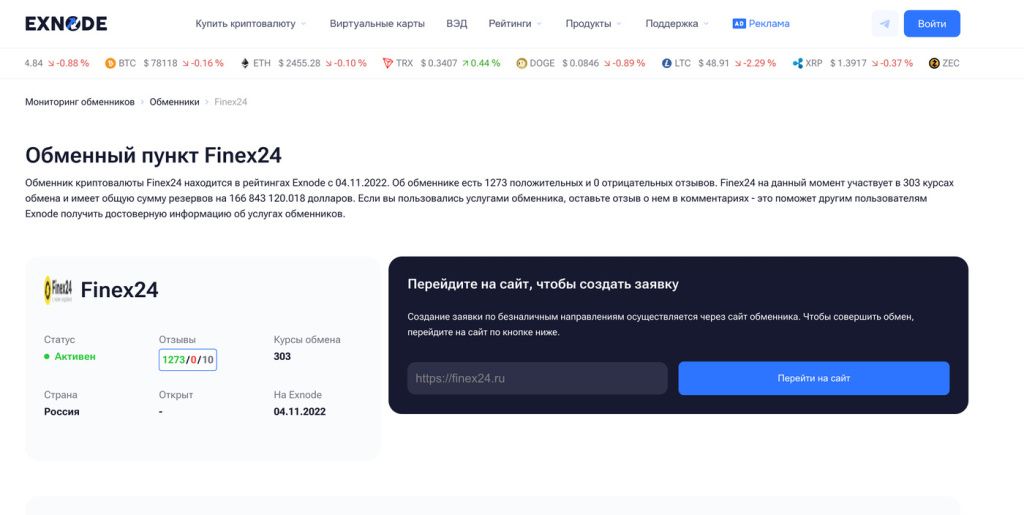
Example of an exchange provider's profile on Exnode: look for the provider's time in business, reviews, supported currencies, and available balance. The figures in the screenshot are provided to illustrate the interface; be sure to open the current profile before making a transaction.
| Check | What to Look For | Risks of Omission |
|---|---|---|
| Domain | Exact match with the card and bookmark | Redirect to a fake website |
| History and Reviews | Dates, transaction details, responses to complaints | No information on disputed situations |
| AML/KYC | Public verification and refund policies | Unexpected document requests or delays |
| Reserve and limit | Available assets and maximum order amount | Transaction Fails Due to Volume |
| Exchange Rate and Payment | When the exchange rate is locked in and how much will be received | Recalculation after transfer |
| Support | Contact information on the same domain and request number | Transaction terms cannot be restored |
A large number of reviews without dates or specific details isn’t very helpful. Posts about similar transactions and amounts are more useful, especially recent ones that include a response from the service. See how the exchange service handles payment delays and errors. Five identical short compliments in a single day are not as valuable as a detailed account of a resolved complaint. But even a single negative review doesn’t prove fraud: read the facts and the outcome of the case.
Imagine two profiles. The first has hundreds of short ratings but almost no transaction details; the second has fewer reviews, but shows dates, currency pairs, amounts, support responses, and a note indicating the dispute was resolved. The second listing provides more verifiable details, even though its rating may be lower. Cross-check reviews against current terms: the service may have changed its domain, owner, or payment process since the older reviews were posted.
Check the contact information separately. The email address, contact form, and support account must be listed on a verified domain. If the monitoring tool shows one Telegram account but the website suddenly displays a different one, clarify the reason through a known channel before making a payment. Save a screenshot of the service card and the contact page along with your request: in the event of a dispute, this will help establish where you reached out.
Check how the service responds to feedback. A transparent process includes a ticket number, response times, and a list of details for investigation: TXID, amount, time, network, and address. If support redirects the conversation to a personal account unrelated to the request, asks you to make the payment again, or forbids you from saving the chat history, stop right there.
Reserves, Limits, and Exchange Rate Before the Transfer
The balance shows how much of the asset the exchange is ready to issue for that transfer. For BTC → USDT, check the available USDT on the desired network; for USDT → rubles, check the rubles available via the selected payment method. The reserve shown in the monitoring tool and on the website may differ due to data updates and other requests. Check it on the form before paying. If it’s less than the required payout, don’t expect the service to automatically cover the shortfall.
The limit per request is different from the reserve. The exchange may hold a large reserve but accept no more than the set amount per transaction. If your amount exceeds this limit, do not split it on your own into multiple transfers under a single request. Find out whether the service allows multiple transactions and whether the exchange rate will be the same for each one.
Check when the exchange rate is locked in: when the order is placed, after funds are received, or after network confirmation. Note the order’s validity period and the rules for amounts below or above the requested amount. If an exchange promises a fixed rate but does not specify the timeframe or the event triggering the lock-in, this does not provide you with a verifiable condition. The price must be expressed as the total amount to be received, including any deductions. A detailed example of such a calculation can be found in the MSG article on exchange rates and fees.
For large transactions, ask whether the requested amount fits within the current reserve and whether prior approval is required. Do not send a “test” payment for an amount below the minimum without a separate request. Such a transaction may not be recognized automatically, and a refund may require manual verification and network fees. If you want to test the service with a small amount, submit a full, separate request for it following the same rules.
AML and KYC: What You Need to Know Before Paying
AML refers to procedures for verifying transactions and the source of funds; KYC refers to customer identity verification. The exchange publishes specific rules in its terms and conditions. Some services request documents before the transaction, while others do so during an additional transaction review. The absence of a registration prompt on the first screen does not guarantee that documents won’t be requested later.
Review the published terms and conditions: at what stage verification may occur, what documents may be requested, how long it takes to resolve a dispute, what happens in case of a rejection, and who covers the cost of a refund. If the rules are hidden, contradict the application form, or if customer support only responds with “we’ll explain after the transfer,” you don’t know the terms of the transaction. Choose a service with a clear procedure before making a payment.
Don’t confuse an AML check with a request to provide access to your wallet. To verify the origin of a transaction, the service may request documents or transfer details in accordance with its own rules, but a seed phrase and private key are not required to verify the source of funds. Before sending any documents, make sure you’re on the correct website and using an official communication channel. Do not post personal information in a public chat.
The FATF lists risk indicators for transactions involving virtual assets, including unusual transaction patterns and opaque sources of funds. This document helps explain why services conduct verification checks. It does not confirm the reliability of a specific exchange and does not replace its public terms and conditions.
Verifying Details After Creating a Request
After selecting a service, create a request on its website. Make a note of the transaction ID, destination, exact amount, network, payment address, receiving address, and timer. Check the first and last characters of the address and make sure the address you entered hasn’t been altered. If you’re sending USDT, check the network: having the same token name does not make TRC20 and ERC20 interchangeable.
Send only the amount and asset specified in the current transaction. Do not use old details—the exchange may generate a new address for each transaction. If someone sends you an “updated address” via a messaging app, return to the website and contact support through the official channel. Do not transfer funds until you receive clear confirmation.
After sending, save the TXID. It indicates that the transaction has been added to the blockchain, but by itself does not prove that the exchange has completed the payment. Check the status of your request, then verify the incoming transfer and the balance of your wallet or account. For Bitcoin, confirmations can take varying amounts of time; Bitcoin.org explains how confirmations work. Network delays and service processing delays are different stages.
If you’re receiving USDT, verify not only the token symbol in your wallet but also the network and contract address, if your wallet displays this information. Counterfeit tokens may appear with a similar name. For BTC payouts, verify that the funds were sent to the exact address you specified. The “request completed” screen on the exchange’s website serves as a processing status indicator, but the final result is confirmed only when the asset appears in your wallet or the funds are credited to your selected account.
Red Flags: When It’s Best to Stop a Transaction
- The domain differs from the address in your saved card, and the service does not explain the change.
- There are no AML/KYC, exchange rate lock, or refund policies, or the service offers to provide this information only after payment.
- Support requests your seed phrase, private key, remote access to your device, or a transfer to a third-party address to “unlock” something.
- The exchange rate is significantly better than comparable offers, but the final amount, reserve, or fees are not disclosed.
- The listing includes complaints about unanswered inquiries, and the website lacks a verifiable request number or a channel for filing a complaint.
A single warning sign might just be an interface error, but each one requires you to pause and determine the cause before proceeding with the transfer. The most costly mistake is to send an irreversible transaction, hoping to figure it out later. If in doubt, compare another service offering the same route and review its terms again.
If the payment is delayed
First, check the TXID in the browser for the relevant network and compare the address, amount, asset, and network with your request. Then check the status on the exchange’s website. An unconfirmed transfer, insufficient funds, an expired request, or an AML verification require different actions; do not send a duplicate payment without first contacting support through the official channel.
When contacting support, have your request number, TXID, transaction time, a screenshot of the terms and conditions, and any relevant correspondence ready. Do not post private keys. If the service changes the payout amount, request a written breakdown for that same request: what exchange rate was applied, what fees were deducted, and on what basis. If a refund is offered, clarify the network, address, and the fee for the return transaction before agreeing to it.
A verified exchange service does not guarantee the absence of any delays. The purpose of verification is to know in advance who you are transacting with, what terms you are accepting, and how you will resolve any disputes. The mechanics of the transaction itself are described in the MSG article “How Crypto Exchanges Work.” However, the specific service you’re using is also important for each individual transfer. The steps for an online transaction are outlined in the instructions for exchanging BTC and USDT.
Final Checklist Before Payment
Verify the domain, the exact destination, and the network; then check the current reserves, limits, total amount, and exchange rate locking policy. Save the order number and payment details directly from the exchange’s website. Make sure the AML/KYC and refund policies are published and clear. If any detail doesn’t match, go back to the list of options on Exnode and compare another service before sending funds.
Questions About Verifying a Crypto Exchange
Are there enough positive reviews on the monitoring site?
No. Reviews help assess the exchange’s track record, but you should also check the domain, order terms, reserves, limits, and dispute resolution process. The rating on the profile page does not guarantee that your specific transaction will be processed successfully.
Can you trust an exchange if its website uses HTTPS?
HTTPS secures the connection to a public domain, but a fake domain can also use a certificate. Compare the page’s address with the official address listed in the profile and with the bookmark you’ve saved.
Why might the AML verification begin after submission?
Some services analyze specific incoming transactions after they are received. Therefore, before paying, please read the rules regarding additional verification, processing times, and refunds.
What should I do if the payment address has changed in the correspondence?
Do not send funds to the new address provided in the message. Open your request on a verified domain and confirm the change through the official support channel. Save the correspondence and the previous payment details.