
BestChange compares offers from services that exchange cryptocurrency, electronic money and cash. It shows rates, amounts, payout methods and reviews. In November 2026 it has two interfaces: the classic green version and a new version with larger amount fields and filters. You place an order with the exchanger you choose.
This guide covers both versions of BestChange, the calculator, exchanger profiles and apps. It explains AML labels, reviews and financial claims, then looks at Russian regulation and the history of the service.
Offers are updated throughout the day. Check the amount, limits and payout method before placing an order.
- You can compare rates and open exchanger profiles without registering.
- Compare the same amount on the same network, with the same payout method and city.
- Labels flag conditions that can affect your choice of exchanger.
- Claims and responses help explain disputes. Check who is responsible for fulfilling your order.
| BestChange feature | Where to find it | What it does | What else to check |
|---|---|---|---|
| Currency pair | Currency columns or Send and Receive fields | Find offers for a specific pair | Network, bank, payout method and city |
| Calculator | Dedicated tab in the classic version and amount fields in the new one | Compare payouts for a specific amount | Limits, fees and when the rate is locked |
| Exchanger profile | Link in the reviews column | Check status, operating history and complaints | Recent responses and the exchanger’s terms |
| Statistics and alerts | Tabs above the classic table | Review historical figures and set an alert | Chart period, reserve and alert expiry |
| Labels and filters | Icons beside an offer and the Filters button | Narrow the list by exchange conditions | The exchanger’s full terms, including AML and KYC |
What BestChange does
Exchangers send BestChange their supported pairs, rates, reserves and limits. BestChange brings the offers together in a table. Choose a pair, compare the terms and open the website of a suitable exchanger. The exchanger provides the order number, payment details, payment deadline and settlement terms.
Searching is free. Founder Denis Malkov has explained that the project earns money by referring customers to exchangers. Exchange fees follow the provider’s terms. Optional AML address screening has separate prices.
BestChange says in its FAQ that it does not guarantee transactions. It reviews complaints and can remove exchangers that break its rules. A listing does not oblige BestChange to compensate users for losses. Our guide to crypto exchanger comparison services explains how these platforms work.
Classic and new BestChange interfaces
Classic version: currencies on the left, offers on the right
The green interface has Send and Receive columns on the left and an exchanger table on the right. Select currencies from the table, drop-down lists or popular pairs. You can also search for the asset by name.
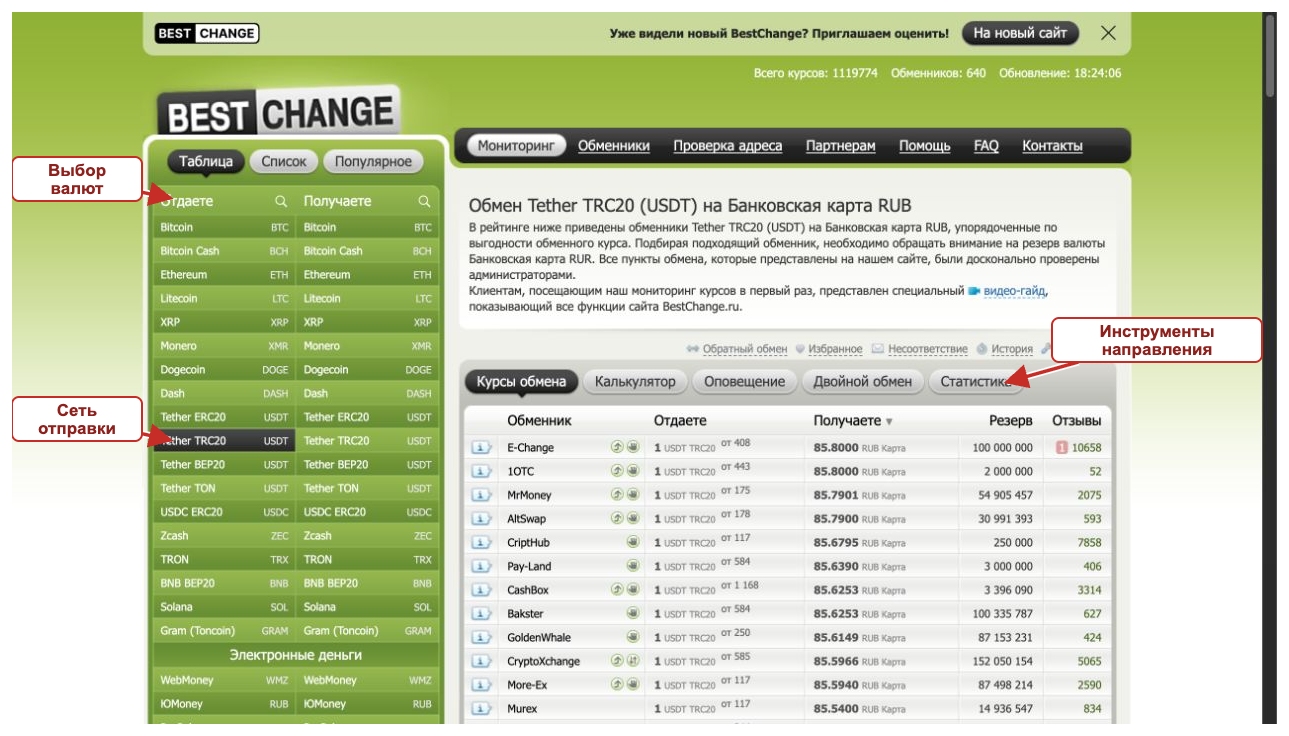
The selected currency is highlighted in its column. Above the results are the Calculator, Alert, Double Exchange and Statistics tabs. Nearby you can reverse the pair, open favourites or see your visit history.
New interface: amounts, filters and multi-step exchange
Enter an amount directly in the Send or Receive field. Currency lists and search remain on the left. Direct and Multi-step Exchange sit above the form. Filters open on the right, and cash pairs have a city selector.
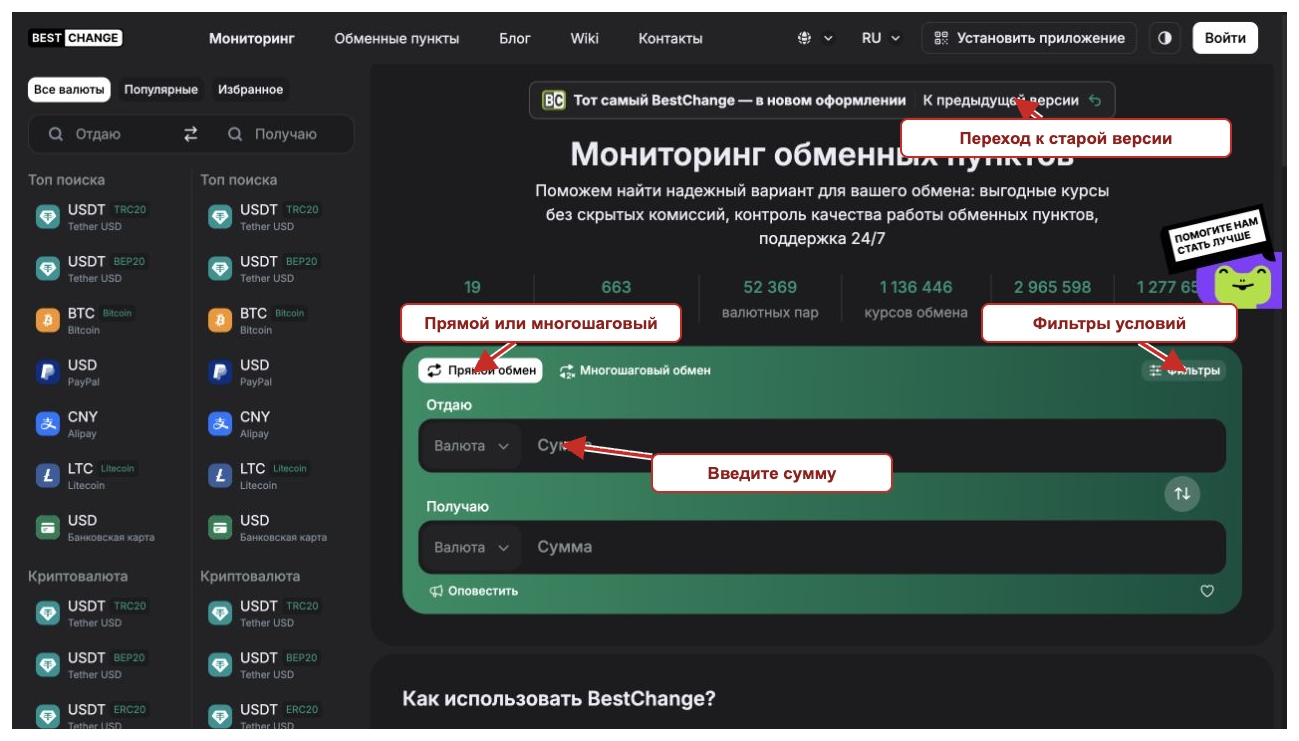
The classic page links to the new site, which links back to the classic version. These links help verify that the two interfaces are connected. A familiar logo alone is insufficient to verify a separate site.
- To compare several offers at a glance, use the classic table.
- To narrow results by terms, open the filter panel in the new interface.
- To see how rates have moved, open Statistics in the classic interface.
The interfaces displayed different exchanger counts during our review. Some preferences in the new version required signing in. Each example below identifies the version it uses.
How to use BestChange: choose a currency, network and city
Start with the sending network and the payout method. BestChange lists cryptocurrencies, bank cards, Russia’s Faster Payments System (SBP), individual banks, electronic payment services and cash. The available offers depend on your choice.
Example: USDT on TRC20 to a rouble bank card
- Choose Tether TRC20 in the Send column.
- Select the rouble payout method in Receive. This example uses the bank card and SBP option in RUB.
- Check the pair name above the table. Confirm the asset, network and payout currency.
- Open the calculator and enter the amount. Compare the offers whose limits accommodate it.
The general card category can include different conditions for different banks. Select a specific bank when the option is available. Check card restrictions and who will send the payment before placing an order.
USDT on TRC20, ERC20 and BEP20 uses different networks. Changing the row in BestChange does not move tokens between networks. Your wallet and the receiving address must use the same network. See our guide to withdrawing USDT to a bank card for the order process.
Cash in Moscow: choosing a city and arranging a meeting
For cash, select the currency and city. We opened USDT TRC20 to cash RUB in the new version and selected Moscow. Before applying the filter, the results included offers in other cities.
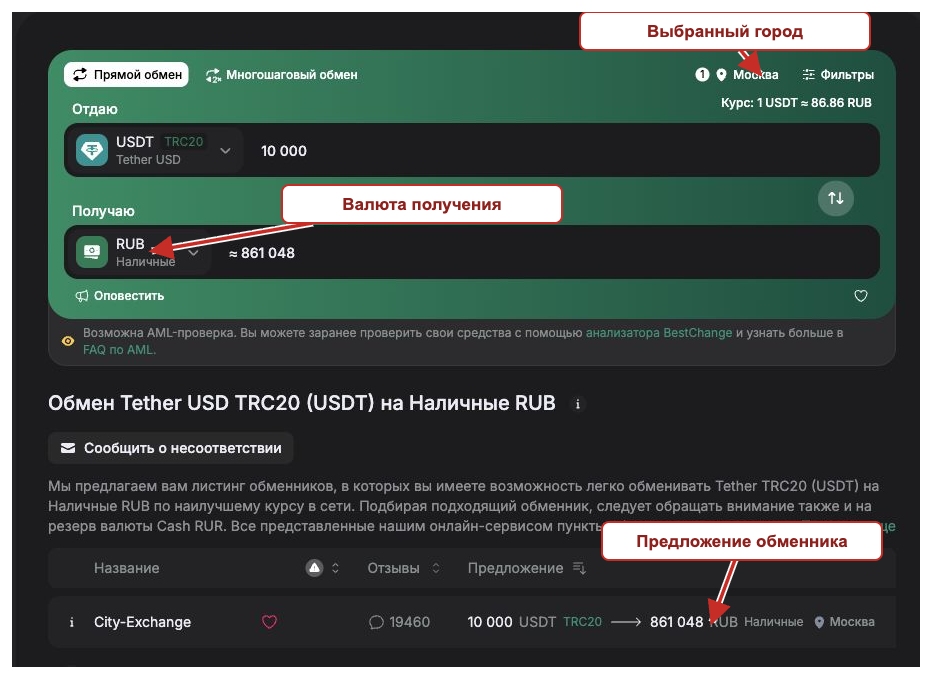
Confirm the meeting address, opening hours, appointment requirements and when the rate is fixed. A label indicates when an exchanger uses delivery and has no office in the selected city. See our directory of crypto exchangers in Moscow City for locations in the business district.
BestChange rates, reserves and calculator
The top offer in a rate sort is simply first by price. Check the payout amount, limits, reserve and labels, then open the exchanger profile.
- Rate links the amount you send to the amount you receive. Reversing the pair changes how the rate is quoted.
- Minimum and maximum amounts define the size of an individual order.
- Reserve is the reported amount available in the payout currency. The limit for one order can be lower.
- Reviews link to the exchanger profile. Outstanding financial claims may appear separately.
An exchanger can hold several million roubles in reserve and set a much lower limit per order. Likewise, an offer with a 5,000 USDT minimum is unsuitable for a 1,000 USDT order.
Calculator example: 1,000 USDT
On 13 November 2026 we selected Send in the classic calculator and entered 1,000 USDT on TRC20. AltSwap showed RUB 86,060 and E-Change showed RUB 85,810, a difference of RUB 250. These figures reflect the offers displayed at the time of the check.
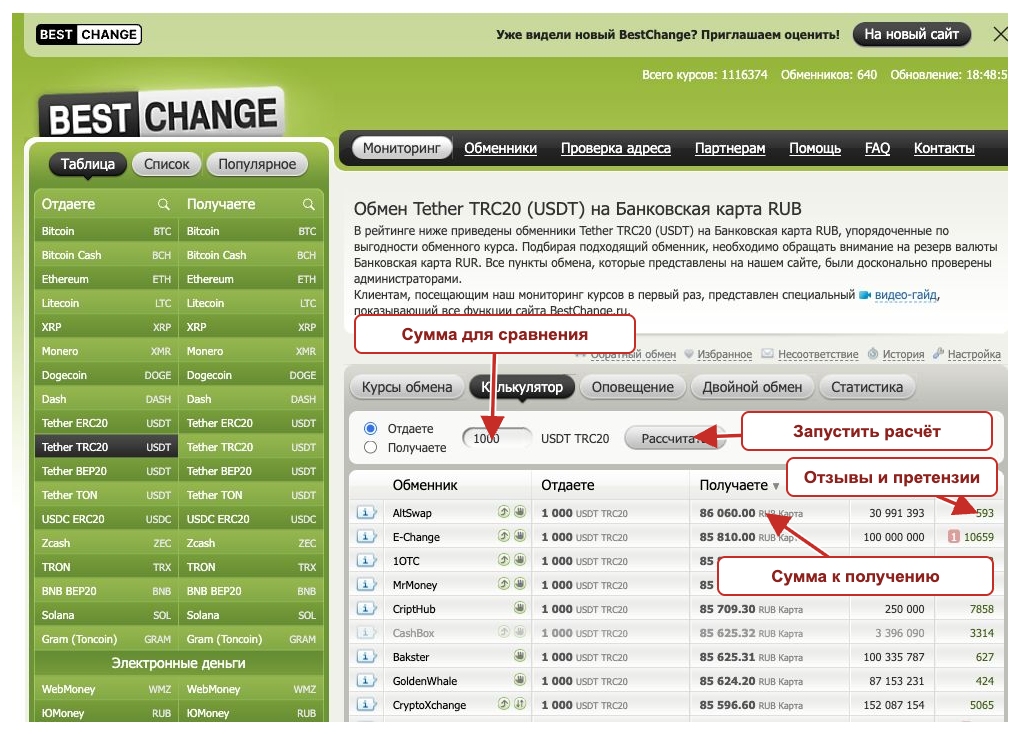
Faded rows indicate that the amount falls outside an offer’s constraints. Changing the amount can change which offers are available.
Compare the result with the amount on the exchanger’s website. If they differ, find out why before paying. The rate or payout method may have changed. BestChange requires accurate data and disclosure of costs, and lets users report discrepancies.
How fees affect the payout
Illustrative example. Exchanger A quotes RUB 86 per USDT and deducts RUB 500 from the payout. Exchanger B quotes RUB 85.80 with no additional deduction. On 1,000 USDT, A pays RUB 85,500 and B pays RUB 85,800. B pays RUB 300 more despite quoting a lower rate. The figures are hypothetical.
If a fee is already included, count it once. Also allow for any sending fee charged by your wallet or exchange. Check three figures: your total debit, the amount the exchanger receives and your final payout.
Statistics, alerts, favourites and double exchange
Rate and reserve statistics
The classic version charts rates, total reserves and a pair’s popularity over periods from one hour to one year. The example shows the best quoted rate for the pair over 30 days. The chart records past quotes.
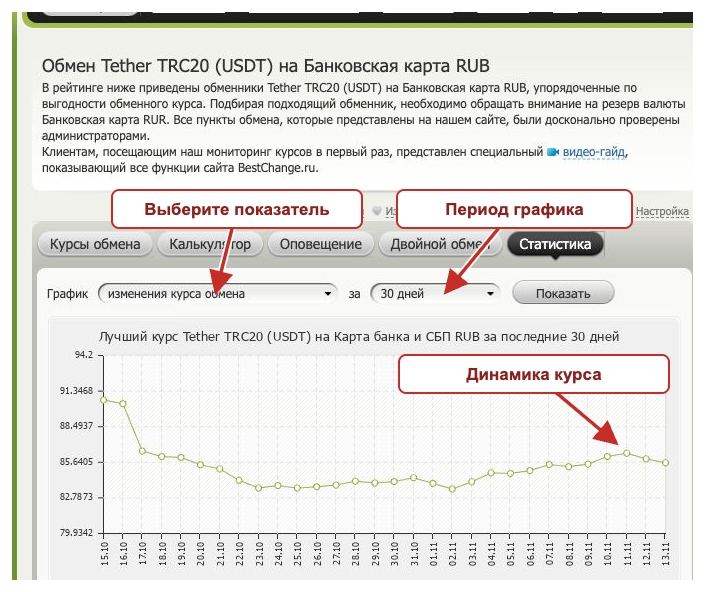
Rate alerts
Set a target rate, minimum reserve and expiry. The interface we checked offered email and Telegram alerts. An alert tells you when an offer meets your criteria. Funds and orders remain unreserved.
Double and multi-step exchange
The classic interface looks for a route through an intermediate currency. The new interface groups such routes under Multi-step Exchange.
For a route from USDT through an intermediate asset to roubles, check amounts, networks, fees and timing at both steps. The second quote can move while the first exchange is in progress. Each provider is responsible for its own order.
Favourites and visit history
Favourites save time when you revisit a pair. The classic History panel shows visits to exchanger websites. It is stored in the browser and can disappear when browser data is cleared. Save your order number and records separately.
How to read a BestChange exchanger profile
Open the profile from the reviews column. It shows status, how long the exchanger has operated, how long it has been listed, supported currencies, reserves and complaints. City-Exchange’s profile shows its operating history and time on BestChange as separate figures.
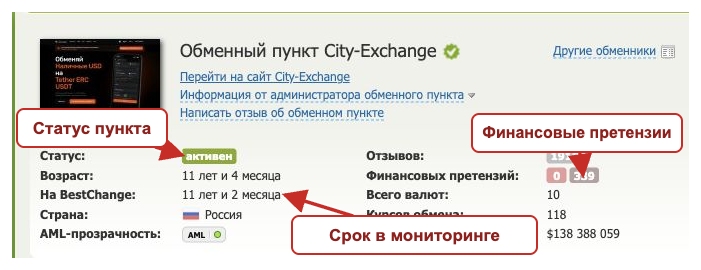
An Active status means the exchanger was listed when you checked. Review these details before choosing it.
- Recent complaints. Look for unresolved disputes, responses and dates.
- History. Check when the business started and when it joined BestChange.
- Contracting party. Identify the legal entity and payment recipient.
- Terms. Check timing, rate locks, refunds and extra checks.
What BestChange checks before listing an exchanger
BestChange’s published standard requirements include at least six months of active operation, total reserves of at least USD 10,000 and support replies within 60 minutes during working hours. The rules also cover the website, its data feed and exchange terms. The FAQ describes exceptions to the operating-history requirement.
The one-hour standard concerns support response times. Exchange processing times follow the provider’s terms. BestChange can remove an exchanger for breaches. See our guide to checking a crypto exchanger before a transaction.
BestChange labels, filters and AML address screening
Icons beside an offer can indicate manual processing, a floating rate, document checks, fees or special payout terms. The new interface can filter out some conditions or show only exchangers with offices.
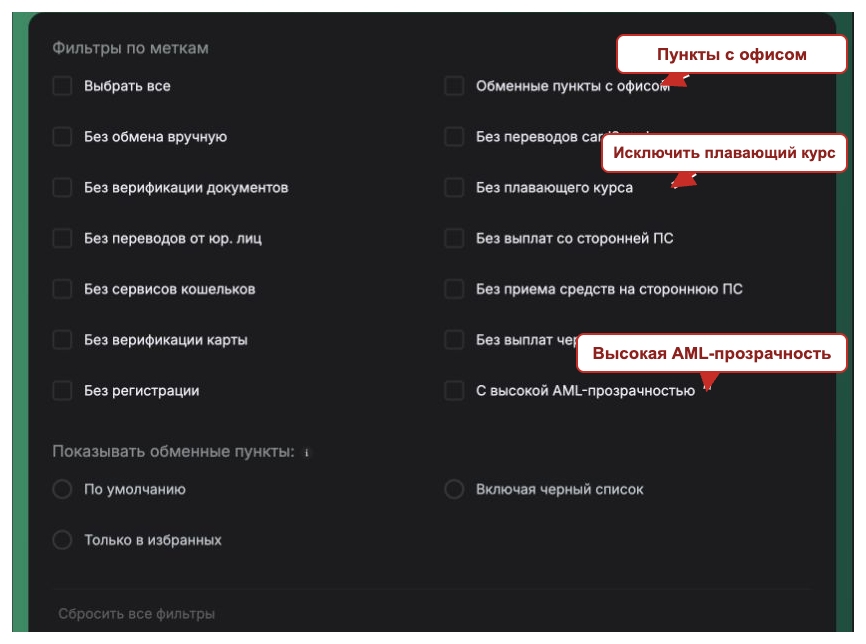
For a floating rate, check when it is fixed and how recalculations work. For manual processing, ask about working hours. If a third party handles the payout, check who sends the funds and how.
A filter for offers without document verification does not rule out later requests when an AML concern arises. An offer with no verification label may still involve identity checks.
What AML transparency means
The AML transparency label reflects how an exchanger discloses its screening terms, follows its timelines and deals with disputes.
- Green. BestChange has verified practices that meet its criteria.
- Yellow. The assessment is still in progress or there is too little evidence for a high rating.
- Red. BestChange has identified risks or gaps in AML transparency.
The label describes the service at the time of review. Screening a specific address is a separate process, and individual transactions can still be delayed.
Screening a cryptocurrency address
In Address Check, choose the asset and screening provider. There are paid services and a free blocklist check for USDT and USDC. The price depends on the checks selected. A blocklist check covers fewer data points than a full analysis of an address’s connections.
Screening requires a public address. Keep seed phrases and private keys private. The receiving party may apply different criteria. Ask what the exchanger screens and how it handles a disputed result before sending funds.
BestChange apps, Telegram and other tools
BestChange offers apps through the App Store, Google Play and AppGallery. It also lists a Telegram bot, a Mini App and browser extensions.
Follow the installation link from BestChange and check the developer listed in the store. App names can be copied. We checked the public product pages for this review.
The wiki, blog and news pages offer reference material. The classic menu also has a currency converter, a developer API and Push TX for broadcasting Bitcoin transactions.
The affiliate programme has its own terms for referring visitors. It is marked Coming Soon on the new homepage. The classic site has a separate affiliate section.
BestChange reviews: what users praise and dispute
External review sites discuss BestChange and its support. Reviews within BestChange concern the listed exchangers. These examples have dates and describe specific issues. Where a company replied, we considered its response alongside the review.
Yell review: finding offers
On 8 October 2026, Yell user OlegPletnev praised the filters, exchanger information and labels. BestChange replied and supported checking AML risks in advance. The review describes what it was like to search for an offer.
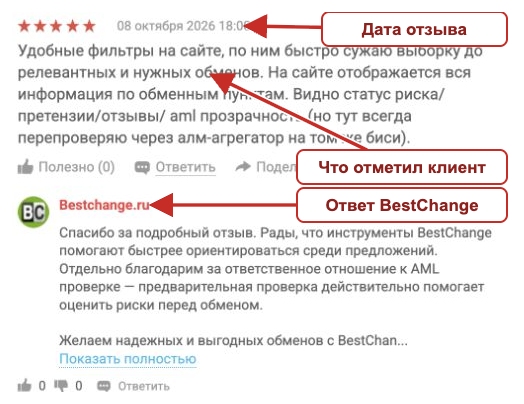
Trustpilot disputes and profile status
The Trustpilot profile for BestChange’s English-language domain includes both praise and complaints. On 19 October 2026 a reviewer described a longstanding dispute over a Litecoin payout. BestChange replied that the address formats were compatible and referred to the original order. The exchange does not independently establish what happened.
When checked, Trustpilot showed a warning that the company’s score was unavailable because of a breach of its rules. It also said it had removed unreliable reviews. The warning applies to the profile as a whole and does not determine responsibility for an individual dispute.

Reviews of exchangers on BestChange
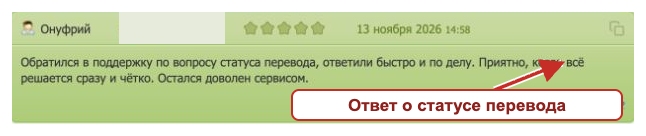
On 13 November 2026 a reviewer praised a quick response about a transfer on the City-Exchange profile. The review concerns City-Exchange’s support team.
How financial claims work on BestChange
The profile shows active and closed claims. A closed claim still has its review and discussion. Read why the status changed and whether the customer confirmed the outcome.
A financial claim concerns an obligation the exchanger has failed to meet. Use a review for general feedback. If the deadline has passed and the payout is incomplete, record what happened.
- Save the order number, amounts, payment time, transfer receipt and correspondence.
- Tell the exchanger what was not fulfilled and how you want it resolved.
- Open a claim in the exchanger profile and describe the events in order.
- Provide evidence using the support contacts listed by BestChange.
Keep passports and full card numbers out of public posts. Use a verified support channel for documents. A closed claim can be reopened under the rules if there are grounds and the obligation remains unfulfilled.
BestChange may request an explanation and take action under its listing rules. If you suspect a crime, report it to law enforcement.
BestChange and Russian law in November 2026
Russia adopted Federal Law No. 282-FZ of 4 August 2026 on digital currency and digital rights. Law No. 283-FZ introduced related amendments. The legislation provides for regulated market participants and transitional periods.
According to the Bank of Russia’s explanation of 12 October 2026, from 1 July 2027 residents who do not organise digital currency circulation themselves will generally conduct the relevant transactions and operations through or with authorised participants. The law sets exceptions and qualifications. The July 2027 rule was not yet fully applicable in November 2026.
For a regulated digital currency exchange organisation, check the entry in the Bank of Russia’s register. Match the legal entity and identifiers and consider the activity and transitional rules. A BestChange listing, positive reviews or a Moscow office do not establish regulatory status.
Banks retain their obligations to review transfers. Ask for an explanation if a payout comes from several unknown senders or you are asked to state a false payment purpose. Splitting a payment does not resolve questions about the source of funds.
BestChange history: from electronic money to two interfaces
According to its official help pages, BestChange launched on 19 June 2007. In an April 2025 interview, founder Denis Malkov said the service began by collecting rates for electronic payment systems such as WebMoney and E-gold.
Bitcoin pairs arrived in 2012. Malkov said growing interest in cryptocurrency in 2016 and 2017 expanded the audience considerably.
By November 2026 BestChange offered two web interfaces, mobile apps and a Telegram Mini App. Its core purpose remains bringing together exchange offers and the information needed to compare them.
Where BestChange helps and what to check separately
BestChange gives the classic table and dedicated tool tabs a prominent place. Exnode puts Cash and Online modes, city and amount on its homepage. Both can filter by city. Compare them using the same pair, amount and payout method.
The classic BestChange interface makes it easy to scan rows. The new one helps narrow offers by labels. Confirm the terms with the exchanger and, for cash, check the meeting address before placing an order.
BestChange FAQ
Can I cancel an exchange through BestChange after placing an order?
Contact the exchanger that created the order. Cancellation terms differ before and after payment. BestChange cannot reverse a cryptocurrency transaction already broadcast to the network. Any refund depends on the exchanger’s terms and what happened.
What if the currency I need is missing?
Check the name and network. If the asset is unavailable, suggest it through BestChange’s contact channels. BestChange says additions depend on demand and the availability of exchangers. It does not promise a date.
How do I verify someone who contacts me claiming to be support?
Open the BestChange contacts page yourself and verify the request through a listed channel. Check before paying or sending documents in a messenger. Profile names and avatars can be copied.
Can I use a BestChange quote for accounts or tax reporting?
Use the transaction records and applicable valuation rules. A screenshot of an offer can supplement your records, but it does not confirm how the transaction settled.