

Mobile Top Up translates as “mobile top up”. On Bybit, this name appears in two different situations: among P2P payment methods and when purchasing communication services through the Bybit Pay Marketplace. In the first case, you make a transaction with another user and check their payment terms. In the second, you pay for a specific replenishment from the service provider. It is impossible to determine by name alone who to send money to and what balance it will go to.
To purchase USDT, check the P2P order, to pay for communications, check the offer of your operator in the Bybit Pay store. Let's figure out how to distinguish these actions, calculate costs and deal with delays.
You can check the products available for your account by by opening Bybit using the MCG affiliate link. Availability varies by country and terms of service; the presence of a link does not mean that all listed functions are allowed to each user.
What does Mobile Top Up mean in different sections of Bybit
| Where are you | What's going on | What to check |
|---|---|---|
| P2P, Mobile Top-up payment method | Settlement with a counterparty for a transaction for the purchase or sale of cryptocurrency | Advertising conditions, specific payment service and order details |
| Bybit Pay Marketplace, mobile top-up | Purchasing communication services with cryptocurrency | Country, operator, number, denomination and order price |
| Funding, Deposit or Transfer | Depositing an asset into an exchange account or moving between accounts | Asset, destination account; for blockchain transfer - network and address |
| Bybit Card, replenishment of funds for the card | Preparing funds for card payments | Terms of your card, available balance and conversion |
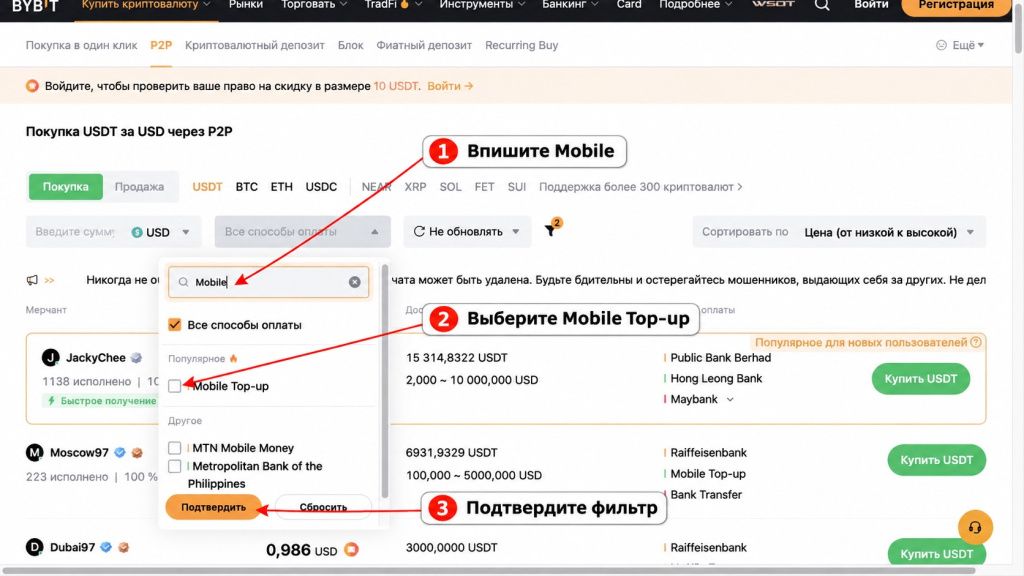
In the official Bybit P2P issuance Mobile Top-up does occur alongside other payment methods. But the line itself does not contain the complete instruction. It cannot be automatically considered a transfer via SBP, replenishment of a SIM card, or payment with any card via telephone.
Mobile Top Up in P2P: what to check before paying
The ad describes an exchange between two participants. Its author chooses payment methods, and the buyer decides whether the offer is suitable. B terms P2P Bybit separately states: the listed methods reflect user preferences. Their presence on the site does not mean approval of the payment service by the exchange.
Therefore, the question to the seller must be specific: through which service the payment is made, what type of operation is needed and what details will be indicated in the order. The answer “you will transfer by phone” is not sufficient. The phone number can be a subscriber number or a bank beneficiary ID. In the first case, the money relates to the communication service, in the second - to the bank payment. The recipient, confirmation of payment and the procedure for contacting in case of an error differ.
For example, the ad has Mobile Top-up and Bank Transfer. You know how to make a regular bank transfer, but have never used the specified mobile method. It is wise to choose a suitable banking method and check its conditions. Marking Mobile Top-up just for the sake of a more attractive rate is not worth it: a discrepancy between the chosen method and the actual payment can lead to a dispute. Meaning Bank Transfer to Bybit We analyzed [[T034]] in detail separately. we covered in detail in a separate article.
When choosing an ad and before paying, go through five checks:
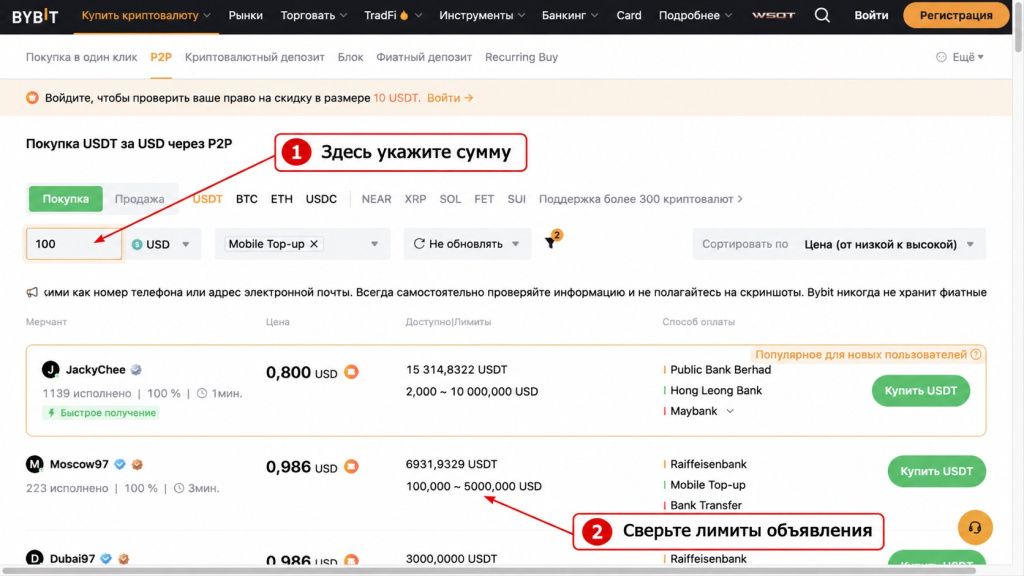
- Direction and amount. Make sure you are buying the right asset with the right currency. See how much cryptocurrency you will receive and whether the amount is included in the minimum and maximum ad limits.
- Payment method. Read the seller's terms and conditions. The name of the service and the type of transaction must be clear before sending money. It is better to clarify an unknown method than to master it by transferring a large amount.
- Counterparty. View history, reviews, and progress rates. In Bybit's instructions, the number of orders and completion percentage in the issue refer to the last 30 days. They help you compare offers, but are not a substitute for checking specific conditions.
- Account Holders. Pay from your account whose owner name matches Bybit's verified details. After opening an order, check the recipient using the details shown in it: it must match the counterparty. The seller's consent does not cancel the prohibition of third party payments.
- Duration and costs. Check your payment window, payment due date with your provider, and final charge. If the transfer may take longer than the allotted time, find a suitable advertisement in advance.
Bybit describes limits, ad metrics and name requirements in instructions for purchasing via P2P. The terms of a specific order still need to be read before each transaction: a familiar seller can change the details, the available balance or the range of amounts.
Mobile Top Up payment in P2P: when to click "Paid"
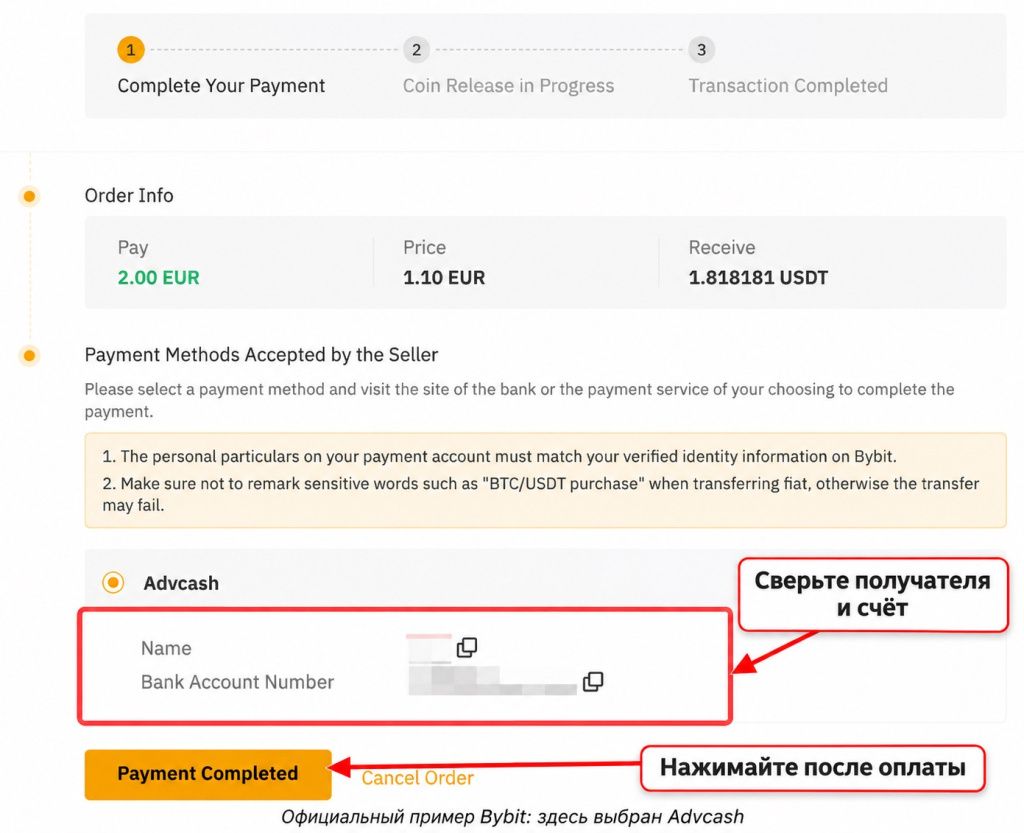
Creating a P2P order does not deduct money from your bank. After opening it, you see the payment information and make the transfer yourself in your banking or payment application. This is exactly the sequence that shows Bybit's official instructions for paying the seller.
Check the recipient, amount and selected method against the active order. Make the payment, wait for confirmation from the provider and save the receipt. After the actual payment, click “Payment completed” or “Payment completed” - this is how this button is called in the Russian Bybit help. The English version uses Payment Completed. This mark informs the seller about the transfer; it does not itself move money between the bank and the exchange.
The statuses "created", "processed" and "executed" in a payment application can indicate different stages. If the transfer is stuck, do not report a credit that does not yet exist, and do not send a second payment at random. Report the actual status of the order in the chat. If there is a problem, use help inside the transaction and attach confirmation from the provider.
Once the money has been confirmed, the seller releases the cryptocurrency and the purchase is reflected in Funding. Check the credit in your own account, and not by a message or screenshot from the other party. How they work Funding and single trading account UTA, it is useful to understand in advance: the total balance of an account does not always indicate where a specific asset is located.
If you've already paid, asking the seller to "cancel and recreate" requires stopping. Cancellation does not automatically refund money sent. Save the order and correspondence, record the payment and seek review through the available appeal procedure. A detailed procedure for applying is in the material about supported by Bybit.
How to compare costs when paying for Mobile Top Up in P2P
Compare full write-offs for the same amount of USDT. Separately take into account the seller’s price, the commission of your payment service and possible platform fees for the selected direction. The blanket statement “P2P is always commission-free” cannot be used: Bybit's current instructions link fees to fiat currency, advertiser level and ad type.
Conditional example. In the first sentence, 1 USDT costs 100 ₽. For 50 USDT you need to transfer 5,000 ₽, and the payment service additionally withholds 100 ₽. The total cost is 5,100 ₽, that is 102 ₽ per USDT. In the second offer, the price is 101 ₽, there are no additional fees in our example: the same 50 USDT costs 5,050 ₽. The second offer is 50 ₽ cheaper, although its price is higher in the list.
These are training numbers, not current quotes. For your transaction, divide the total costs by the amount of USDT received. If a commission is deducted from the amount sent, separately check how much will be received by the seller: an underpayment may prevent the order from being completed.
Do not automatically add a network fee to your calculation. A regular fiat payment to a P2P seller and the subsequent withdrawal of cryptocurrency to the blockchain are separate operations. If a conclusion is needed, consider it the second stage. Commissions for various actions are collected in the article on expenses on Bybit.
How to top up your phone via Bybit Pay Marketplace
To pay for communications, you need a digital services store. In review Bybit Learn July 29, 2026 mobile top-ups are named as a separate Marketplace category; suppliers listed as Uquid and KryptoMate. Gift cards, subscriptions and eSIM are also listed there. This confirms the existence of the category, but not support for any operator in any country.
In the Bybit Pay application you can find it through the search or the More section, on the website - through Finance. To use Pay, you need to be authenticated; Store and feature availability varies by country. The current path and restrictions are published in Bybit Pay help. If the application interface is noticeably different, check its version and installation source according to the instructions how to download Bybit.
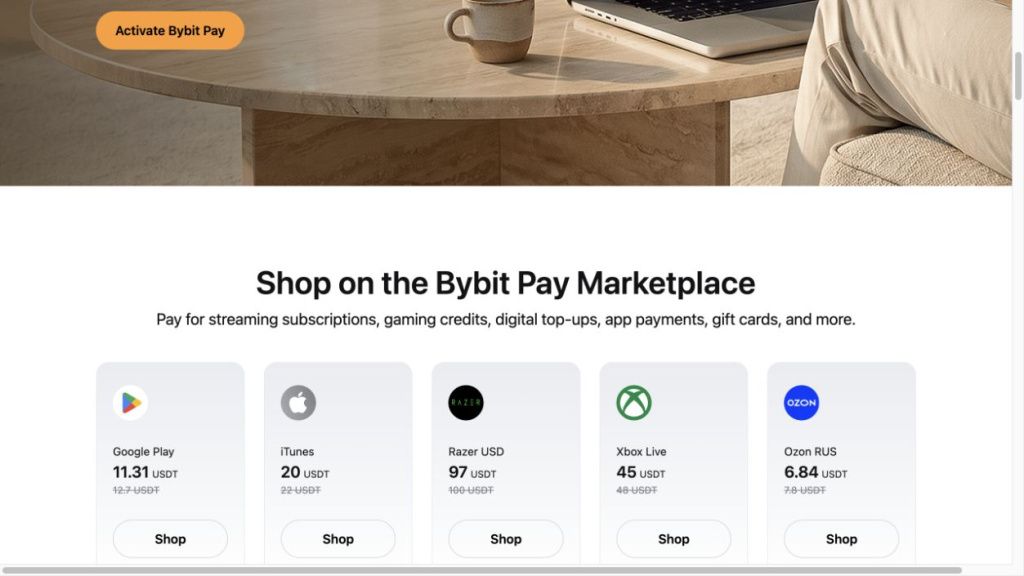
In the mobile top-up card, first select the country and operator. Then check what exactly is being sold: crediting money to your balance, a traffic package, or a voucher with an activation code. The same price for these products does not mean the same result. The Internet package may not increase the cash balance of the room, and the voucher will require separate activation.
Enter the number in the format required by the seller, including the country code, if provided. If the subscriber changed the operator while maintaining the number, a familiar prefix alone is not enough: check the current operator. Review prepaid and contract rate limits, package expiration dates, and return policies before confirming.
On the last screen, match the recipient number, service denomination and debit amount. You should pay only after this check. The prompt payment notice refers to payment processing; The actual provision of the service must be verified with the operator or in the supplier's order. If possible, save the product card and the final confirmation with the order number.
Bybit Pay uses available Funding funds. If there are not enough funds for payment, check the available balance on this account and the debit currency. The assets in another account or the amount borrowed from a pending transaction do not equate to the money available for purchase. Do not transfer additional funds until it is clear which balance is verified by the payment screen.
How much does it cost to top up your phone with USDT
The price of a digital service and the recharge denomination are different values. The comparison only makes sense for the same operator, the same value and the same result. For example, a cash top-up of 1,000 units of local currency cannot be directly compared to a weekly internet package, even if both offers cost 12 USDT.
Calculation example. Let's say a top-up of 1,000 units of local currency sells for 12 USDT. To estimate costs, you use the acquisition cost of USDT - 90 units per coin. Then the payment corresponds to 1,080 units: 12 × 90. The difference with the face value is 80 units, or 8%. This is a conditional illustration, without the actual tariff of any operator.
If there is a separate service charge or conversion from another asset on the screen, add it to the price. The Pay certificate separates the commission for the payment itself and the costs of conversion. Therefore, the phrase “no commission” in one place in the interface does not yet describe the full cost of the order. Consider a discount only after it has been applied to a specific purchase.
Money has been debited, but the phone has not been replenished: what to check
Such a purchase has at least two results: payment and execution of the order by the seller. Successful status in Pay confirms the payment stage. The crediting of the connection is checked according to the operator’s data, the balance of the number or the activated package.
Open your Pay history and order card from the supplier. Compare time, amount, order number and phone number. Check to see if you have purchased a voucher that needs to be activated first. If a processing time is specified, compare it with the actual time that has elapsed. Repeated purchases before the status is clarified may result in two debits and two replenishments.
To contact us, please have your Pay payment ID, merchant order number, date and time with time zone, amount, and a description of what did not happen. Keep the payment receipt and the operator's message separately. For a regular purchase via Pay, there is no need to come up with a TXID: the blockchain hash exists for the corresponding operation on the network, and an internal payment may have a different identifier.
If you made a mistake in the number, contact the supplier immediately. The possibility of correction depends on the stage of the order and the conditions of the service; It is impossible to promise a refund of an already credited mobile top-up. Do not share your password, login codes, or account recovery information with a person who offers to “check payment” in personal correspondence. If there is a suspicious link, check first Bybit official website address.
Why Card Top Up and Funding don't pay for the phone
The word Top Up is also used when depositing funds for other products. If you transferred USDT to Funding, your exchange balance has increased. To pay for communication, a separate order is required indicating the operator and number. The deposit itself cannot determine which phone you wanted to top up.
Bybit Card refers to card payments. B description of the card operation Bybit explains the use of Funding and conversion of the chosen cryptocurrency when there is a fiat shortage. The authorized amount may be initially reserved and debited upon completion of the transaction by the merchant. You should check your card terms and conditions for your region and product.
A practical reference point is the recipient's screen. Mobile recharge must have information about the communication service. The deposit contains details for crediting funds to your account. For a card payment - the seller and the purchase amount. If the expected recipient is not listed anywhere, it is too early to confirm the transaction.
What requests from the counterparty require stopping the payment?
- “Pay into a relative’s account.” In P2P, the ban on third party payments cannot be overridden by an agreement in the chat. A name discrepancy is a reason to seek clarification before transferring.
- "Split the amount among several recipients." Do not agree to splitting a P2P payment or changing details outside the prescribed procedure.
- “Click “Paid”, then pay.” The action taken must be confirmed. Such a request creates a false order history.
- “Cancel the paid transaction” or “pay extra for unlocking.” Save the evidence and apply through the platform itself. An additional transfer does not guarantee receipt of cryptocurrency.
For P2P, these restrictions are described in the service rules. For purchasing communications, the dispute is usually related to a specific product and its supplier. Do not mix requests: P2P order number, store order and Bybit Pay payment refer to different operations.
Questions and Answers
Is it possible to top up a relative's phone through Marketplace?
Bybit describes the ability to mobile top up your or another number in supported regions. Before paying, check the rules of the selected supplier. This is a purchase of a service for the specified subscriber; the prohibition of third party payments in P2P applies to settlements of exchange orders and continues to apply.
Transfer via Bybit Pay by phone number - also Mobile Top Up?
In the Send function, the phone number can serve as the ID of another Bybit user, along with the UID or email. Then the recipient's account receives the funds. The balance of the mobile operator does not increase from such a transfer. This method is described in Bybit instructions for sending payments.
Does purchasing an eSIM immediately top up my regular number?
You need to look at the composition of the product. eSIM can be a separate profile for data transfer with its own installation instructions and expiration date. Purchasing such a package does not in itself mean crediting money to a valid number. Check your device compatibility and when the package starts.
Is it possible to select a universal method for any country in advance?
No: P2P payment methods, digital service offerings, and account feature availability vary. Check the current offer, its currency, restrictions and recipient.
Mobile Top Up makes sense to read along with the section name and transaction data. For P2P, the terms of exchange and the details of the counterparty will be decisive; for a telephone, the operator, number and product in the Marketplace will be decisive. You can check available offers at Bybit via MCG affiliate link; Before paying, compare the total costs with what you receive.
This material is for informational purposes only and does not constitute individual financial advice. Product terms, fees and feature availability may change. Examples of calculations are conditional.