


When comparing cryptocurrency exchange rates, focus on the amount that will be credited to your wallet or account, not on the large number displayed on the exchange service’s card. For the same transaction, enter the same amount, destination, and network for all services, then subtract the transfer fee and check the rate lock policy. This way, you can see the actual cost of the transaction before transferring the money. Exnode makes it easy to gather offers for a single destination; the final amount and terms must be confirmed on the website of the selected exchange service. This material is for informational purposes only and does not constitute individual investment or financial advice. The market quote shows the transaction price on a specific exchange at a specific moment. It may be the price of the last trade, the best bid, or an average index. On an exchange platform, the customer sees the service’s own rate. This often includes costs for liquidity, order processing, and the exchange’s profit. Therefore, a cryptocurrency exchange rate cannot be evaluated solely by comparing it to an exchange chart: they use different calculation methods. For the customer, the side of the transaction is more important. If you’re giving up rubles and receiving USDT, a lower price per USDT is usually more advantageous, all else being equal. If you’re giving up USDT and receiving rubles, a higher output amount in rubles is more advantageous. When exchanging BTC for USDT, the direction also changes the meaning of the rate: compare the amount of USDT you’ll actually receive for a given amount of BTC. Don’t apply the conclusion from one pair to the reverse pair. The spread is the difference between the service’s buy and sell prices. It may not be labeled as a commission and may not appear as a separate line item. The phrase “0% commission” does not mean that the exchange is free: costs may be included in the exchange rate. The opposite situation is also possible—a rate that appears favorable is offset by a separate fee for processing or sending the funds. Rates fluctuate, and the available balance changes as other customers place orders. Monitoring helps you understand the market, but it doesn’t guarantee that a saved screenshot of the exchange rate will still be valid an hour later. Before paying, check the amount listed in the order you created, its validity period, and the time the exchange rate was locked in. The transaction cost consists of several components. Some are displayed in the exchange platform, while others you pay separately from your own wallet or bank account. Break them down before comparing, otherwise two offers with the same “amount to receive” may end up costing different amounts.Market Rate vs. Exchange Rate: Why the Numbers Differ
What Makes Up the Exchange Cost
| Flow | Where it is visible | How to account for it |
|---|---|---|
| Spread in the exchange rate | Comparison with an alternative calculation | Look at the total, not the “0%” label |
| Exchange fee | Rules and Application Form | Subtract from the amount to be received |
| Asset transfer fee | Sender’s wallet | Add to the total cost |
| Withdrawal fee | Exchange form | Check if this is included in the total |
| Bank fee | Your bank’s or payment method’s fee | Account for this separately, if applicable |
The network fee for sending BTC or a token is usually displayed by the sender’s wallet. It is not necessarily included in the exchange’s calculation. Bitcoin.org explains that the transaction fee varies depending on network congestion and is not directly tied to the transfer amount. For tokens on the Ethereum network, the gas fee is charged in ETH; ethereum.org describes this mechanism. Rules vary for other networks, so check them in your wallet.
If the exchange charges a fee for sending the transaction, look for it in the final calculation. For BTC → USDT transactions, not only the exchange rate but also the USDT issuance network may vary: comparing TRC20 to ERC20 without accounting for fees and wallet compatibility is pointless. When exchanging to a bank card, add the payment channel fees if they are listed. Here, we’re calculating the cost of a specific transaction, not choosing a method for buying cryptocurrency.
Example: How much USDT will you receive for 100,000 ₽
Let’s use a hypothetical calculation to illustrate the method. These are not current quotes or offers from active services. In both scenarios, you pay 100,000 ₽, receive USDT on the same network, and do not pay an additional fee to your bank. Service A quotes 100 ₽ per 1 USDT but charges a 5 USDT processing fee. Service B quotes 100.40 ₽ per 1 USDT and does not charge a processing fee.
| Metric | Service A | Service B |
|---|---|---|
| Amount you pay | 100,000 ₽ | 100,000 ₽ |
| Price per 1 USDT | 100 ₽ | 100.40 ₽ |
| Amount before deductions | 1,000 USDT | ≈ 996.02 USDT |
| Withdrawal fee | 5 USDT | 0 USDT |
| Will be credited to your wallet | 995 USDT | ≈ 996.02 USDT |
Option A seems more favorable: the price per USDT is lower. After fees, 995 USDT will be credited to your wallet. For Option B, the calculation 100,000 ÷ 100.40 yields approximately 996.02 USDT. The difference is about 1.02 USDT in favor of B. If your bank or payment method charges a separate fee, you must deduct it from your budget before making these calculations. Since the final amount is determined only after the funds are received, the figures will remain preliminary until the funds are credited.
Let’s say Service A doesn’t charge any additional fees for sending funds, while Service B sends USDT to the network and deducts an additional 2 USDT for doing so. In that case, Service B’s net total would drop to 994.02 USDT, and Service A would be the winner. This illustrates why you can’t determine the best option based on a single number in the table: the withdrawal method and network must be the same, and all fees must be factored into the calculation. In a real transaction, the network fee may vary, so it should be taken from the current form, not from someone else’s review.
The same principle applies in reverse. When selling 1,000 USDT, don’t just compare “rubles per USDT”: multiply the amount by the exchange rate, then subtract all fees. If a service promises 100.5 ₽ per USDT but charges 1,000 ₽ for the withdrawal, the total will be 99,500 ₽. An offer of 100 ₽ per USDT with no fees will yield 100,000 ₽. The seemingly better rate in the first case actually results in a loss of 500 ₽.

How to Compare Multiple Exchangers for a Single Request
Open the offers on Exnode and set the same currency pair, amount, and withdrawal method. Select two or three services with sufficient reserves. Then open each service’s form: monitoring is needed for selection, and the final terms of the transaction are specified in the exchange’s order form.
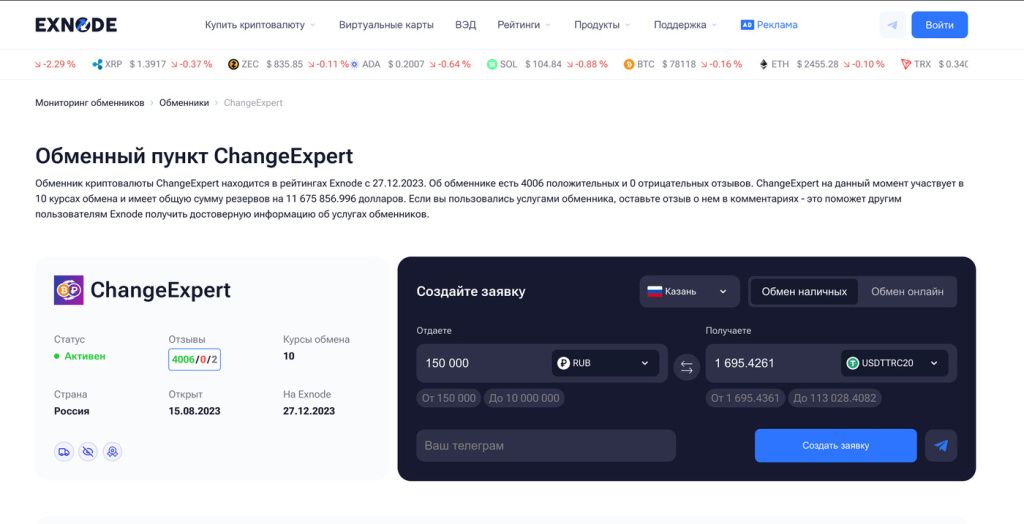
The ChangeExpert card example shows where to compare the amount you’re giving and the calculated amount you’ll receive. The screenshot shows the interface, not the current exchange rate: before paying, double-check your amount and direction.
- Write down what you’re sending and how much. If you’re sending cryptocurrency, specify the network of the source asset. For USDT, different networks have different destinations.
- Note down what you want to receive. For coins—the exact asset and wallet network; for rubles—the payment method. Do not treat the card and cash as the same product.
- Enter the same amount on all forms. Check the minimum, maximum, and reserve of the asset being issued. Exclude any offer with an insufficient reserve.
- Copy the total amount to be received and, separately, all fees outside the request: wallet, bank, or payment method fees.
Do not create multiple paid orders at the same time just to compare them. While you’re transferring funds, the rate for one of them may expire, and the exchange may reserve the asset for a certain period. To compare, simply review the calculation forms before payment and save the terms of your selected order.
MSG explains in detail how the monitoring service collects offers in the article “Monitoring Cryptocurrency Exchanges.” If you want to complete the transaction yourself, use the separate guide on exchanging BTC and USDT online. This article addresses a more specific question: how to calculate the transaction price.
Reserves and limits can affect the calculation
Reserve refers to the amount of an asset that an exchange can provide for a given transaction. When buying USDT with rubles, check the USDT reserve; when selling USDT, check the availability of rubles via your chosen payment method. A favorable exchange rate with a reserve below the required amount is not a viable option for your order. A partial exchange may result in a different exchange rate and an additional network fee.
The minimum and maximum amounts per transaction also affect the final result. If you want to exchange 100,000 ₽ but the order limit is 70,000 ₽, two orders of 50,000 ₽ each may end up costing more due to the repeated fixed fee. Check the calculation for each part separately. Do not split the payment after creating a single order without coordinating with the service: the automated system may not recognize the second transfer.
Some offers have tiered exchange rates: the price depends on the amount. It is incorrect to compare the exchange rate for 10,000 ₽ with a competitor’s rate for 100,000 ₽. Enter your exact amount in each form. If the exchange platform displays “from” or a range, request a quote for your specific amount before sending funds.
Pay close attention to the units of measurement. One card might show how many rubles you need to pay for 1 USDT, while another shows how much USDT you’ll receive for 1,000 ₽. At a glance, both figures look like “exchange rates,” but you can’t put them in the same column without converting them. Write down the direction with an arrow, for example, RUB → USDT, and convert all options into a single, clear value: how much USDT you’ll receive for your 100,000 ₽.
If a service offers a bonus or promo code, check whether it applies to your amount and destination, whether it requires separate registration, and whether the result is visible in the request before payment. The discount promised after contacting support may not match the calculated discount. Include in the comparison table only what the exchange service has confirmed in the terms and conditions of the specific transaction.
Fixed and Floating Rates
With a fixed exchange rate, the exchange service specifies at what stage it locks in the rate and how long the terms remain valid. This does not always mean the rate is locked in the moment you open the page: sometimes it is locked in after you create an order, receive the funds, or a certain number of confirmations are received. Check the service’s wording, not just the lock icon next to the rate.
With a floating rate, the total is recalculated based on the described event. For BTC, the confirmation time depends on the network and the fee selected by the sender. Bitcoin.org explains why confirmations do not arrive on a fixed schedule. If the market changes during this time, the result of a floating order may differ from what was initially displayed on the screen.
Both formats have conditions regarding underpayment, overpayment, and delays. Read them before sending: even a small discrepancy in the amount can result in the order being processed manually. If the transfer is delayed, save the order number and TXID, then contact support using the contact information on the exchange’s official website.
What Does “Exchange with the Lowest Commission” Mean?
This label is only useful after you’ve done the math. The commission percentage should be compared alongside the spread, fixed fees, and external costs. For small amounts, the fixed fee may be more important than the percentage; for large amounts, the opposite is true. One service may be cheaper for USDT → RUB, while another may be cheaper for BTC → USDT. There is no universal “best cryptocurrency exchange” for every pair and amount.
Standardize the data: one asset, one network, one amount, and one payment method. Then evaluate the net amount to be credited and the conditions for receiving it. If a service doesn’t disclose when the exchange rate is locked in, how much the fee is, or what happens in case of an amount error, you don’t have a complete price to compare. Don’t fill in this gap with guesswork. Before making a transfer, check the service against a separate crypto exchange checklist.
For a repeat transaction, start the calculation over. A previously favorable offer may no longer be the best option due to the exchange rate, reserve, or network fees. Compare options on Exnode before creating a new order, then check the total on the exchange’s website. The amount after all fees have been deducted is what represents the actual cost of the transaction.
Questions about the exchange rate and fees
Why does the exchange rate on the monitoring tool differ from the rate in the order?
Data is updated at different rates, and the exchange service recalculates the price based on the specific amount and payment method. The terms and the total shown in the order form before payment are what matter most. If the discrepancy is significant, do not pay until you’ve clarified it.
Does a 0% fee mean the exchange is free?
No. The service’s revenue may be included in the exchange rate, and network fees or payment processing fees may be deducted separately. Compare the total amount with an alternative option using the same transaction parameters.
How should you calculate the cost if the network fee is deducted from your wallet separately?
Add it to the amount you’re actually spending. If your budget is exactly 100,000 ₽ or the equivalent in cryptocurrency, first subtract the network fee, then calculate the amount to exchange.
When should you double-check the exchange rate?
Immediately before creating the order and again before sending the funds, if the form allows you to see the current total. After payment, follow the rule for locking in the rate and confirmation within the order itself.