

Mirocard is a service that provides virtual international cards for paying for subscriptions, software, games, web hosting, and other online services. The card exists only in digital form: once issued, the card number, expiration date, and CVC code appear in your account. You can use these details to pay on websites that accept Visa or Mastercard.
Official website: https://mirocard.com/ru
In short: Mirocard is a good fit for anyone who needs an international card to pay for recurring subscriptions and foreign services. Card issuance starts at 5 USD, and you can top up your balance via the National Payment System (NPS) or with cryptocurrency. Before applying, be sure to check the terms of your chosen card in your account dashboard: BIN, fees, 3D Secure availability, and the list of supported services.
A virtual card is issued faster than a physical one: you don’t have to wait for delivery or contact an intermediary every time. After registration, all that’s left is to top up your balance, select a card, and receive its details. However, payments aren’t accepted on every website—the outcome depends on the card’s BIN, the merchant’s policies, and the settings of their anti-fraud system.
What Is Mirocard and How Does a Virtual Card Work?
Mirocard issues virtual Visa and Mastercard cards for international online payments. There’s no physical card, but one isn’t needed for online payments. The user receives a standard set of card details:
- card number;
- expiration date;
- CVC code;
- billing information, if required by the specific card.
You use it just like a regular international bank card: add the details to your service account and save them for future charges. It’s best to top up your balance in advance before your subscription renews. The payment may go through slightly before the due date, and the merchant sometimes temporarily reserves a small amount to verify the card.
Mirocard offers cards for subscriptions, advertising, and travel. Here, we’ll discuss the option for digital services. Don’t choose a card based solely on the category name: first, check whether the website you need is supported for that specific BIN.
Key Benefits of Mirocard
Fast Issuance
Registration, funding, and issuance are all done online. Mirocard states that your card details are available immediately after application, and the entire process takes about 10 minutes. Access to your account and card is not tied to your country of residence, provided the rules of the selected card program do not impose any restrictions.
Clear Terms Before Payment
The cost of issuing and reloading the card is displayed before the transaction is confirmed. When working with an intermediary, the final markup often becomes clear only after correspondence or when an invoice is issued. Mirocard cards have different rates, reload fees, limits, settlement currencies, and service restrictions—be sure to check each item before paying.
Recurring Debits and Automatic Payments
You can save your card in your online service account to renew subscriptions. This is especially useful for work tools, cloud platforms, streaming services, and software that you use every month. To ensure your automatic payment isn’t declined, keep the subscription amount plus a small buffer on your card to cover fees or exchange rate fluctuations.
3D Secure
If your card issuer supports 3D Secure, the payment is confirmed with an additional code. Many international stores and services use this verification method, as the card number and CVC alone are not sufficient. 3D Secure support is listed in the card’s specifications—check this before the card is issued.
What Services Can You Pay For
Mirocard is designed for a wide range of international platforms. The official website lists examples such as AI tools, streaming services, games, web hosting, cloud services, marketplaces, and travel services. However, compatibility is subject to change: international companies update their anti-fraud policies, country restrictions, and BIN requirements.
| Category | Examples of Services | What to Check |
|---|---|---|
| AI and developer tools | ChatGPT, Claude, Cursor, Midjourney, GitHub Copilot, JetBrains | Account country, billing address, allowed BIN |
| Cloud and hosting services | Hetzner, WebShare, CDN77, VPS.me, Notion, Figma | Limits, auto-renewal, corporate or personal account |
| Streaming and subscriptions | Netflix, Spotify, YouTube Premium, Disney+ | Profile region and available balance for the next charge |
| Games | Steam, Epic Games Store, PlayStation Store, Xbox, Xsolla | Store region and account information matching card details |
| Travel and shopping |
If a particular service isn’t supported by one card, you can select a different BIN and issue an additional card. According to Mirocard, there is no monthly service fee, so it’s convenient to use multiple cards for separate budgets: for example, you can use one for work-related expenses and another for personal subscriptions.
How to Top Up Mirocard via a Payment System: Step-by-Step Instructions
Funds deposited into Mirocard are first credited to a single master balance in your account dashboard. The card issuance fee is deducted from this balance, and then the desired amount is transferred to the card balance. If you have multiple cards, the master balance allows you to distribute funds among them without having to top up from an external source again.
Step 1. Open the master balance
Log in to your Mirocard account. At the top of the page, locate the master balance section and click the “Top Up” button.
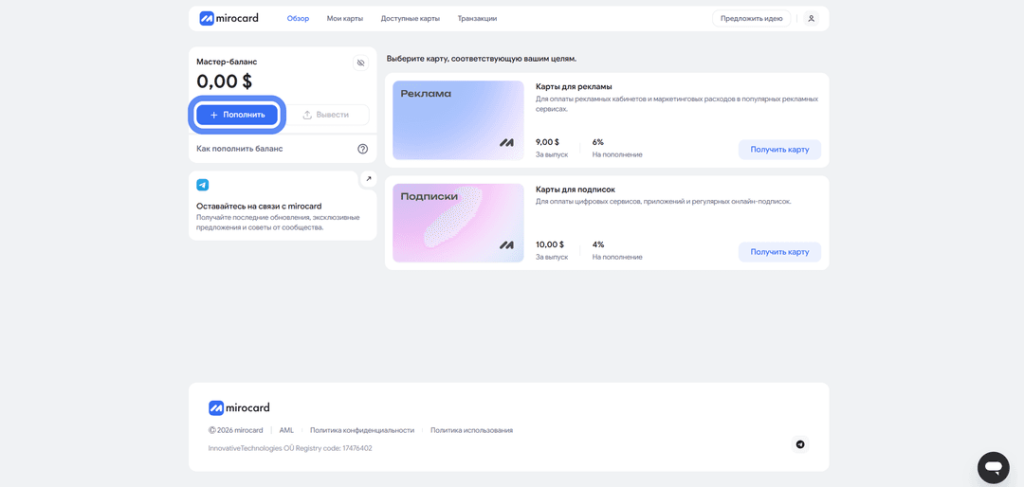
The “Top Up” button in the Master Balance section. Source: Mirocard’s official blog.
Step 2. Select “Top Up via SBP”
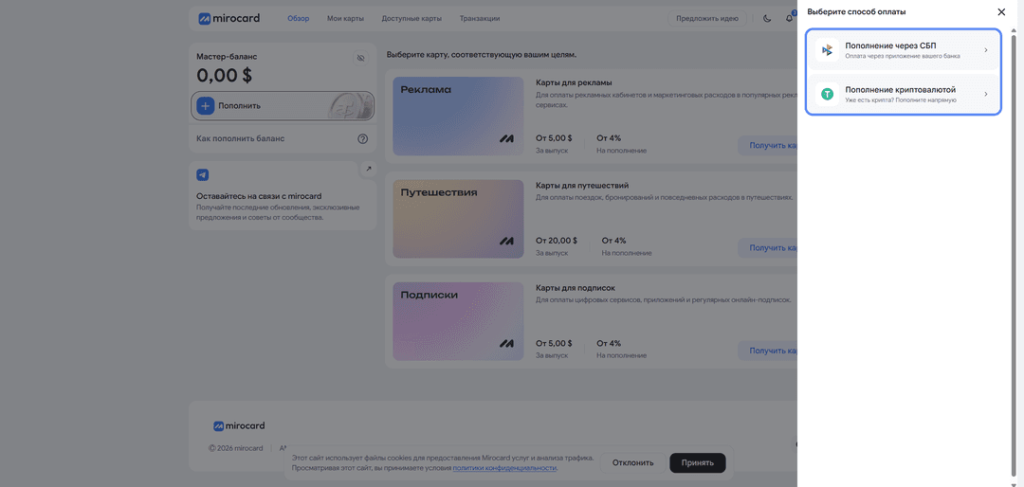
In the form that opens, select the “Top Up via SBP” method. You can also top up with cryptocurrency here—select this option if a ruble transfer isn’t convenient.
Step 3. Enter the amount and review the calculation
Enter the top-up amount in rubles. Before paying, check the total amount to be credited, the current exchange rate, and the fee: the service displays the transaction details before you confirm it.
Step 4. Pay for the transfer using a QR code
After you confirm the amount, Mirocard will generate a QR code. Open your Russian bank’s app, select payment via QR code or through the Secure Payment System (SPS), scan the code, and confirm the transfer. Do not close the page until the transaction is complete.
Step 5. Transfer the money to the desired card
Wait for the funds to be credited to your master balance. Then open the desired virtual card and transfer the amount needed to pay for the subscription to it. Make sure there are sufficient funds remaining on the card to cover currency conversion and a small verification transaction by the merchant.
How to Top Up Mirocard with Cryptocurrency
On the payment method selection form, click “Top Up with Cryptocurrency,” select the desired asset, and receive a transfer address. You can top up your master balance from an external wallet or exchange. Mirocard’s technical specifications and documentation list ETH, USDC, USDT, AVAX, BCH, DAI, BNB, BTC, DASH, DOGE, POL, LTC, SOL, TON, TRX, and XMR.
Be sure to verify the coin, network, and address before sending. You can first make a small test transaction and send the main amount after it has been credited. A transfer made on an incompatible network may be lost.
The time it takes for cryptocurrency to be credited depends on network congestion and the number of confirmations required. To pay for a subscription, it’s best to top up your balance in advance rather than waiting until the next payment is due.
Fees and Costs
The cost of issuing a Mirocard virtual card starts at 5 USD. The exact price depends on the card program and BIN. The terms are visible in your account dashboard before the card is issued—you should also check the top-up fees, limits, and supported services there.
| Parameter | What We Know | What to Do Before Release |
|---|---|---|
| Release | Starting at 5 USD | Compare available BINs and card purpose |
| Service | No monthly fee listed | Check the current terms and conditions for the selected card |
| Funding | Fees depend on the method and card | View the total amount before confirming the transaction |
| Transactions and currency conversion | Depend on the card program and the merchant’s currency | Keep a small balance on your account |
When comparing Mirocard to a payment processor, consider more than just the issuance fee. A payment processor typically charges a fee for each individual payment, while the card remains with the user and can be used for future transactions. But if you only need to make one small purchase, it’s worth calculating the total cost of both options in advance.
How to Get Started with Mirocard
- Sign up. Create an account on the official website and verify your email address.
- Top up your master balance. Select SBP or a supported cryptocurrency.
- Open the card catalog. Compare prices, BINs, limits, and 3D Secure availability.
- Check the desired service. Make sure it is not on the list of prohibited services for the selected card.
- Pay for the card issuance. Once your application is processed, the card details will appear in your account dashboard.
- Transfer funds to the card. Leave a buffer for the fee and the verification authorization.
- Add the card to the service. Enter the card details and billing address from your personal account, if required.
More detailed instructions are available in the Mirocard guide to issuing a virtual card. The Mirocard blog also features step-by-step guides on making payments on popular platforms.
Pros and Limitations
| Pros | What to Consider |
|---|---|
| Online issuance without waiting for a physical card | Compatibility depends on the BIN and the merchant’s rules |
| Suitable for recurring subscriptions and auto-renewal | You must maintain a sufficient balance in advance |
| Top-ups via SBP and cryptocurrency | There is a top-up fee and possible currency conversion |
| You can separate business and personal expenses across different cards | Avoid keeping a large, long-term balance on your payment card |
| 3D Secure is available for card programs that support it | Check for this feature before the card is issued |
Who Should Consider Mirocard
Mirocard is ideal for those who regularly pay for international subscriptions, AI services, developer tools, server rentals, or digital content. A separate card is convenient for automatic payments and helps keep these expenses separate from other purchases.
A virtual card is not suitable for receiving salaries from abroad, bank transfers, cash withdrawals, or storing large sums of money. For these purposes, you’ll need a full-fledged account at a foreign bank. Be sure to check the requirements of foreign exchange and tax laws separately.
For more details on the different options, see the article on how to choose a virtual international card.
Reviews of Mirocard
There aren’t many public reviews of Mirocard yet, so it’s more helpful to look not only at the overall rating but also at specific examples of payments. On several platforms, users most often mention the low issuance fee, quick processing, and the card’s compatibility with international services.
Reviews on CRMindex
On CRMindex, users praise the simple registration process, the ability to top up via SBP, and the card’s affordable price. The reviews include examples of successful payments on Booking, ChatGPT, Cursor, and Claude. One reviewer also notes that they continued using the Hong Kong card after making their first payment.
Platform: CRMindex
URL: https://crmindex.ru/services/mirocard
Reviews on Trustpilot
Positive reviews on Trustpilot highlight fast transaction processing and the convenience of the service for international payments. There are still few reviews, and the overall rating is mixed, so it’s worth checking recent posts and the company’s responses before applying for the card.
Platform: Trustpilot
URL: https://www.trustpilot.com/review/mirocard.com
Review on VC.ru
The author of the review on VC.ru lists the availability of BINs from Singapore, Estonia, and Hong Kong as a strength, as well as separate cards for subscriptions, advertising, and travel. This is the opinion of a single author, not an aggregated user rating, so it’s best to compare it with reviews on other platforms.
Platform: VC.ru
URL: https://vc.ru/top-raiting/3132352-mirocard-obzor-virtualnyh-kart
Conclusion
Mirocard provides foreign card details for subscriptions and online purchases. You can quickly issue the card, top it up via a payment system or with cryptocurrency, and use it alongside other cards in a single personal account. 3D Secure is available in some card programs.
Before issuing a card, check three things: whether the service you need is compatible with the selected card, how much the total fee will be, and what restrictions apply to the BIN. If these conditions are met, you can use Mirocard almost like a regular international card—link it to your account and pay for one-time purchases or recurring subscriptions without having to go through an intermediary every month.
Frequently Asked Questions
What is Mirocard?
Mirocard is a service that issues virtual Visa and Mastercard cards for paying for international subscriptions, digital services, games, web hosting, and online purchases.
Can I top up my Mirocard via SBP?
Yes. A QR code is generated in your account dashboard for payment via a Russian bank’s app. Before confirming, be sure to check the total amount and any fees.
Which cryptocurrencies are supported?
Mirocard’s documentation lists ETH, USDC, USDT, AVAX, BCH, DAI, BNB, BTC, DASH, DOGE, POL, LTC, SOL, TON, TRX, and XMR. Check your account dashboard for the current list of coins and networks.
Is the card suitable for auto-renewing subscriptions?
Yes, if the specific service is enabled for the selected card. To ensure smooth payments, keep the subscription amount plus a small buffer in your balance in advance.
Does Mirocard work with ChatGPT, Claude, and other AI services?
ChatGPT, Claude, and other AI services are included in the list of platforms supported by Mirocard. Before making a payment, check the compatibility of the desired platform with the specific BIN: lists are subject to change.
Does Mirocard support 3D Secure?
3D Secure is supported by certain card programs. Whether this feature is available is indicated in the card’s terms and conditions before issuance.
How much does it cost to issue a card?
Prices start at 5 USD. The final price, reload fees, and limits depend on the card you choose and are displayed in your account dashboard.
Can I issue multiple cards?
Yes. This is convenient if you need one card for business services and another for personal subscriptions, or if platforms require different BINs.
Does the card guarantee payment for any international service?
No. The decision to accept a payment is made by the merchant and their payment provider. The outcome is influenced by the BIN, the account’s region, the billing address, anti-fraud checks, and the specific platform’s rules.
Sources
- Mirocard’s official website.
- Cards for international services.
- Instructions for paying for online purchases and services.
- Overview of the Mirocard virtual card.
Terms, rates, available BINs, and lists of compatible services are subject to change. This information was verified using publicly available sources and the technical specifications provided on October 9, 2026. Before applying for a card, please check the current information in your Mirocard account. This material is for informational purposes only and does not constitute financial advice.