

Bank Transfer+ in Bybit allows you to transfer money between your bank account and exchange via dedicated details, including your personal vIBAN where available. When deposited, funds can be converted into the selected stablecoin and transferred to the Funding Account; When withdrawing, the reverse operation occurs. The usual Bank Transfer inscription without a plus is also found in other sections of Bybit. In P2P it denotes the method of payment with the seller, and in fiat replenishment it denotes the bank payment channel. These operations have different conditions.
First, determine which section the application is in and what you will receive as a result: fiat balance, USDT, or transfer to a bank account. If you don't have an account yet, you can register on Bybit using the MCG affiliate link. Registration itself does not provide access to all banking areas.
The material is for informational purposes only and does not constitute individual financial advice. The availability of transactions, limits and costs are determined by the terms of the specific account, payment provider and bank.
What does Bank Transfer mean in different sections of Bybit
The literal translation is “bank transfer”. But just two English words cannot determine the recipient of the money, the conversion method or the deadline. This requires context: product name, application currency, details and total amount.
| Where is the method shown | What's going on | What to check in the application |
|---|---|---|
| Bank Transfer+ | Deposits and withdrawals via dedicated bank details, with conversion between fiat and supported stablecoins | Account permission, currency, recipient, conversion conditions |
| Fiat Deposit / Fiat Withdrawal | Top up fiat balance or withdraw supported currency | Provider, bank account requirements and payment reference |
| One-Click Buy | Buy or sell cryptocurrency through an accessible payment method | A pair of currencies, rate and number of coins to be received |
| P2P | Bank payment to the other party of a specific P2P order | Announcement, counterparty name, details, limit and timer |
For example, selecting USDT and Bank Transfer in the purchase form does not mean connecting Bank Transfer+. B One-Click Buy Help Bybit indicates that the set of methods depends on the chosen fiat currency and coin. The commission from one direction cannot be transferred to another, even if the bank button has the same name.
In P2P, the method name must match the method in the declaration. The seller’s terms and conditions are read before creating an order, and the payment is made according to the details of this transaction. If there is another unfamiliar mark nearby, figure it out first, what does Mobile Top Up mean in Bybit: the signature itself does not confirm the availability of your bank, nor the terms of payment.
Who can use Bank Transfer+ and where to find it
In an update dated September 9, 2026, Bybit describes Bank Transfer+ as a service for eligible users with a personal vIBAN. Possibilities include transfers to your own and approved third-party bank accounts. Connection requires verification of identity, address and profile; Additional checks are provided for some users. These conditions are given in official announcement about Bank Transfer+.
You need to check access in the application: Bybit indicates that Bank Transfer+ works there. The ad shows the path Deposit → Buy with USD → Pay with → Bank Transfer+. Names in Russian and button locations may vary. If you have an older version, first update Bybit app from official source, then open the desired direction again.
The absence of an item does not mean that it can be enabled by transferring money or changing the signature in the profile. Region, account status and verification result are important for access. Old images with the inscription VIP Only also do not determine the conditions of your account: Bybit updates the product, and educational illustrations may retain the same appearance. The guideline is the form available to you and its requirements.
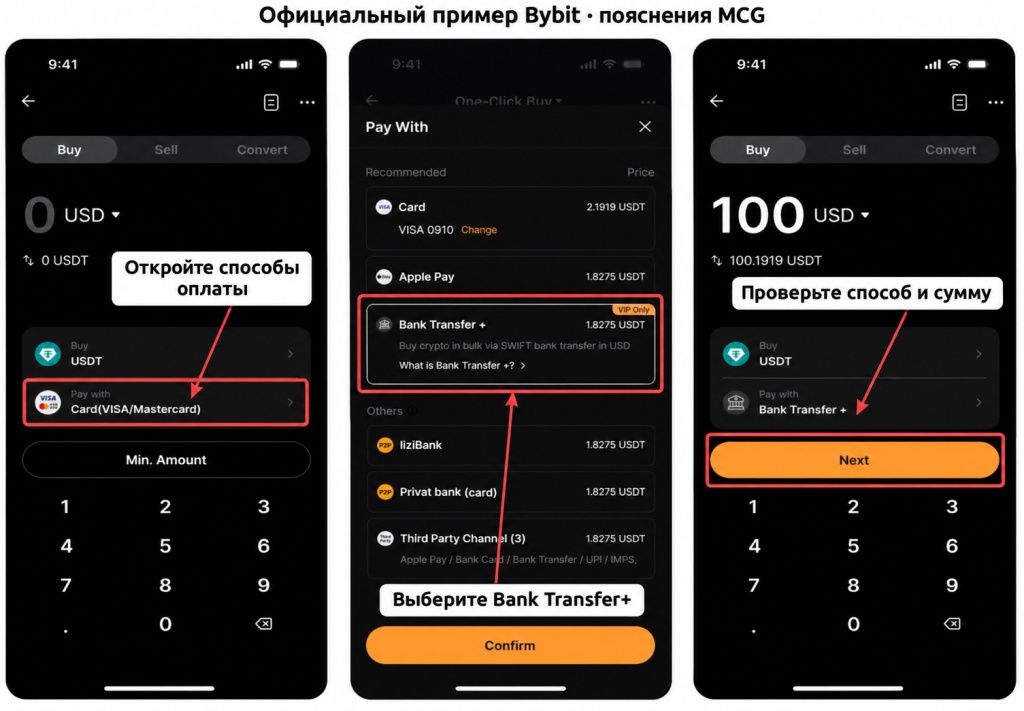
How to top up Bybit via Bank Transfer+
The work sequence begins with selecting a result. See what currency comes from the bank and what asset appears on the exchange. B Bank Transfer+ manual Bybit describes the conversion of incoming fiat into supported stablecoins, such as USDT or USDC, and credited to the Funding Account.
- Access the product. Fill out the proposed form and wait for approval. If proof of address or origin of money is requested, please submit it via the form provided.
- Open a top-up inside Bank Transfer+. Select supported asset and amount. Write down exactly what needs to be credited, as well as the withholding and limit shown.
- Copy your bank details. Take the entire set from the current form: recipient, account or vIBAN, bank and additional fields. The details of a P2P seller or an old application are not suitable here.
- Check the transfer with your bank. Verify currency, recipient name, and commission. If the bank does not accept such details or assignment, find out the reason before debiting.
- Submit the payment and save the confirmation. Check the amount of the actual debit and the bank transaction number. If Bybit prompts you to mark the shipment, please do so after completing the payment.
- Wait for the result on the exchange. Match the application status and the credited asset. Debiting money from the bank does not in itself confirm the completion of the transaction on Bybit.
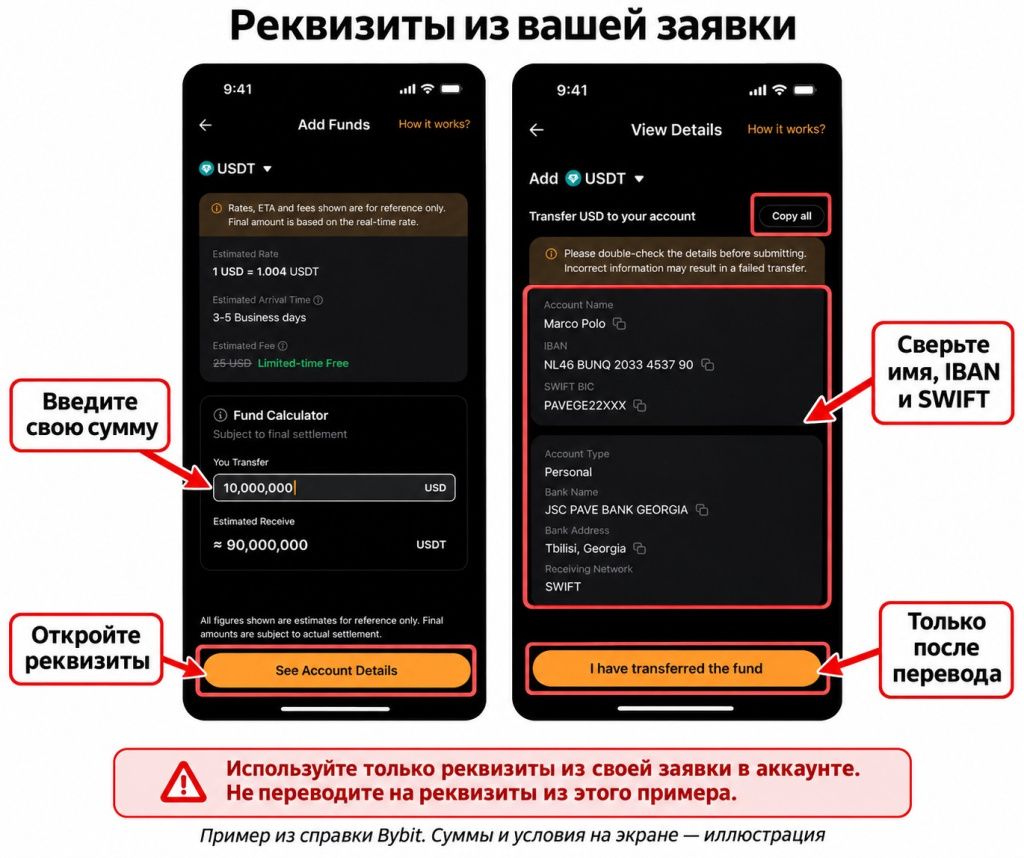
After depositing, open Funding and find the exact coin you selected. If you were expecting USDT and you are looking at the UTA trade balance, the amount may seem missing. We discussed the difference between these accounts and the procedure for internal movement in the material about Funding Account and UTA in Bybit.
How is regular fiat funding different?
In Fiat Deposit, the task may be different: first top up your fiat balance, then buy cryptocurrency separately. Therefore, a transfer of $1,000 should not automatically be considered a purchase of 1,000 USDT. Before payment, check the currency of payment and the presence of a separate exchange stage. The fiat balance is also located on Funding, but is displayed in the corresponding currency.
B Fiat Deposit instructions Bybit separately describes banking channels for different currencies. Among them there are permanent details and data created for one operation. Therefore, the saved bank payment template is only useful after checking with a new application: the account, destination or provider may have changed.
If you topped up one currency yesterday and chose another today, do not send the payment to yesterday's account. Channels can serve different banks. A successful previous transfer does not confirm the compatibility of the new conditions.
There is one more check before replenishing: how to withdraw money later. Supporting currency at the input does not guarantee the same banking method at the output. If you plan to return the balance to the bank, open the withdrawal form in advance and check the available method. This is especially important when money is needed by a certain date.
Name, IBAN, SWIFT and reference: where they are most often mistaken
Account number, bank ID and payment purpose solve different problems. IBAN indicates the account in the appropriate format, SWIFT/BIC helps to identify the bank, and reference connects the transfer with the desired client or application. One field does not replace another.
- Recipient. Transfer the name or organization name as indicated in the details. Do not shorten a long title at your own discretion.
- Account and bank. Verify the entire number, including letters and leading zeros. If you are asked for a bank address and SWIFT, fill them out as instructed.
- Reference or destination. Provide an exact value if required. Do not substitute your UID, last name or phone number in place of the issued code.
- Currency. Make sure the transfer is sent in the approved currency. Bank account conversion and service-side conversion may be separate costs.
- Amount and validity period of the application. Check transaction limits and partial payment allowance. Do not split the amount into several transfers without specifying them in the terms and conditions.
- Source of money. Check which accounts are allowed for the selected product. The rules for a regular fiat deposit and Bank Transfer+ may differ.
For a general provider account, the reference is especially important: without it, the payment is more difficult to match with the user. Personal virtual details may not require a separate code. Therefore, do not add an arbitrary assignment “to be on the safe side” or remove a required field. The differences between general and personal details are described in Fiat deposit FAQ.
Error example: in the banking application, the name was automatically pulled from the old template, and you inserted the account number from the new application. The presence of both fields does not make the details consistent. Remove the template from the current transaction and fill in the details again before confirmation. If the payment has already been sent, check its status first rather than repeating the transfer with a corrected signature.
Can I use another person's account?
There is no one answer for all Bybit bank buttons. In a standard fiat deposit, the sender's name must match verified account details. For P2P official rules for payment methods also require an exact match of the owner's name with KYC. A relative's transfer in lieu of his own payment may not pass verification.
Bank Transfer+ in the September update includes separate transactions with eligible third-party accounts and recipients. This is not permission to transfer money from any account without documents. You need to check whether your form allows exactly this operation, what recipient data is required and what checks are provided.
The practical difference is simple. If you connect your account to a regular Fiat Withdrawal, do not enter your relative’s details. If a transfer to an authorized third-party recipient is available in Bank Transfer+, enter its real data in the provided fields. Do not register someone else's account as your own to complete the form.
How to calculate the total cost of a bank transfer
One line “service commission” is not enough. Costs may arise when sending to a bank, going through intermediaries and exchanging currency. Part is withheld from the amount, part is written off from above. If you mix these options, the calculation will be incorrect.
Case study, not Bybit tariff. You send 1,000 USD, the bank deducts an additional 10 USD. Let's assume that after the remaining deductions and conversion, 980 USDT arrives at Funding. A total of 1,010 USD left the account. Actual cost of one USDT received: 1,010 ÷ 980 ≈ 1.0306 USD.
If another offer gives 990 USDT for the same total cost of 1,010 USD, its resulting rate is approximately 1.0202 USD per USDT. Comparison of the final amount shows the difference immediately. Comparison only by the inscription “commission 0” can hide it.
To calculate in advance, find out whether the commission is included in the amount “receivable”. If it is already included, there is no need to subtract it again. If the bank deducts the expenses separately, add them to the total write-off. Leave unconfirmed expenses of intermediaries as an unknown value, rather than equating them to zero.
It is correct to compare Bank Transfer+ and P2P if the result is the same: one source currency, one output asset and a comparable amount. Evaluate the time period separately. A more favorable calculation will not help if the payment is due today, but the selected channel takes several banking days to process. Other types of deductions are discussed in the article about Bybit commissions.
Withdrawal via Bank Transfer+ and regular Fiat Withdrawal
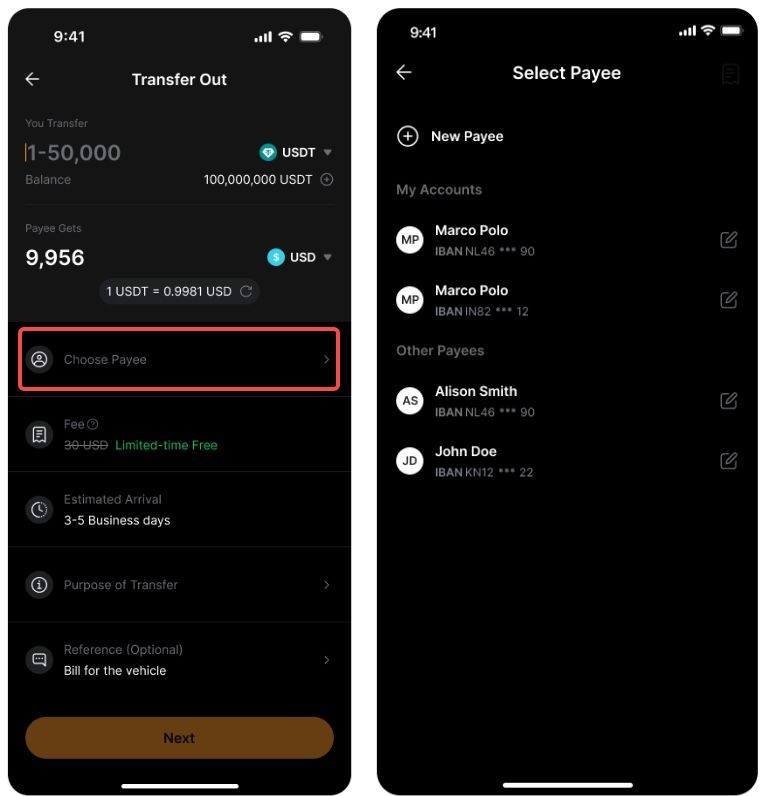
In Bank Transfer+, withdrawal involves selling a supported stablecoin for fiat and sending the money to the recipient. Select a withdrawal operation, a saved recipient or a new bank account. Then check the asset being written off, the payment currency, the total amount and the recipient details. An entry in the address book speeds up entry, but the details should still be checked.
The regular Fiat Withdrawal opens separately: in the Assets → Withdraw → Fiat application. Supported currencies and methods are shown there. Some methods become available after the first fiat deposit from the corresponding account; for others, data is added manually. These differences are listed in fiat withdrawal instructions.
Check whether the receiving bank can accept this particular currency and this transfer. Foreign currency account, card and phone number are different details. If the form asks for a bank account, the card number is not suitable instead. If the bank requires additional information about the sender or destination, find out before confirming the application.
For standard fiat withdrawal, Bybit indicates that a successfully submitted application cannot be cancelled. Therefore, the last confirmation is a moment for verification, and not a way to find out whether a random set of details will pass. Commission, minimum amount and expected term depend on the chosen currency and method; the current parameters are displayed in the form. This is described in Fiat Withdrawal FAQ.
Where to look at the status and what to do if there is a delay
A bank transfer has at least two records: a transaction in the bank and an application in Bybit. First, compare them by amount, currency and time. Then check exactly where processing stopped. A bank check with a postmark and successful deposit on the exchange are different confirmations.
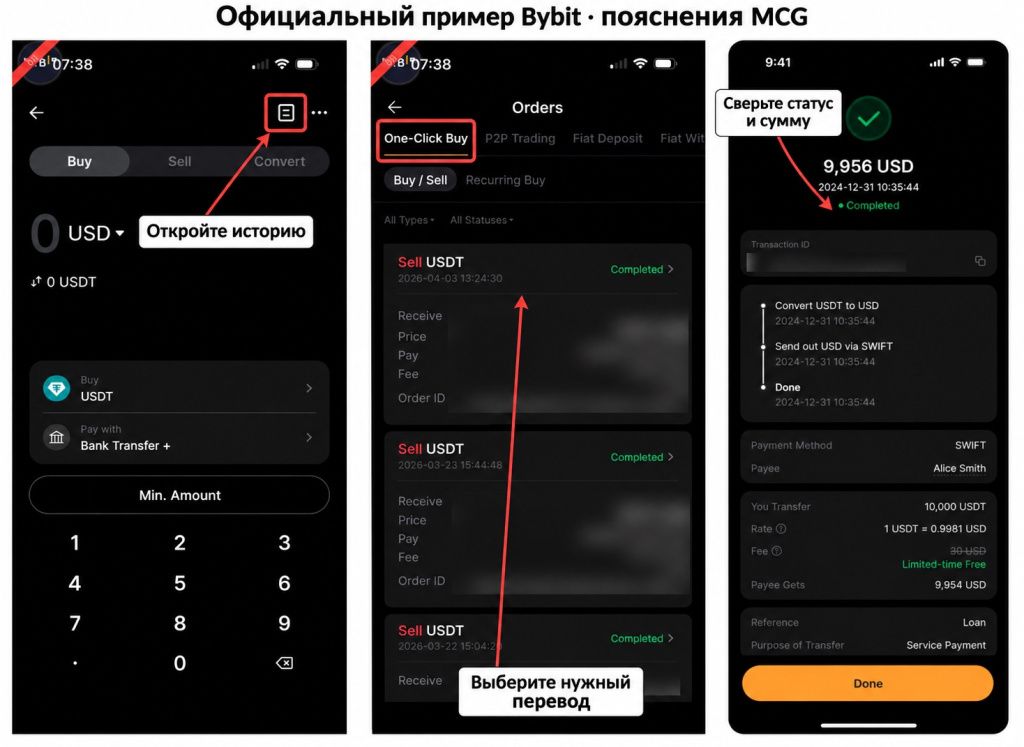
Money has been debited from the bank, but has not been credited yet
Compare the elapsed time with the estimated time of this particular channel. If banking days are specified, weekends and holidays cannot be counted as regular business days. A transfer on Friday evening will not necessarily start processing as quickly as a transfer on Monday morning.
Look at the notifications and transaction history: the service may be waiting for a clarifying document. If the deadline has expired, ask the bank for confirmation of execution and transfer ID, and in Bybit attach the application number, amount, currency, date and receipt. For SWIFT, the bank can provide separate data for payment tracing. Don't look for such a transfer by TXID: a banking transaction is not a blockchain transaction.
Application rejected or refund shown
Rejection and completed return are different states. First, find out the reason: details, unsupported account, data mismatch or requested documents. Then check to see if you need to fill out a return form. In Bybit's fiat deposit history, this opportunity appears for eligible applications; missing data may delay returns.
Do not consider the money returned until the receipt is visible in the bank. Ask to clarify the amount to be refunded and withheld for a specific transaction. The promise of a “full refund” without checking bank expenses does not help here. If you need to correspond with the service, use official ways to contact Bybit support and continue with one request for this operation.
Bybit shows completion but no expected amount
When replenishing, check the desired asset on Funding and conversion details. When making a withdrawal, check the final recipient and the currency of the bank account. Make sure to look at your current request: there may be a previous transaction nearby with a similar amount. If the discrepancy remains, provide support with both records, not just the cropped balance snapshot.
A second translation does not correct the first one. If the money has already been debited, first find out where it is. Otherwise, instead of one delayed transaction, there will be two, and bank commissions may be withheld for each.
Questions and Answers
Is it possible to top up Bybit from a Russian bank via Bank Transfer+?
This feature should not be considered available by default. You need at the same time an authorized product in the account, a suitable sender’s account and confirmation from the bank that it is making the transfer using the specified details. The Russian interface language and the presence of USD in the list do not prove this. General features of using the site are discussed in the material about Bybit's work in Russia.
Is personal vIBAN a full-fledged bank account?
Bybit describes it as dedicated transfer details associated with an account. The guidance makes it clear that Bank Transfer+ is not a traditional bank account and does not itself provide savings, credit or interest products. Based on the presence of vIBAN, one cannot draw a conclusion about the range of banking services.
Is it possible to specify a reference in a support message after sending?
Informing the missing code and attaching the receipt is useful for analysis. But this does not change the already sent bank order and does not guarantee automatic crediting. Support must match the payment with the application. Before she responds, do not send another amount “for binding”.
What to save in order to confirm the transfer later?
Save the final terms of the application, bank receipt, transaction number and confirmation of deposit or withdrawal. For your own reconciliation, it is helpful to record the total amount written off and the actual asset received. Such documents are placed in a public review only after personal data and full details have been removed.
What to check before your first surgery
Before sending, four things must be clear: what product is open, who the money is going to, what will be credited, and how much the total costs will be. Then check your bank's restrictions and save your current application details. You can open an account via Bybit partner page, and the availability of Bank Transfer+ and the terms of the transfer are only in the form of your account.