
Spot trading on Bybit - exchanging one asset for another through the exchange terminal. In the BTC/USDT pair, buying means you are giving USDT and receiving BTC; sale - reverse exchange. Here you need to distinguish between the price on the chart, the order price and the actual execution price.
Below we will look at the terminal, order book, market and limit orders, sell, TP/SL and checking the result. All prices and amounts in calculations are conditional: they show the mechanics and do not reflect the current market. The material does not suggest buying a specific coin and does not promise profitability.
You can open the platform by Bybit affiliate link. Before transactions, check the availability of the desired product for your account and the terms of service.
What do you buy on spot and how does it differ from trading with leverage
A spot pair has an underlying and a quoted asset. In BTC/USDT, the underlying asset is BTC: it counts the number of coins. Quoted - USDT: it expresses the price of one BTC. Therefore, the entry “0.002 BTC at 60 000 USDT” means a transaction volume of 120 USDT before commission, and not a purchase of 0.002 USDT.
When purchasing with your own funds, the purchased asset appears on your balance sheet. It is sold for return exchange. In the derivatives market, a contract with position and margin conditions is traded. The definition of spot exchange is given in Bybit FAQ on Spot.
This instruction covers Spot without borrowing. Spot Margin is a separate feature: it allows you to borrow funds against collateral. Do not consider the inscription about available leverage as an invitation to enable this mode. If you want to exchange only your own balance, please check the product, the available amount and the absence of a loan before confirming. There may be other positions and commitments held at the same time in a UTA; Just going to the Spot tab does not disable them.
Bybit describes separately Spot Margin mechanic: Borrowing involves collateral and interest and can occur while a pending order is being placed. The absence of leverage does not eliminate market risks and the risk of errors in the account.
What to check before opening an application
- Counting mode. Demo and live trading must be clearly distinguishable. After switching between them, look again at the mode designation and balance.
- Bill and coin. For a spot transaction, funds must be available in the Unified Trading Account, i.e. UTA. The presence of USDT in another section of the account does not mean that you can use it to pay for the application here.
- Trading pair. BTC/USDT and BTC/USDC are different markets and different means of payment. Check both parts of the name, not just the familiar coin ticker.
- Amount available. The total dollar value of assets does not equal the free balance of a particular coin. Some of the funds may be used for applications or other obligations.
- Market parameters. The minimum amount, quantity accuracy, price step and maximum volume are set for a specific pair. Do not transfer the parameters of one coin to another.
The UTA asset page differentiates the coin balance, funds occupied by orders, and other indicators; The available amount to bid is shown on the trading form. This explains official parsing of the UTA page. If the money is in Funding, deal with it first transfer between Funding and UTArather than trying to compensate for the shortage with new additions.
If you don't have USDT yet, start with the instructions about buying USDT for rubles. This is a separate operation: crypto pairs do not enter bank card details in the spot order.
How a spot terminal works
On a computer, blocks are often visible simultaneously, but on a phone they are opened in separate tabs. Look for signatures: the position of the panel and the color of the buttons depend on the device, settings and interface version.
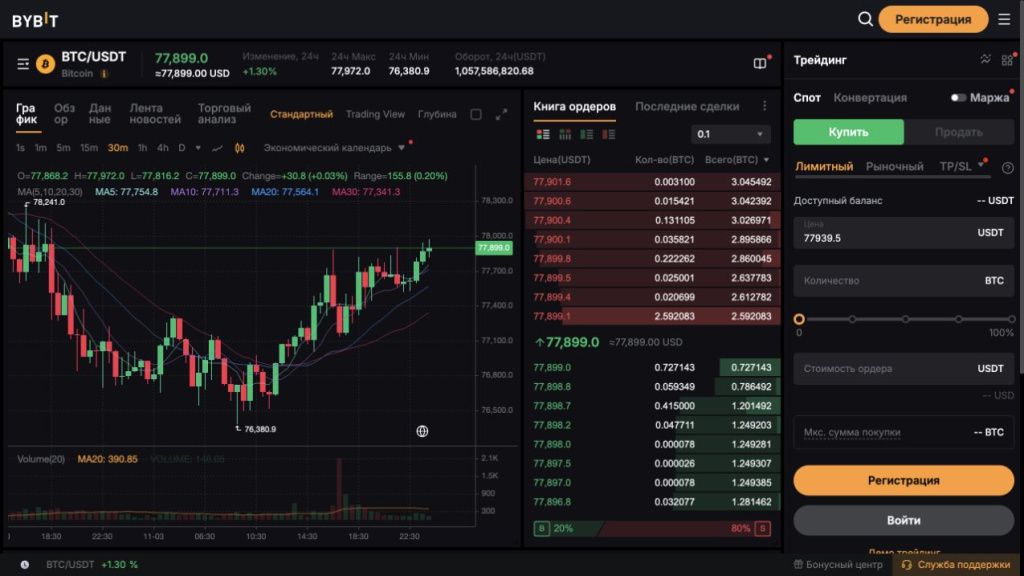
| Zone | What it shows | What to check |
|---|---|---|
| Pair name | What asset is being exchanged and for what currency | Spot, both parts of the ticker, real or demo mode |
| Schedule | History of transactions in the selected time scale | Timeframe and price units; the last candle is still changing |
| Glass | Orders from buyers and sellers by price levels | Best bid/ask, gap between them, volume near price |
| Deal Feed | Exchanges already completed on this market | Do not confuse an executed transaction with a still valid order in the order book |
| Order Form | Buy/Sell side, order type and parameters | Price, quantity or amount, available balance, additional conditions |
| Current applications and history | What is awaiting execution and what has already been executed or canceled | Status, Filled Quantity, Average Price, Commission, Order ID |
Blocks and settings are shown in Bybit trading chart instructions. The execution of your application is checked in your account history.
Candles, timeframe and volume: what is really visible on the chart
The candle collects price movement over one interval. For example, with a time frame of 15 minutes, each completed candle describes its 15 minutes, and not a separate trade. It has an opening price, a closing price, a maximum and a minimum. The body connects the opening to the close, the shadows show the extreme values. Color depends on settings; the meaning is determined by whether the close occurred above or below the opening.
The training candle opened at 100, reached 102, dropped to 99 and closed at 101. From this we know that trades took place in this range during the interval. But it is impossible to restore the exact sequence from one candle: at first the price could go up or down. It is also impossible to conclude that the next candle will necessarily continue to move.
Changing 1 minute to 1 hour changes the data grouping. A short interval shows the fluctuations in more detail, a long interval combines them. The body, shadows and volume of the last candle are still changing: the period is not completed.
The volume column shows how much of the asset was traded during the interval; check the units. This is not the amount of orders in the order book and not the number of buyers. Neither high volume nor the addition of indicators alone determine the next price direction.
Glass, spread, depth and slippage on numbers
Bid - the price at which the buyer's application is worth; ask — seller's price. The best bid is the highest among the available purchase prices, the best ask is the lowest among the sale prices. Buying at the market meets sellers, selling meets buyers. The order book level can combine several orders; The volume shown does not necessarily belong to one participant. The structure of this block is described in Bybit help about glass.
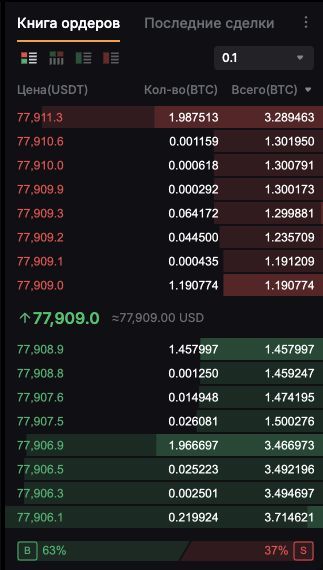
Let's say the best bid is 59 990 USDT, and the best ask is 60 000 USDT for BTC. The spread is 10 USDT per BTC. This is the gap between the two sides of the market, not a separate exchange fee. The last transaction could have gone through at a different price: a large number between the sides of the order book does not promise the same price for the next purchase.
Let's look at the conditional side of the sellers. The volumes shown here are in BTC, not amounts in USDT:
| Price, USDT per BTC | Available volume, BTC | What will it cost to buy 0.004 BTC |
|---|---|---|
| 60 000 | 0.001 | 0.001 BTC for 60 USDT |
| 60 010 | 0.002 | 0.002 BTC for 120.02 USDT |
| 60 030 | 0.003 | Remaining 0.001 BTC for 60.03 USDT |
The purchase will cost 60 + 120.02 + 60.03 = 240.05 USDT before the commission. Average price: 240.05 ÷ 0.004 = 60 012.50 USDT per BTC. If you bought the entire volume at the best ask, it would be 240 USDT. The difference of 0.05 USDT arose due to the passage of several levels - this is an example of slippage relative to the first ask. As a percentage: (60 012.50 ÷ 60 000 − 1) × 100 ≈ 0.0208%.
Orders in the order book have time to change: the calculation explains the principle, and does not predict the transaction. Depth shows volumes at different levels. A large order relative to the volume near the best price can further shift the average execution price.
For supported market orders, Bybit offers Slippage Tolerance - a tolerance limit. It sets the execution limit, but does not promise the purchase of the entire quantity: the part outside the established range is canceled. Setting options vary by instrument; check available fields by Slippage Tolerance instructions. A predetermined limit and guaranteed full execution are two different things.
Market and Limit: what do you specify in each case
Market takes away counteroffers. You set the amount or quantity, and the price is based on the available liquidity. “By the market” does not mean “by the number I saw on the chart.”
Limit sets the price limit: maximum for buying, minimum for selling. The order can wait, be executed in parts, or immediately meet a suitable application. Therefore, Limit is not always a maker and does not mean the absence of a commission. The classification is given in list of Bybit order types.
If the form offers an expiration date, check it: the options available vary by product and application type. GTC leaves the unexecuted part waiting; The IOC executes what is available immediately and discards the remainder; FOK demands that everything be executed immediately or cancels the entire order. Details - in help about GTC, IOC and FOK.
The site also has its own price and quantity restrictions. A market order may be partially executed or canceled due to the price limit. The minimum amount and acceptable size are checked for the selected instrument in current Spot rules, and not by the number from someone else's screenshot.
How to buy on the market
Read the field units: 100 USDT and 100 BTC are different orders. For Market Buy, the default input is set by amount, for Market Sell - by quantity; option can be switched. The order is shown in instructions for placing a spot order.
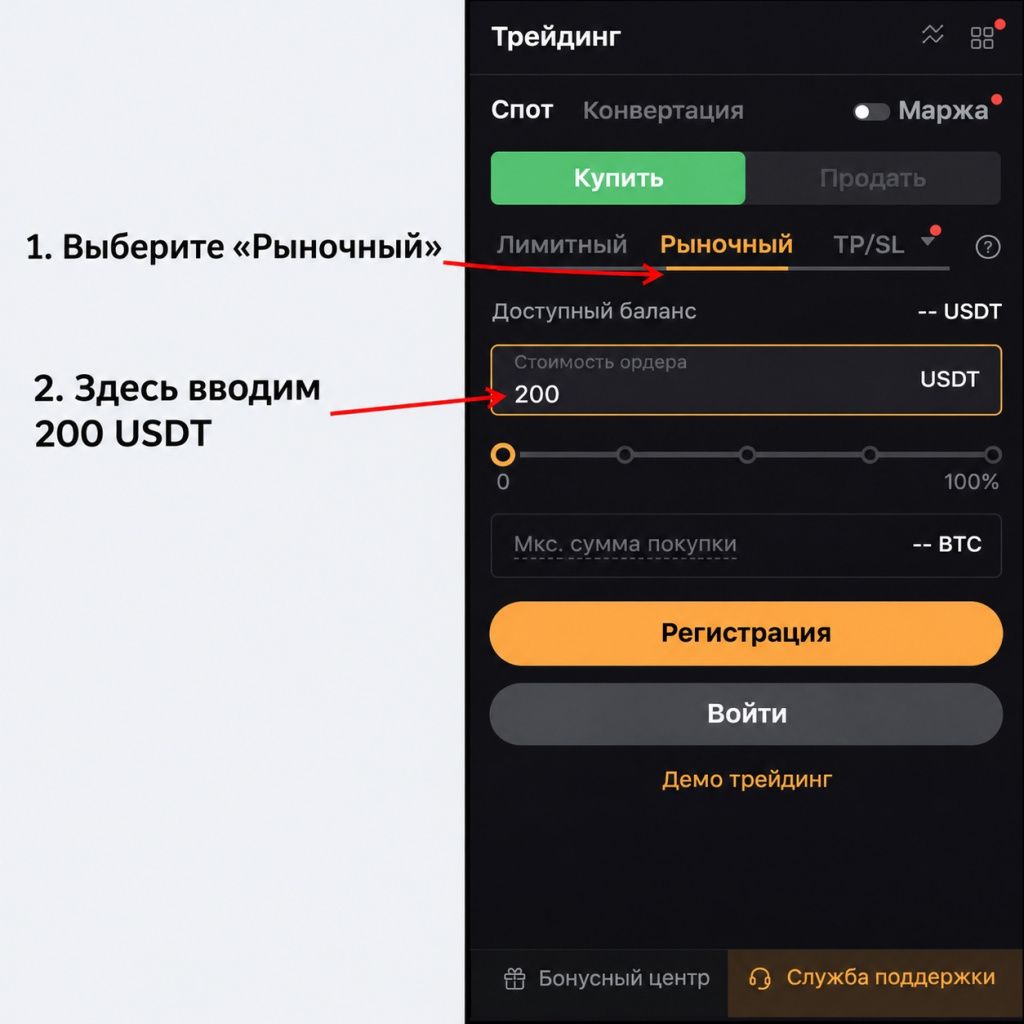
- Open the desired pair and make sure that "Spot" is selected and not a contract with a similar ticker. The Margin switch must remain turned off for normal exchanges.
- Select Buy and Market. Check the field units: USDT or the amount of the underlying asset.
- Enter a training amount, such as 100 USDT, if it meets the pair's rules and available balance. Do not enter this number in the number of coins field.
- Check the available slip settings and the preliminary calculation. Calculation before execution remains an estimate.
- Check the pair, side and amount in the confirmation. After sending, open the execution history.
If the conditional average price of ETH is 2 000 USDT, then 100 USDT corresponds to 0.05 ETH before fees. At a different average price the quantity will be different. The number on the purchase form does not replace the execution record: the total quantity, average price, and commission appear after the trade.
When choosing 100%, Bybit provides a buffer for price movements. A small balance in itself does not mean the loss of funds. Verify expense, rounding, and status before submitting a repeat order.
How to set a limit buy and check the wait
For example, let's set a purchase of 0.002 BTC with a limit of 77 000 USDT per BTC. The cost at this limit is 154 USDT. These are educational parameters and not an offer to buy at this price. Before placing, compare the limit with the current sellers in the order book: this determines whether the order will wait or can be executed immediately.
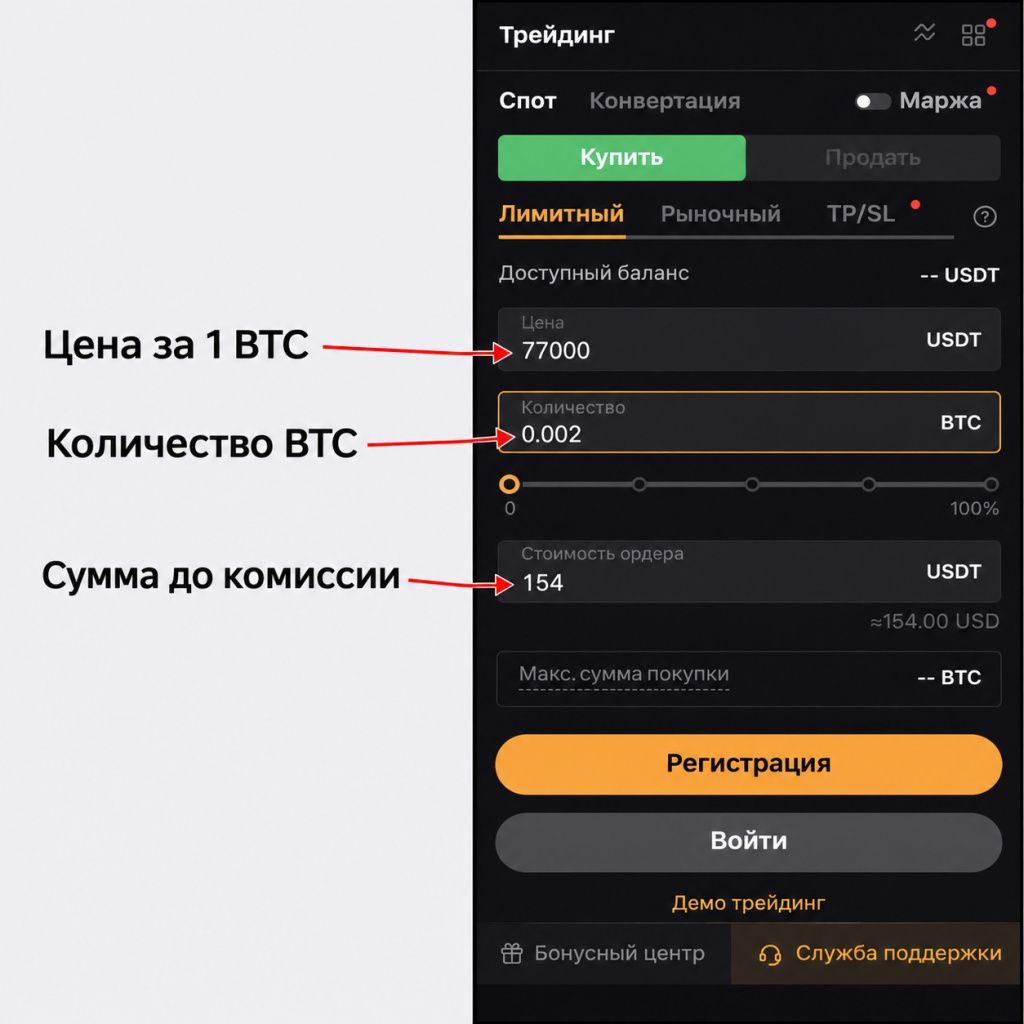
- On the "Buy" side, select "Limit" and enter the price of one BTC: in the example 77 000 USDT.
- Set the amount to 0.002 BTC. Double-check the calculation of 77 000 × 0.002 = 154 USDT and the units of each field.
- Check the additional settings available for this type, including expiration date if offered. Don't enable unclear flags.
- Confirm the order and find it among the current orders. The pending application does not yet have the result of exchanging the entire volume.
- Check the completed and remaining parts. If you change your mind, cancel the remainder of the required order by checking its pair and number.
If the best seller offers BTC at 77 100, the 77 000 limit does not agree to this price. If the seller is priced at 76 990, the limit of 77 000 allows an immediate purchase at the best available offer. A limit purchase has an upper limit, but there is no requirement to pay exactly it.
Touching the price on the chart does not prove execution: the queue and lack of counter volume could have interfered. Check the order status. The principle of limit purchasing is also discussed in Bybit's Spot tutorial.
How to sell a purchased coin
To sell, you need a free balance of the base coin. In a normal BTC/USDT exchange, BTC decreases and USDT increases. A sale should not quietly turn into a loan or position in another product.
- Open the same pair or consciously choose a different receiving currency. For BTC/USDT, the result of the sale is expressed in USDT.
- Select Sell. For immediate exchange, specify “Market”, for the minimum acceptable price – “Limit”.
- Enter the available amount of BTC. Keep in mind that after the purchase, the commission could be withheld in BTC, and part of the balance may already be occupied by applications.
- For Limit, check the price, expiration date and total amount separately. For Market, look at the buy side and available volume.
- After confirmation, check the execution and received USDT in history. The presence of a line in the order history does not yet prove that the entire volume has been sold.
Limit selling has a reverse limit: for example, a limit of 60 050 USDT per BTC means “not cheaper than 60 050”. If buyers are lower, the application may remain waiting. If there are 0.004 BTC available, the sale amount at this limit is 240.20 USDT before fees. Do not confuse this with the price of one coin.
For a full reverse exchange, compare the sale to the balance after the purchase commission. The unsold portion may be below the new order minimum. This is a reason to check the parameters and functions of working with small balances, and not to automatically increase the purchase.
TP/SL and OCO: three prices that cannot be mixed
For a conditional sale, distinguish between the current price, the trigger price, and the price of the order being created. Trigger - the starting condition. After it, a Market or Limit order can be sent. Just hitting the trigger does not turn the given number into a guaranteed trade price.
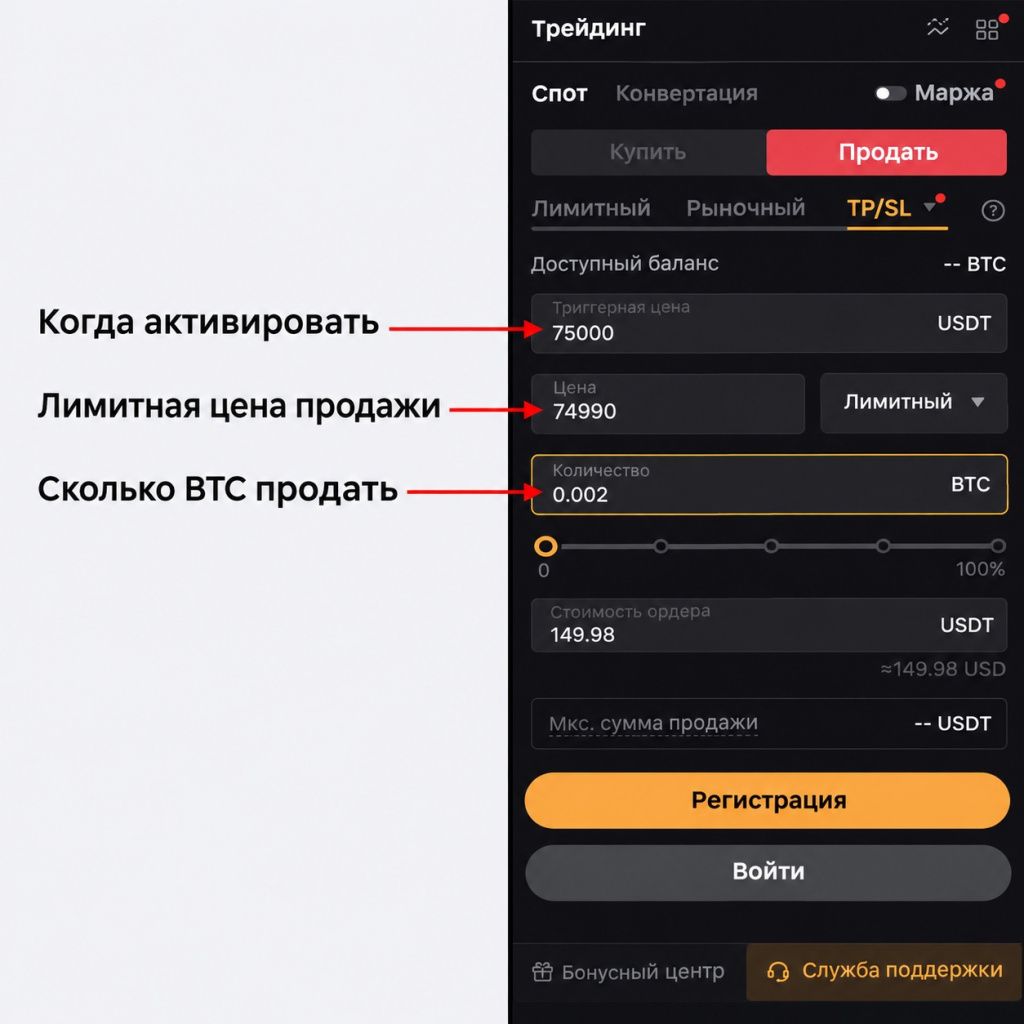
TP is usually set to sell when the price moves up, SL - when the price moves down. For a training example with 0.002 BTC already available, let’s assume the current price is 60 000, the upper trigger is 63 000 and the lower trigger is 57 000 USDT. These are arbitrary numbers to differentiate fields, not levels for placing orders.
Once the bottom trigger is triggered, the Market Sell goes to available buyers, so the average price may be below 57 000. The Limit option has a separate limit: for example, 56 800. If the market has sharply jumped to 56 700 and there are no buyers at 56 800, such a sale may remain unexecuted. A price cap is not the same as an actual loss cap.
Bybit allows you to set Spot TP/SL separately and preset exits for a limit trade. These options have different conditions for creating and reserving assets. Please check the bid type, trigger, bid price and quantity before submitting; Check the readiness of TP/SL after execution of the original order. Mechanics and limitations are described in Spot TP/SL Help.
What changes OCO
OCO links two alternative conditions. To sell an existing asset, this could be the upper TP and lower SL. In Bybit, when one branch is triggered, the opposite one is canceled, and the activated request continues to act according to its type. The cost of one side is reserved, rather than two independent sales. This follows from OCO Official Instructions.
For a conditional Limit, the opposite branch can be canceled after the trigger, although the execution of the activated order has not yet taken place. Therefore, after a sudden movement, check not only the trigger message, but also the real balance of the coin, the status of the child order and the transaction history. The phrase “one cancels out the other” does not mean that the coin has necessarily already been sold.
If the original purchase is partially filled, do not automatically expect to exit on the original full quantity entered. Check which TP/SLs have been created, what volume is available to them and whether they pass the market minimum. It is useful to test these differences separately in a demo before repeating the settings in a live account.
Commission: how much is purchased and how much is left after resale
The commission must be separated from the spread and slippage. Maker adds liquidity with a pending order, taker takes the existing one. An immediately executed Limit can also be a taker. According to description Bybit spot commissions, the fee relates to the executed portion and is retained in the received cryptocurrency; There is no trade fee for the unfulfilled canceled balance.
The rate of 0.1% below is used for calculation purposes only. For your account's actual maker/taker rates, see My Fee Rate: they may vary by region, level, and trading product. This is stipulated in current commission structure. The conditional rate from the article should not be taken as a personal rate.
Let's assume that 100 USDT was spent on the exchange, ETH was purchased at an average price of 2 000 USDT, and the rate in both directions is conditionally equal to 0.1%. For clarity, we will exclude spread, slippage and rounding - in real history their influence must be taken into account separately.
- Purchased before commission: 100 ÷ 2 000 = 0.05 ETH.
- Purchase fee: 0.05 × 0.001 = 0.00005 ETH.
- Received after it: 0.05 − 0.00005 = 0.04995 ETH.
- If you sell everything received at the same conditional price, the amount before the second commission: 0.04995 × 2 000 = 99.90 USDT.
- Sales commission: 99.90 × 0.001 = 0.0999 USDT.
- 99.90 − 0.0999 = 99.8001 USDT will be returned to the balance.
The difference from the original 100 USDT is 0.1999 USDT even with the same price in this simplified example. Considering two commissions simply as “0.1% once of the invested amount” is incorrect. And after the real exchange, they compare the actual executions and the holding currency, without trying to restore everything at the same rate on the chart. Separately disassembled types of Bybit commissions: Trading fee and withdrawal fee are different costs.
Partial execution and busy balance
An order and a deal have different roles. An order specifies an instruction; it can have several executions. Let's say a limit purchase of 0.002 BTC at 60 000 received only 0.0008 BTC. This part cost 48 USDT before commission; expects another 0.0012 BTC at 72 USDT. These are not two missing amounts, but the completed and pending parts of one application.
If in the simplified example there were initially 150 free USDT, after reserving 120 for such an order, 30 USDT remains outside of it. After partial execution, these 30 do not automatically turn into 102: the remaining 72 are still occupied by a pending purchase. When canceling the unfulfilled balance, the reserve is released, and the already purchased 0.0008 BTC remains the result of the transaction, taking into account the commission. This is an arithmetic illustration of the ordinary Spot; For other UTA positions and obligations, the available balance is more difficult to calculate.
For GTC, the unexecuted portion usually continues to wait, for IOC the remainder is canceled. Cancellation does not reverse completed executions. Therefore, the status seen “partially executed, then cancelled” cannot be interpreted as a complete cancellation of all actions. Check separately purchased quantity, USDT written off and released reserve.
Active claims can reserve coins. For stand-alone Spot TP/SL, the reserve occurs when placed, for Conditional - after the trigger; do not transfer a rule of one type to another. If the balance is already taken, the new sale may not go through. Check applications for all pairs.
How to check the result by history and order number
After sending, check three sets of data: current orders, order history and execution history. The first shows the expectation, the second - the fate of the order, the third - individual completed transactions. An application that disappeared from the current ones could be executed, canceled or rejected; its absence from one list is not the answer.
Open the desired pair and period, select Spot. If the entry is not found, check the demo/real mode, subaccount, filters and time. Then commit:
- Order ID, pair, Buy/Sell side and order type;
- original, fulfilled and remaining quantity;
- average price and amount of actual exchange;
- the amount of the commission and the coin in which it is withheld;
- time and ending status, including cancellation of balance only.
Order ID associates executions with one order and helps describe the issue to support. For reconciliation, save in the table: “written off”, “received”, “commission”, “free”, “busy with applications”.
Why the application does not go through or looks unexpected
| What do you see | What to check first |
|---|---|
| There is money, but little is available | Funding or UTA, settlement coin, active orders, TP/SL and account liabilities. Total dollar value - not free USDT. |
| Quantity too large | Field units: USDT amount or BTC/ETH amount. Multiply price and quantity before confirmation. |
| Minimum or precision error | Minimum cost, price step and quantity of this particular pair. After rounding, the volume may have become less than the minimum. |
| Limit is waiting for a long time | Your price relative to counter orders, queue, liquidity and expiration date. Waiting in itself is not a technical error. |
| Market was not completely fulfilled | Filled quantity, market limits, Slippage Tolerance setting and canceled balance status. Do not repeat the original full amount blindly. |
| Received fewer coins than expected | The average price of several executions and the commission in the received coin. Comparison with only the last price of the chart is incomplete. |
| SL triggered, but the coin remained | Market or Limit was set after the trigger, whether the child order was executed, whether the opposite OCO branch was canceled. |
| Can't sell everything | Free quantity after commission, reserves in other orders, accuracy and minimum size of a new order. |
| Application disappeared from the list | History of orders and executions, pair, dates, subaccount and mode. Do not create a duplicate until you have determined the status of the first one. |
If the reason is unclear, save the exact error text and Order ID. For Bybit support requests does not require a password, verification codes or seed phrase. Do not change multiple parameters at the same time; otherwise, it will be difficult to understand which condition caused the failure.
How to practice on a demo without real funds
Active Bybit Demo Trading instructions explicitly states support Spot and Derivatives in UTA. Therefore, the statement that the demo is only for futures is incorrect. The demo uses conditional assets and is different from the standalone Testnet environment; These modes should not be mixed.
In the web version, Demo Trading is opened from the trade or profile menu. If authorization appears, log into your account first; Product availability is checked for it. Then find the demo marking, select "Spot" and pair. A public terminal without a login is not a demo account in itself. Details are collected in the material about the Bybit and Testnet demo account.
To master the terminal, it is more useful to perform a testable exercise than to evaluate the result by conditional profit:
- Find the pair, chart, order book and free amount. Write down how price and quantity are measured.
- Make a market exchange for the selected training amount. Find the average price, commission and remaining balance received.
- Place a limit order that remains waiting. Compare the free and occupied balance, then cancel it and check the release of the reserve.
- Sell the available balance, check the receiving currency and the second party commission.
- Disassemble TP/SL and OCO: separately find the trigger, order price, volume and status after triggering.
A successful exercise is a situation in which you can explain every entry in the story. The demo does not prove future profits and does not fully reproduce the real queue: according to Bybit, conditional executions do not go into the real order book. Before returning to real trading, check the mode, settings and order size again.
Go to Bybit is available via the affiliate link. To get acquainted with the terminal, first find the demo mode and check all the actions on the conditional balance.
Frequently asked questions
Why don't you need to buy a whole Bitcoin?
Quantity may be fractional. The limit is set by the minimum amount and quantity step of a specific pair. The price of one BTC on the screen does not indicate the minimum cost of participation in the exchange.
Clicking Sell on a regular spot opens a short?
Selling a free coin without borrowing - exchanging it for a quoted asset. Leveraged selling and contract trading are different mechanics. If the form prompts you to borrow or shows item options, check the selected product first.
Is it possible to remove the commission by canceling the order after partial execution?
Cancellation applies to the remaining portion. The exchange that has already taken place and the commission charged for it are retained. To check, open executions by order number.
Sold a coin: why didn’t the rubles come to the card?
Selling BTC/USDT gives USDT in the exchange account. Exchanging for rubles and receiving them into a bank account is a separate operation. Check the asset you received before seeking a bank transfer.