

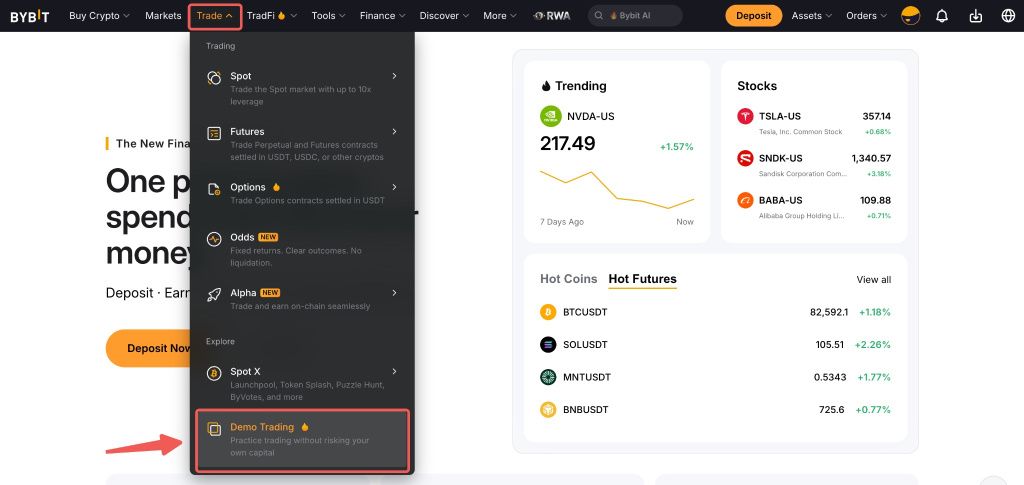
A Bybit demo account is opened inside a regular account: after logging in, select “Trading” → “Demo Trading” or “Demo Trading” in the profile menu. The mode issues virtual assets for training spot and derivatives transactions in the Unified Trading Account. Separate replenishment with real money and KYC are not required for Demo Trading.
If you don't have an account yet, you can create it using the MCG affiliate link. After registration, go to Demo Trading and check the mode mark before each exercise.
How to enable a Bybit demo account on the website
A demo account is created for the main account and subaccounts. First, log in to the desired account, then switch the mode: a separate login directly to the demo is not provided.
- Log in to your main Bybit account or the desired sub-account.
- From the top menu, hover over "Trade" and select "Demo Trading". The second path is profile icon → “Demo trading”.
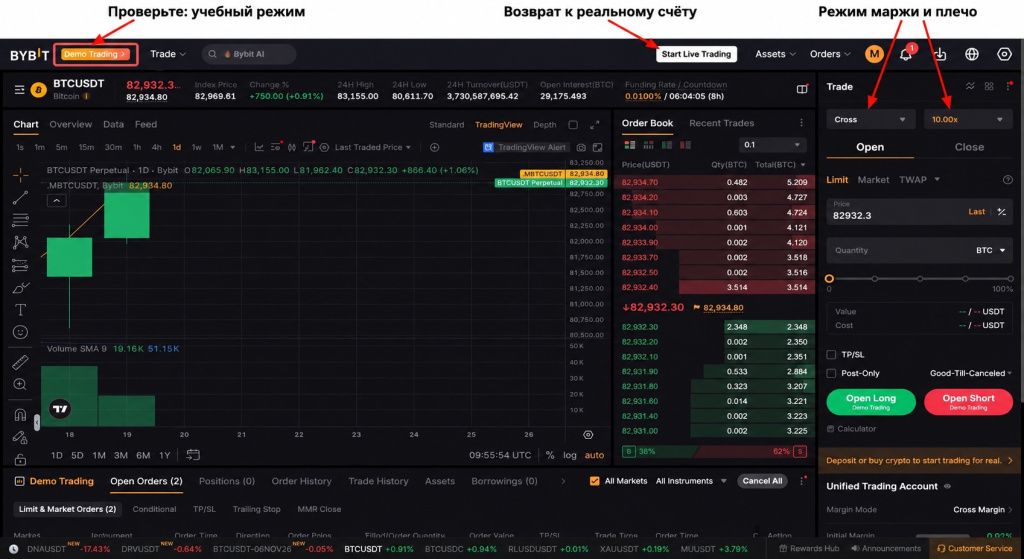
- Make sure that the Demo Trading checkbox appears on the page.
- Open Assets and check your virtual balance.
- Select a training trading pair and start with one small order.
Start Live Trading is used to exit. After clicking, check the mode: the next order may relate to a real account. It is convenient to keep the training terminal in a separate tab and close it after class.
How to open Bybit demo on your phone
In the app, go to Trade → Futures, click the three dots above the order book and select Demo Trading. Another way: “More details” → trading section → “Demo trading”. To set up a virtual balance, open “Assets” → “Set up demo funds”. The “Start real trading” button returns to real mode.
If the application does not exist yet or its version is noticeably different, start with Bybit installations and updates. After logging in, switch to Demo Trading separately.
Check the location of the buttons with official instructions Demo Trading, updated October 30, 2026.
How much virtual money they give and how to change the balance
Demo Trading Starter Set includes 50,000 USDT, 50,000 USDC, 1 BTC and 1 ETH. These assets exist within the learning mode. They allow you to check orders, settlements and balance movements without sending cryptocurrency from an external wallet.
It is convenient to reduce virtual capital to the size with which the exercise is associated. For example, with a balance of 1,000 USDT, it is easier to see what proportion of the account is occupied by an order for 100 USDT than with a starting balance of tens of thousands.
To change funds, open “Assets” → “Single Trading Account” → “Set up demo funds”. Select Add Funds or Decrease Funds, coin and amount. In the English version these commands are called Adjust Demo Funds, Add Funds and Reduce Funds. The function works with USDT, USDC, BTC and ETH within the limits specified in the interface. It changes the academic balance and does not serve as a full account reset.
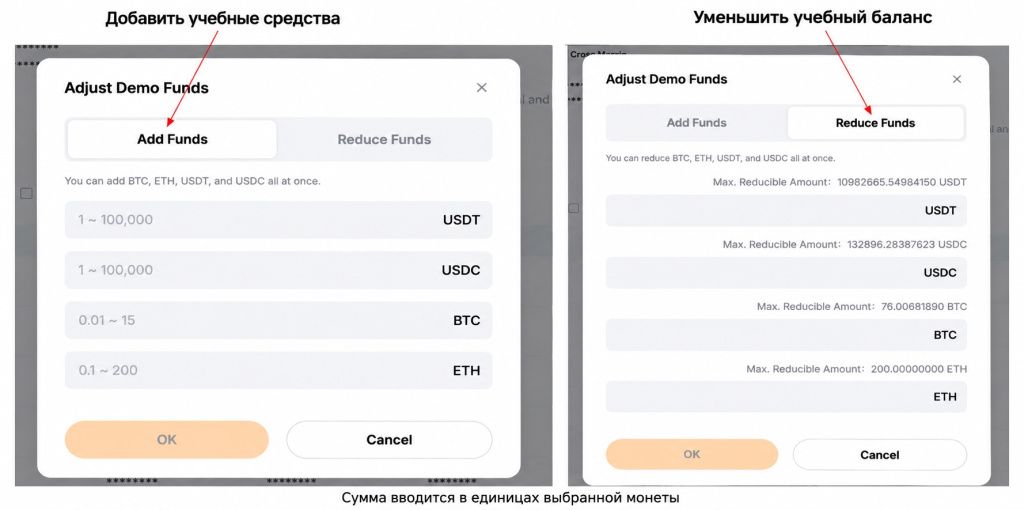
A separate Request Demo Funds feature is available when the demo account's Total Equity is below 10,000 USDT. It should not be confused with Adjust Demo Funds. In the first case, an additional set of funds is requested according to the terms of service; in the second, the user adjusts the amount through the balance management window.
Demo Trading and Bybit Testnet: what's the difference
Demo Trading reproduces the price movements of Bybit's main market. In this case, educational applications do not fall into his real glass. Testnet operates as an independent testing environment: participant requests affect its order book, and prices may differ from the main market. This difference affects what conclusions can be drawn after testing.
| Parameter | Demo Trading | Testnet |
|---|---|---|
| Access | From the main account or subaccount | Separate test environment |
| Market | Mainnet prices; applications do not change the real glass | Own glass and independent prices |
| Means | Starting Balance, Request Demo Funds and Adjust Demo Funds | Manually request test coins every 24 hours |
| KYC | Not required for Demo Trading | May be required for certain functions |
| API | Available for supported operations | Available in test environment |
Demo Trading is convenient for getting acquainted with the terminal on the movement of the main market. Testnet is used for experiments with a separate test cup. When checking software integrations, consider the available API methods of the selected environment.
Demo Trading offers spot and derivatives supported by the Unified Trading Account. Functions outside of UTA are not included in this mode. Therefore, the absence of another product in the training menu does not in itself indicate an account error.
Exercise: Limit Order and Balance Cancellation
Select one pair, make sure the Demo Trading checkbox is checked and note down the free balance. In the exercise, you need to track the placement of the order, changes in the available amount, and entries after cancellation.
Conditional settlement: the training account has 1,000 USDT, the user places a purchase of 10 units of the asset at 20 USDT. The application amount is 200 USDT without commission. While the order is pending execution, these funds are reserved, and the free balance for other transactions is 800 USDT. Prices and amounts here are chosen for explanation; These are not current quotes.
Let's say the purchase of only 4 units is fulfilled. 80 USDT was spent on it, and the remaining 120 USDT is associated with the open part of the application. If you cancel the balance, 120 USDT is released. The 4 units purchased remain on the account. Their number after deducting the commission is specified in the execution history.
The result of the exercise is confirmed by three records: the executed part of the order, the canceled balance and the updated balances of the two coins. This helps to avoid repurchasing the original volume once the portion has already been purchased. After cancellation, do not rush to create the same request in its entirety - first check what has already been completed.
Pair designations and order types are discussed in more detail in Bybit spot instructions. Repeat the exercise with a different amount, calculating the change in balance in advance.
Exercise: Amount of Risk and Impact of Leverage
On a demo account, you can check the calculation of a position before a real trade. For a training example, let's take a line position with a denomination of 1,000 USDT. A 2% price movement against a position results in a loss of about 20 USDT before trading commissions and funding. With a favorable movement of the same size, the calculated result has the opposite sign.
With 5x leverage, the initial margin for this denomination in the simplified model is 200 USDT; at 10× – 100 USDT. A loss of 20 USDT takes up 10% and 20% of this margin respectively. The denomination in the example is the same, so the monetary result of the price movement remains the same. The share of the result relative to the allocated collateral changes.
If you keep the margin at 200 USDT and increase the leverage from 5x to 10x, the denomination will increase from 1,000 to 2,000 USDT. Then a movement of 2% already gives about 40 USDT change in the result. It is the difference between fixed margin and fixed denomination that is useful to check on a training position.
This is simplified arithmetic. The liquidation price calculation includes collateral rules, margin regime and other contract parameters. The value in the terminal must be read separately. We discussed the mechanics of these parameters in the material about futures trading on Bybit.
For the stop exercise, write down the trigger and expected loss in advance. Once triggered, compare them to actual executions in history. The goal is to see the difference between the activation condition and the resulting price, and to understand where the commissions are reflected as a result.
Why the order doesn't go through or the balance looks wrong
- Insufficient funds available. Check open orders, occupied positions and settlement currency. The overall USDT account valuation may include BTC and ETH; this does not mean that the entire amount is available for the selected order.
- The limit order remains open. Check the price, Buy/Sell direction and executed volume. Placing an order confirms its acceptance, but does not guarantee the purchase of the entire quantity.
- The operation disappeared after switching. Check the main account, sub-account, Demo Trading and Testnet. Stories of different environments should be viewed separately.
- The required function is not available. Compare it with the capabilities of UTA in demo mode. A product that is available in a regular account may not be available in a training account.
- Error after pressing the button. First, refresh the history and find the order. Clicking again without checking may create another request.
If the demo account has BTC, the total USDT value changes with the market even without new transactions. Compare the number of coins and their valuation separately.
If the reason remains unclear, save the order number, mode, trading pair and error message. Passwords and verification codes are not needed in the screenshot. The procedure for preparing an appeal is discussed in the article how to contact Bybit support.
How to Keep a Short Workout Journal
Four fields are enough for each exercise. You can fill them out in a regular note immediately after completion:
- Task and mode: for example, cancel the balance of a limit order in Demo Trading.
- Settings: pair, quantity, price, order type and leverage if used.
- Waiting: what entry will appear and how the available balance will change.
- Fact: executed volume, balance, commission and reason for discrepancy with expectation.
Add the order number or history snapshot to the result line. If the balance was changed through Adjust Demo Funds, note the adjustment amount separately: it does not apply to trading profits. To compare several classes, use the same amount of training capital and the same accounting rules.
What to consider when checking via API
API available from Demo Trading and Testnet. Please check the environment, key and supported method against the Bybit documentation before submitting your request. An environment error may appear as an authorization failure or lack of balance. Do not randomly substitute your work account keys into your student configuration.
It is convenient to limit the first check to reading the balance and the list of orders. Then create one training order, get its status and cancel the outstanding balance. If the response is delayed, please search for the application by its ID before resubmitting. This is how the program behaves in the event of a communication failure, which otherwise could lead to duplication of actions.
Partial execution, limiting the request rate and changing the available balance are tested in separate exercises. The successful creation of one application does not confirm the operation of the entire program.
What the demo trading result shows
The training mode helps you master the terminal, check calculations and detect errors in the sequence of actions. In this case, demo orders do not participate in the real order book. Large volume, execution queue, liquidity and reaction of other participants in this transaction may give a different result.
Virtual losses also do not reproduce the attitude towards your own money. On the demo it is easier to leave a losing position, increase the volume or replenish the balance again. If each unsuccessful exercise ends with the addition of funds, the final profit figure ceases to describe the result of the original capital.
The practical criterion of preparation is the ability to explain each execution and remainder, cancel an extra order, find a commission and reconstruct the sequence from history. The percentage of return for a successful trade does not predict future trading.
Questions about the demo account and Testnet
Can I withdraw virtual USDT or earned profits?
Withdrawing virtual funds to a real wallet is not available. Educational assets and transaction results have no monetary value. Transferring real cryptocurrency to a test address does not turn it into a demo balance suitable for withdrawal.
Is there an expiration date for a demo account?
The demo account is linked to the lifetime of the Bybit account. However, after 30 days of inactivity, the training data is cleared. It is better to save the history of the necessary exercises until a long break.
Is it possible to manually reset all demo data?
There is no manual hard reset. Changing funds through Adjust Demo Funds adjusts the balance. For a new activity, note the start time and initial balances in your journal.
This material is for informational purposes only and does not constitute individual financial advice. Numerical exercises are provided for learning purposes; Check available functions and conditions in the current Bybit interface.
Available for start Bybit affiliate link for MCG readers. After logging in, switch to Demo Trading, set up your training balance and go through the first history check exercise.