

The Bybit wallet consists of several accounts. Funding Account is used for deposits, P2P and payment transactions; Unified Trading Account, or UTA, for spot and margin trading. To move USDT between your Funding and UTA, open Transfer, select the direction and amount. A blockchain address is not needed for such a transfer. Before sending funds outside, check the amount available for withdrawal: the total balance may include borrowed assets and liabilities.
We'll figure out where to look for money after topping up, why it can be visible in one section and unavailable in another, how to read UTA indicators and check history. The procedure was verified by Bybit in November 2026. In 2027, the names of the buttons and the conditions of the functions should be checked against the open form of the operation.
If you don't have an account yet, you can register on Bybit using the MCG affiliate link. Before entering your password, check the domain: signs of a fake page are discussed in the material how to log into the Bybit official website.
Funding Account and UTA: where are the funds located?
Funding Account - a financial account inside an exchange account. Crypto deposits are initially credited here; setting up automatic translation can then route them to UTA. Funding also handles P2P and fiat transactions. Therefore, after purchasing USDT via P2P, they first look at Funding, then check further movements.
If you plan to transfer from a bank, first check which deposit method is available: Bank Transfer and Bank Transfer+ are different from transferring coins between Funding and UTA.
UTA combines spot, spot margin and derivatives. A regular coin purchase with your own funds and a leveraged position can be in the same trading account. In this case, the procedure for accounting for money depends on the margin regime, open orders and loans. The inscription Unified does not mean that the entire equivalent shown can be freely spent or withdrawn.
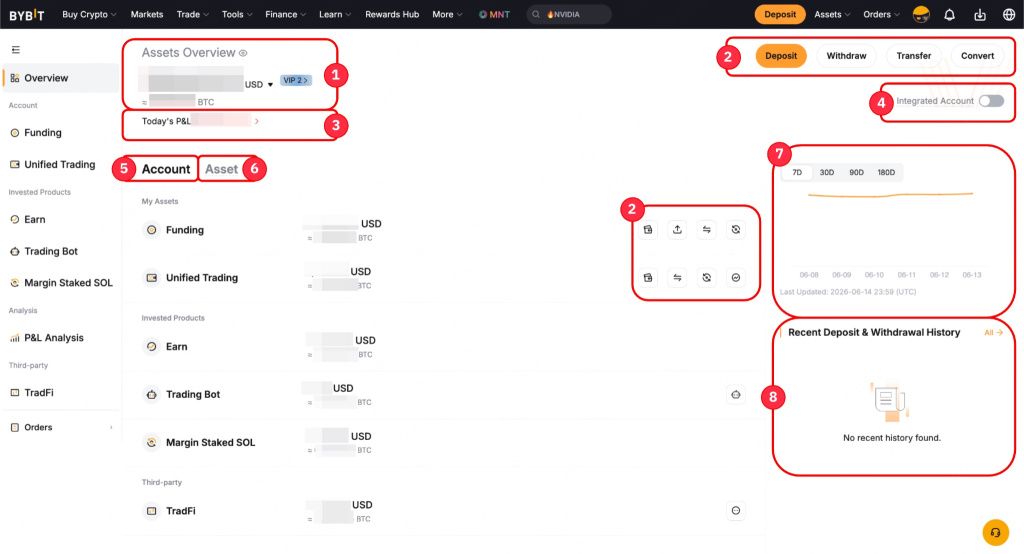
Open Assets and look at the distribution of accounts. When funds are placed in a separate product, such as a bot or Earn, looking for them only in the USDT line on Funding is not enough. First locate the amount, then check the refund conditions from the product. We discussed what happens after starting and stopping an automatic strategy in the article about Bybit trading bots.
The general overview and list of coins may cover different assets. B description of the Assets page Bybit separately shows accounts, product investments and current Funding/UTA coins. Compare numbers from one section and one point in time.
Total, Equity, Available: what balance is needed for the operation
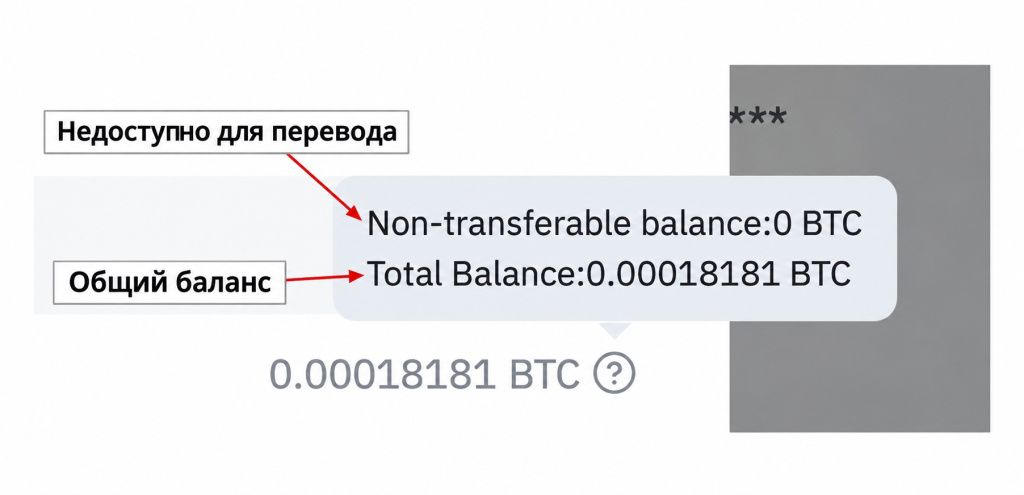
First look at the unit of measurement. The USD or BTC amount at the top of the page often serves as a general assessment of different assets. It does not confirm the presence of so many dollars or bitcoins. To transfer 100 USDT, you need an available amount in USDT and in the selected account.
| Indicator | What it shows | Why watch |
|---|---|---|
| Total Assets / Total Equity | Rating the selected account or all accounts in the review | To evaluate the invoice and understand the composition of the amount shown |
| Wallet Balance | Asset balance on UTA; display unit depends on screen | To verify balances for a specific coin |
| Equity in UTA | Capital including trading results and liabilities | To evaluate an account with positions and loans |
| Available Balance | Available balance or available margin - depending on page | To check the possibility of a new operation |
| Transferable / Withdrawable | Amount allowed for transfer or withdrawal | Before confirming Transfer or Withdraw |
| Frozen / In Use | Frozen or borrowed funds | When the amount is visible but the operation is not available |
B Bybit glossaries Total Equity takes into account the Wallet Balance, the unrealized result of perpetual and futures contracts, the value of options and Spot Borrow. When borrowing, you cannot evaluate your own capital on the same line as coins. The presence of the asset and the obligation to repay the loan are taken into account together.
Margin Balance shows collateral for trading in applicable modes. The collateral value of the supported assets is used for the calculation. The conditional 500 USD market valuation of a coin and 500 USD available margin can be different values. Margin ratio, borrowed funds and position requirements affect the result.
Available on the sales page and Withdrawable in the withdrawal form may also differ. To decide “how much to send to another wallet,” refer to the output field and explanation of the limitation. Subtracting one number from another on your own is not a substitute for calculating account risk.
How to transfer USDT from Funding to UTA and back
An internal transfer between your accounts preserves the asset and its owner. The sequence is the same for both Funding → UTA and the reverse direction. The source account and available amount differ.
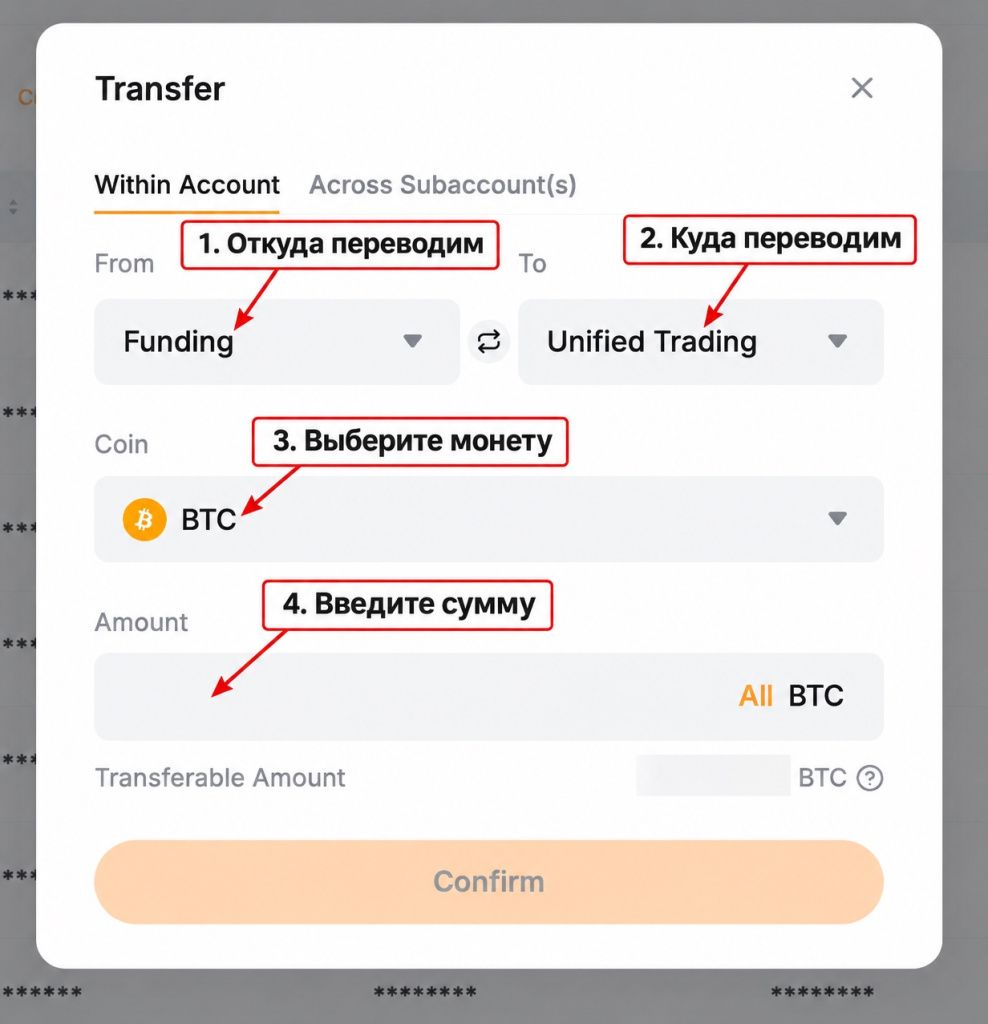
- Open Assets and click Transfer. In the application, the button is also available on the page of the account or the selected coin.
- In the From field, select Funding Account, in the To field, Unified Trading Account. To make a reverse transfer, swap the accounts.
- Select USDT and check the available quantity. The explanation icon next to the amount helps you see the reasons for the restrictions.
- Enter the amount and confirm the transfer. Reconcile the debit on the source account and the credit on the destination account.
When transferring from UTA, positions, orders and commitments are taken into account. The available amount may change while the form is open: the market moves, and the margin status changes along with it. If the operation is rejected, refresh the details and read the reason. There is no need to repeat the same requests before checking the history.
Restrictions are described in Transfer instructions. Bybit also warns that if there are outstanding derivatives obligations, the assets received by UTA may automatically be used to repay them. Successful transfer therefore does not always increase the available balance by the entire transferred amount.
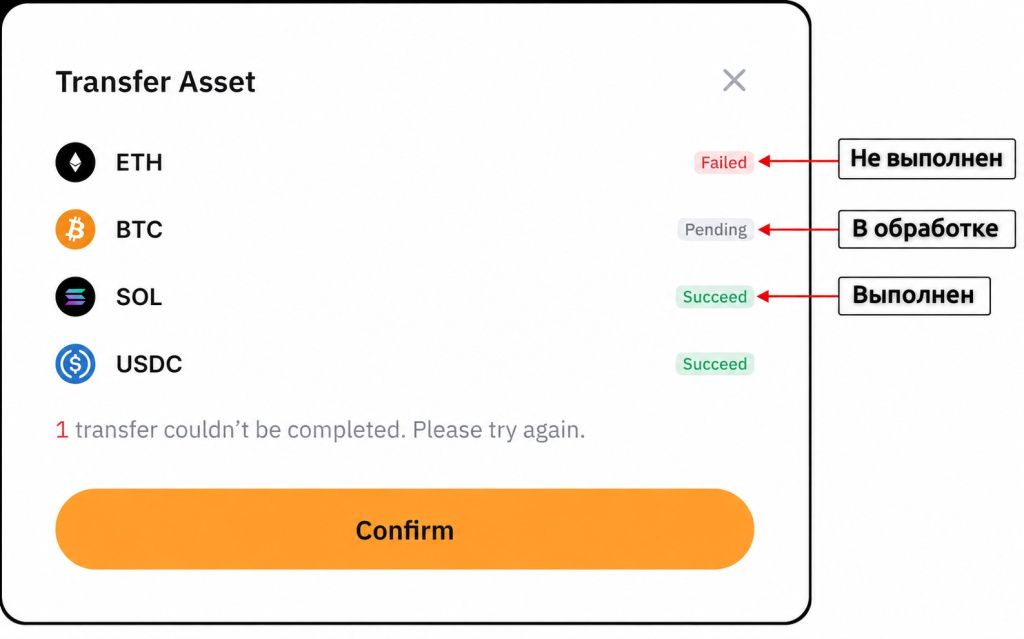
When making a batch transfer, check the result for each coin separately. Pending means that the operation is still being processed; Succeed - that the translation is completed; Failed - that it has not been completed. One successful transfer does not confirm the transfer of remaining assets. If you see Failed, first check your history and available balance: there is no need to resend the entire set of coins.
Example: How 1,000 USDT is distributed
All amounts in the example are conditional. We consider our own funds without loans, derivatives, bonuses and withdrawal restrictions. Purchase commissions are taken into account separately; There are no price movements and expected profitability in the calculation.
Funding has 1,000 USDT. The user transfers 600 USDT to UTA. After the operation, 400 USDT remains on Funding, and 600 USDT on UTA. The total for the two accounts is still 1,000 USDT. The appearance of 600 USDT on a trading account does not in itself mean an external deposit or earnings.
A limit order has been placed on UTA to buy a coin for 250 USDT. These funds are reserved until execution. For other regular transactions, 350 USDT remains; another 250 USDT are pending execution of the order. The amount in the order remains assigned to the account, although it cannot be reused.
Let's assume that part of the purchase for 100 USDT has been executed, and the remaining 150 USDT is still in the order. Now the user has 500 USDT and the purchased coin. Of these 500 USDT, 350 are free and 150 are reserved. The amount of coin received is checked taking into account the actual commission charged.
Once the remainder of the order is cancelled, the 150 USDT reserve is released. The available balance of USDT increases to 500. The purchase for 100 USDT is saved: the balance of the order is canceled, the executed transaction has already taken place. In the history you need to look at both entries - execution and cancellation.
If you then return 200 USDT from UTA to Funding, the balances will be 600 USDT on Funding and 300 USDT on UTA plus the purchased coin. To reconcile the original 1,000 USDT, we get 600 + 300 + 100 spent on the purchase. The market valuation of the acquired asset and its commission are checked separately.
When 350 USDT is available instead of the expected 500 USDT, they first look for a reserve of 150. If 100 USDT is exchanged for another coin, they are reflected in assets differently. Working with partial execution is discussed in more detail in the instructions. by Bybit spot orders.
What changes with margin and borrowing in UTA
The example above ceases to describe the account as soon as margin obligations appear. In UTA, you need to simultaneously check coin balances, Borrowed Amount, positions, current result and collateral requirements. A transfer to Funding reduces trading account assets and may therefore worsen the risk profile of remaining positions.
Asset valuation and collateral value
In cross margin and portfolio margin, the assets backed may serve as common collateral. The price of the coin, the coefficient of its collateral value and the trading result affect the state of the account. Funds that the owner mentally left “just to be stored” can participate in collateral if the appropriate mode is enabled for them.
B UTA Fund Management Reminder Bybit warns that losses on derivatives could affect pledged spot assets. For separate risk management, the platform describes sub-accounts and the selection of assets for collateral. The name “spot” next to a coin does not in itself establish the boundary of its participation in the security.
Why can't I withdraw the entire positive balance?
A positive USDT balance can co-exist with a borrowing in another currency and an open position. B UTA FAQ in the calculation of the transferred amount, unrealized loss, initial margin, frozen amounts for orders and loans, as well as other adjustments are named.
Canceling an unexecuted order or the remainder of it may reduce the reserve, but it does not pay off the loan or close an already open position. Closing a position, paying off a debt, and transferring funds are separate operations, each of which is checked in history. The “cancel everything and click All” rule is not suitable for a margin account.
If you are familiar with the trading interface, you can first check the basic steps on Bybit demo account. The virtual balance will allow you to process the order and cancel it. For a real transfer, you will still need to look at the restrictions of the real account.
Why funds are visible, but they cannot be transferred
The check begins with a specific coin and account. The total amount is of little help when the transfer of a certain 200 USDT from UTA is rejected. Open the explanation next to the available balance and match it with active transactions.
- Open request. Look at the remaining volume and the part already performed. After cancellation, only the unused reserve is released.
- Margin or loan. Reconcile positions, Borrowed Amount and risk indicators. Funds may provide account obligations.
- Deposit verification. Enrollment may remain in a pending confirmation or verification status. See the reason and conditions for lifting the restriction.
- Another product or subaccount. Find the amount in the account distribution. Return procedures vary depending on the product and its condition.
- Bonus. Check the composition of the residue. The bonus may have restrictions on transfer and withdrawal.
There is a feature of Funding: Amount Pending Release can be included in the Available Balance, although it is still blocked for a number of operations. B Funding Account help Restricted actions include crypto withdrawal, transfer to another user, fiat withdrawal, card transactions and P2P. The Available sign alone does not confirm that each direction is already available.
The amount may also be in Frozen due to a current P2P order or verification. Trying to display it through another screen does not remove the reason for the blocking. Save the status name and operation ID: they will help you figure out what action is required.
Where to find Bybit wallet address for USDT
The external deposit address is opened through Deposit after selecting a coin and network. For USDT, you need to agree on the network with the sender and in the Bybit deposit form. A matching token name is not enough. Supporting one network does not mean that an account will accept the same asset on any other.
Check Address, Memo/Tag Requirement, Minimum Amount and Acceptance Status. If the Memo is shown as required, it is passed along with the address to the appropriate field of the sending platform. Conditions are given in Bybit deposit instructions.
Before a large transfer, it makes sense to test the route with a small amount that passes the minimum enrollment threshold. Let's say you were going to send 1,000 USDT: first check the details on a test amount and wait for it to appear in the history. The test size is chosen after checking the minimum and the sender's commission; an arbitrary translation of “one cent” may not confirm anything.
Compare the address after insertion with the details in the open Bybit form. To re-deposit, also first open your current details. An old screenshot is useful as a record of a completed operation, but does not replace checking network availability today.
After sending, two stages are checked: the transaction in the blockchain and its accounting by the exchange. TXID indicates a specific network operation. The status in the Deposit history shows how it was processed by Bybit. Data may be updated at different times, so when there is a delay, both sources are needed.
Transfer, Withdraw and Internal Transfer: how to differentiate them
Transfer between Funding and UTA moves funds within your account. On-chain Withdrawal sends them to the address via the chosen blockchain. Internal Transfer to another Bybit user is a separate withdrawal method within the platform. The latter should not be confused with a transfer between your own trading and financial accounts.
For external withdrawals, it is often convenient to first return the available amount to Funding. At the same time FAQ about crypto withdrawal allows the use of available Funding, UTA and Earn facilities directly on the Withdraw page. Focus on the accounts your form offers. UTA write-offs can increase IMR and MMR—margin stress measures.
Before confirming, review the amount to be received and the commission. In one mode, the commission is deducted from the entered amount, in the other, the entered amount must reach the recipient in full, and the commission is required on top of it. With the second option, the All button can lead to a lack of funds. Examples of both write-off methods are given in the analysis Bybit commissions.
Address and network are related to blockchain transfer; UID is used only where the form supports translation by account ID. If the recipient sent a UID, first check the operation method to avoid inserting it instead of the network address.
How to find discrepancies in balance
Write down the coin, source account, destination account, amount and time. Then open the history of the desired type: Transfer for moving between accounts, Deposit for replenishment, Withdraw for withdrawal. To make a trade change you will need executed trades and commissions. Open orders show what is still awaiting execution.
Start with a short period and one currency. For example, in the morning there were 1,000 USDT on Funding, after which 600 were transferred to UTA and another 100 were sent out. If the total withdrawal amount is exactly 100 USDT, the Funding balance should be 300 USDT. If the form withholds a commission in excess of the specified amount, the balance is reduced by another commission. Here we need actual write-off lines.
Internal transfer is taken into account from two sides: minus on Funding and plus on UTA. Throughout the account, these entries cancel each other out. Recording UTA enrollment as new income would overstate the result. The return of money from UTA to Funding is also not in itself a trading profit.
The dollar equivalent changes without transfers due to the revaluation of coins. First, the number of assets is verified, then the valuation. A change in the total amount by 20 USD does not explain whether there was a trade, a commission, a price increase or a position result. The reason is determined by the transactions and the composition of the account.
If the movement cannot be explained, save screenshots of the lines and the operation ID. For deposit, add TXID, network, address, amount and time. No password or verification codes are needed for verification. How to transfer data and track requests is shown in the instructions via Bybit support.
Questions about Bybit wallet
Amount shown in BTC. Does this mean that USDT has already been exchanged?
No. In the overview, BTC may be the unit of display of the total equivalent. Open the list of coins and check the amount of USDT. The exchange is confirmed by an operation in history, and changing the display currency itself does not change the composition of the assets.
Does transferring to Funding mean selling the purchased coin?
No. If you move 0.01 BTC from UTA to Funding, the same BTC will appear there. Receiving USDT requires a separate exchange or sale transaction. Changing the storage location within the account retains the name of the transferred asset.
Why doesn't the Funding → UTA transfer have a TXID?
This transfer is counted internally by Bybit and does not post the transaction to the blockchain. To search, use an entry in the Transfer history: sending account, receiving account, coin, amount and time. TXID will be needed when parsing a network deposit or withdrawal.
Do I need to top up my account again if I made the wrong Transfer direction?
First look at the history and both accounts. If money is moved between your Funding and UTA, its location is known. To return, select the opposite direction and check the available amount. A new deposit will increase the amount of funds and complicate reconciliation.
What to do if the balance has changed, but the transfer button remains active?
Open the history and check the status, amount and time. There may be a delay in updating page elements. Make the next transfer after you have established the result of the first one, so as not to send the amount again.
This material is for informational purposes only and does not constitute individual financial advice. Transaction availability and restrictions may vary by account and region.
Before replenishing, prepare the details of the selected network, and before transferring from UTA, check the available amount and obligations. If you start working with the platform, MCG affiliate link leads to Bybit registration. After logging in, the necessary indicators are located in Assets: first select an account, then a coin and an action.