

Bybit trading botsplace orders according to preset rules. Spot Grid buys and sells a coin within a price range, DCA buys it at selected intervals, and futures bots work with contracts. The result depends on price movement, parameters, and costs. Automated execution alone does not provide an advantage over the market.
Before launching, you need to understand three things: what the bot buys, how much funds it can use, and what will remain in the account after it is stopped. If you don't have an account yet, you can register through theBybit partner page from MCG. Check the availability of individual bots and trading pairs in your account.
This material is for informational purposes only and does not constitute individual financial advice. All calculations below are educational examples and do not provide parameters for a real trade.
What trading bots are available on Bybit?
The name "Grid" refers to a grid of price levels. DCA stands for scheduled buys. Futures strategies also have position direction, margin, and liquidation risk.
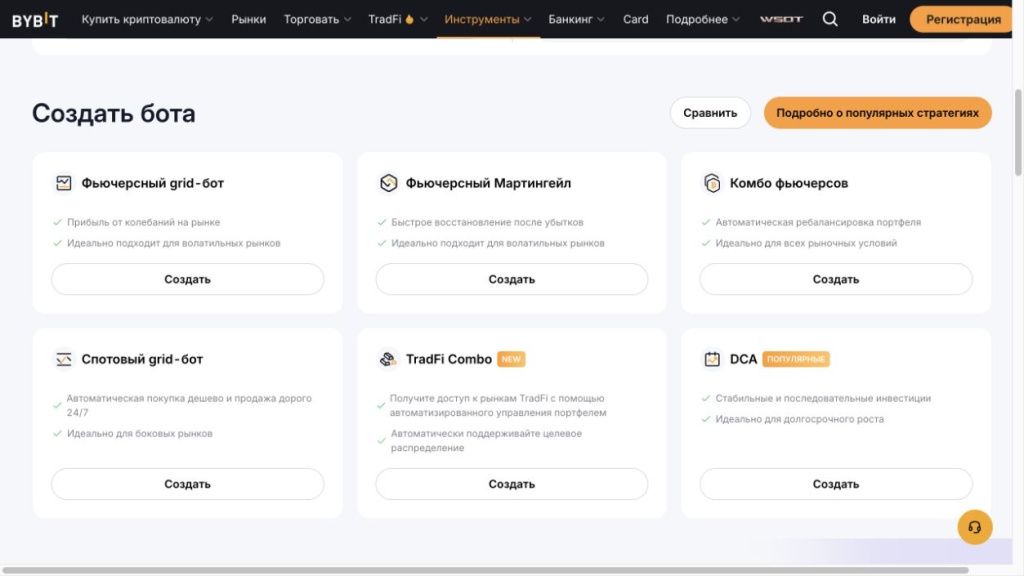
The page also includes "Futures Combo" and TradFi Combo. Below, we'll compare four strategies: spot grid, scheduled buys, futures grid, and martingale. The same "Create" button doesn't mean these products have the same risks.
| Bot | What it does | What can lead to a loss |
|---|---|---|
| Spot Grid | Alternates buying and selling within a range | Decrease in the value of the remaining coins |
| DCA | Buys selected coins at set intervals | Price decrease amid continued buying |
| Futures Grid | Trades a grid on a futures contract | Move against a position, funding, and liquidation |
| Futures Martingale | Adds volume to a position at Given conditions | Position growth during continued unfavorable movement |
A leveraged spot bot is not subject to futures liquidation, but the coin's value may decline. The returns of different products are compared along with their risks and the capital invested.
How the Spot Grid Works
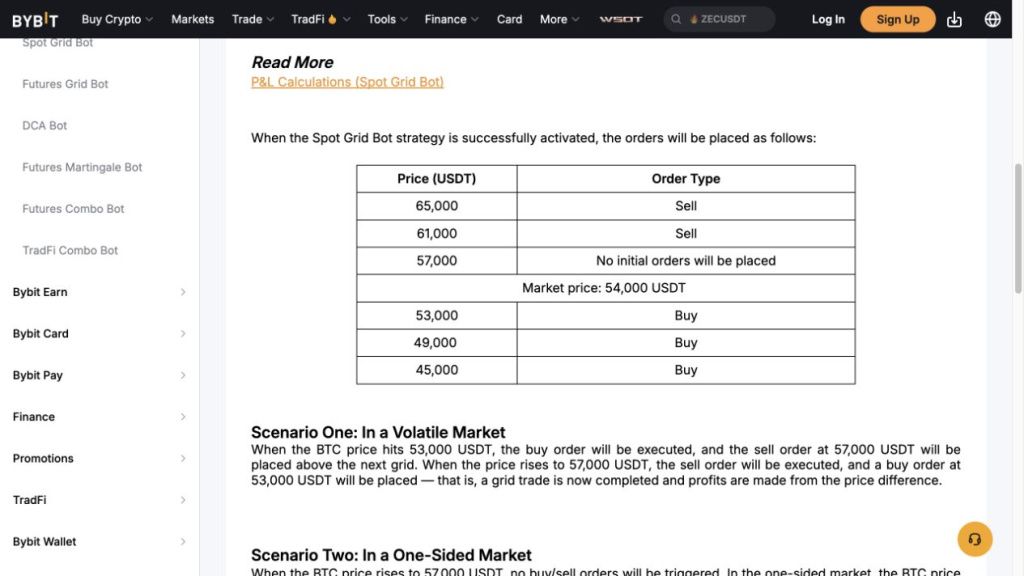
The user specifies a trading pair, lower and upper price limits, the number of grids, and the amount. The bot balances buys below the current price and sells above it. When a buy is executed, a related sell order appears at the next level. When the price moves back, the cycle may repeat.
To sell the base coin, the bot must have a certain amount of it. Therefore, starting a Spot Grid may involve an initial purchase of a portion of the asset. In the BTC/USDT pair, the base coin is BTC, and the quote currency is USDT. The balance after launch will differ from the initial balance only in USDT.
A single touch of a level on the chart does not necessarily mean the entire order has been executed. Check the bot history, volume, and commission. The structure of regular orders is discussed in theBybit spot trading instructions.
Lower Boundary, Upper Boundary, and Number of Grids
Boundaries define the scope of the strategy. A narrow range is more quickly left behind during significant market movements. A wide range distributes the same capital among more distant levels. The number of grids determines how many intervals the range is divided into: as the range increases, the distance between adjacent levels decreases.
- Pair.Determines which asset the bot will retain after purchases and the currency in which the result is evaluated.
- Range.Sets the lower and upper working prices. Its boundary alone does not constitute an order to sell the entire balance.
- Number of grids.Affects the order step and size. More levels do not mean a greater final profit.
- Amount.Must cover the minimum order requirements for the selected pair. The available minimum should be viewed after entering the remaining parameters.
- Start and stop conditions.Determines the event that will trigger the strategy to start or stop, if such settings are enabled.
With the same capital, increasing the number of levels usually reduces the volume of an individual order. The profit per completed cycle also decreases. Look at the calculation after expenses: a small difference between a buy and sell order can be almost entirely lost to commissions.
How to calculate the grid step
With a uniform price distribution, the step is equal to the difference between the upper and lower bounds, divided by the number of grids. The training range from 100 to 144 USDT is divided into two intervals: (144 − 100) ÷ 2 = 22 USDT. This results in three price points:100, 122, and 144.
The difference between levels does not equal the profitability of the entire bot: each order uses only a portion of the capital, while the remaining coins continue to fluctuate in price. Commissions are not included in this tutorial.
How to set up and launch the Bybit bot
On the website, open "Tools" → "Trading Bot," then find "Spot Grid Bot" and click "Create." Theofficial Bybit manualshows manual setup and strategies with predefined parameters. Identity verification is required to use the product. Before creating, check the following:
- Select a pair.Check the base coin and the quote currency. Decide whether you are willing to receive the remainder in this coin upon completion.
- Open settings.In Manual mode, specify the Price Range and number of grids. The automatically suggested parameters also require verification.
- Enter the total investment amount.The Spot Grid uses Funding. You can deposit the base coin, the quote currency, or both—check your selected option and allocation when starting.
- Check the increment and costs.Compare the expected difference between the buy and sell order with trading fees.
- Review the strategy's completion.Review the available stop conditions and asset return options. Distinguish between a price breakout from a complete stop.
- Check the final parameters."Create Now" opens a confirmation. Before clicking "Confirm," check the range, amount, and conditions. After creation, open "My Bots" → "Detailed Information" and check the "Balance" tab and order history.
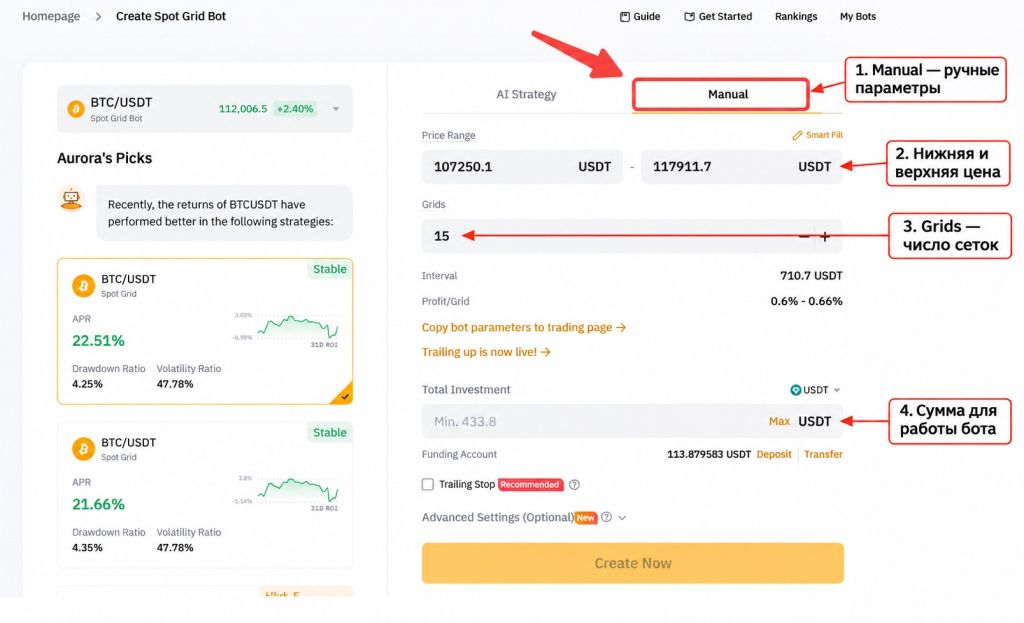
AI strategies and Aurora Picks use historical data. Find out the period for which the displayed result is calculated. A new launch changes the entry price, coin distribution, and execution sequence.
Someone else's annual percentage rate is especially easy to overestimate if it's calculated by rolling over a few successful days over a year. The APR on the card doesn't promise to maintain the same growth rate. A short successful history can't be automatically carried over to months of operation.
What to check when changing the running grid
The bot's detailed information includes the "Edit" action. Bybit's Russian instructions allow you to revise the range and number of grids, but new parameters sometimes require an additional amount or the purchase and sale of the base coin. Changing parameters cancels the previous take profit and stop loss settings; they must be checked and re-set. Therefore, after editing, compare the entire set of conditions, not just the range boundaries.
Grid Profit and Total P&L: Why the Numbers Differ
Grid Profitshows the result of completed grid cycles.Total P&Lreflects the overall result and takes into account the change in the value of assets still held by the bot. Because of this, the grid profit can be positive simultaneously with a total loss.
In the Bybit manual, the Total P&L formula adds the realized grid profit to the unrealized result of the base coin. A separate indicator, Current P&L, subtracts the already withdrawn grid profit from the Total P&L. Therefore, after the profit is withdrawn, these two figures naturally diverge.
Example: 1,000 USDT was deposited into the bot. Completed purchases and sales yielded 20 USDT after accounting for trading fees. Meanwhile, the value of the remaining coins decreased by 80 USDT relative to the cost of their acquisition. Without other transactions, the result is:
- Profit from completed cycles: +20 USDT.
- Change in value of the unclosed balance: -80 USDT.
- Total result: 20 − 80 =-60 USDT.
- Current bot equity: 1,000 − 60 =940 USDT.
If you only look at the +20 USDT, you might miss the decline in most of your position. When you stop, the value of the remaining equity is realized at the available strike price or the owner retains the coins—this depends on the chosen stop option. Conversion fees and slippage may change the final amount.
According toSpot Grid Helpthere is no separate fee for creating a bot; the trading commission is charged for executed trades. Do not deduct it again if the indicator has already been calculated after the deduction. Rates are discussed in the articleabout Bybit fees. For the futures bot, please check the funding account separately.
A portion of the grid profit can be withdrawn to Funding if it is available for withdrawal in the interface. The maximum shown may be less than the total profit: a portion of the funds is reserved for the bot's operation. The initial deposit cannot be simply withdrawn via profit withdrawal; to return it, you must terminate the bot.
What happens when the price breaks the range
When the price moves below the lower boundary of the standard fixed grid, the bot may be left with a significant share of the purchased coin. The market value of this share continues to decline along with the price. Terminating grid trades abroad does not fix the amount of the loss.
If the price rises above the upper limit, a significant portion of the coin may already be sold. A further market rise does not mean the bot is participating with the entire initial amount. If the price returns to the range, grid executions may resume.
The composition of the remaining balance depends on the initial price and trade history. Changing the range or number of grids via Modify may require additional funds, purchases, or sales.Previously set TP/SL are canceled with this change.: Check and set them again. The instructions specifically state that changing only the TP/SL without changing the range or number of grids is not possible.
How to stop the bot and check for a refund
The Terminate command for Spot Grid cancels the remaining orders and returns the funds to Funding. Before confirming, you must select the refund type:
- Quote Token.The base coin is sold at market price, and the refund is made in the quote currency.
- Quote + Base.Both coins are returned in the existing amount, without exchanging the entire balance into one currency.
- Base Token.The quote currency is converted to the base coin at market price.
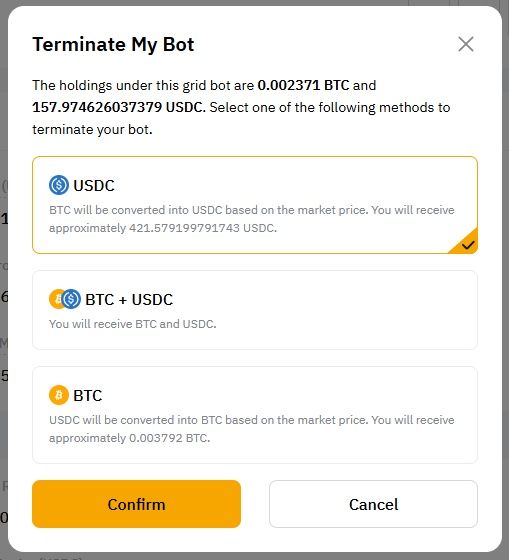
Conversion is subject to a trading fee, so the final result may differ from the amount displayed before the stop. Stored coins continue to change value. After completion, check the status, balances, and conversion history. The location of funds is discussed in the articleabout Funding and UTA accounts.
If the bot has terminated and the history doesn't explain the refund, save its ID, stop time, and conversion records. With this information, you cancreate a ticket to Bybit support.
In the TP/SL option described by Bybit, the trigger terminates the Spot Grid and sells the base coin for USDT. The result depends on actual market execution, so the configured threshold does not guarantee the exact refund amount. Trailing Stop tracks deviations from the bot's maximum value; it is a separate stop condition and should not be confused with moving the grid range.
How the Bybit DCA Bot Works
According tothe Bybit DCA Bot RulesPurchases are made on the spot market. For one bot, select USDT or USDC and up to five coins, then set the amount and schedule. The bot transfers funds from Funding to the Bot Account before the next purchase. There is no separate fee for automation; executed transactions are subject to a spot commission.
When purchasing the same amount, a low price results in more coins, while a high price results in fewer. The average price is calculated as the total cost divided by the actual quantity purchased. A simple average of two market prices is not suitable for this calculation.
Example without fees: The first purchase of 100 USDT at a price of 10 USDT yields 10 coins. The second purchase of 100 USDT at a price of 5 USDT yields another 20. A total of 200 USDT was deposited and 30 coins were purchased. Average price:200 ÷ 30 ≈ 6.67 USDT. At the current price of 5 USDT, the position is worth 150 USDT, and the total loss is 50 USDT.
A decrease in the average price is accompanied by an increase in the invested amount. If the coin continues to decline, regular purchases increase its supply and the overall risk. The schedule alone does not assess the project's health, liquidity, or the reasons for the decline.
To control the budget, multiply the amount of one cycle by the number of purchases. If multiple coins are selected, first add their amounts together. You can set a Max Investment — the maximum budget. When the remaining limit is not enough for the next purchase, the bot automatically terminates and returns the accumulated coins to Funding.
Example: A 250 USDT limit and a 100 USDT purchase per cycle allow two full cycles. The remaining 50 USDT limit is insufficient for a third cycle; a reduced 50 USDT purchase is not automatically created. This is the remainder of the allowed budget, not a separate amount the bot is required to spend.
Insufficient funds in Funding are handled differently: purchases are suspended, but the bot does not close. After replenishment, operation resumes at the next scheduled time. Check the reason for the schedule stop before creating a new bot.
When manually completing a DCA, you can keep the purchased coins without exchanging them or convert them to USDT at the market price; the return goes to Funding. You can change the amount, frequency, and maximum budget during operation. The selected coins do not change after creation. When setting up, check Flexible Savings: this option is enabled by default according to the help file, and you can disable it before creating the bot. The income of this product should be considered separately from the result of purchases.
What's the difference between Futures Grid and Martingale?
Futures Grid places grid orders on a contract. Long, Short, and Neutral are available. A long position is adversely affected by a price decline, while a short position is adversely affected by a price increase. Neutral mode can also result in a loss. Leverage increases the position relative to the allocated margin; if there are insufficient funds to maintain it, liquidation is possible.
Funding is taken into account for perpetual contracts. Depending on the rate and the position side, this is an expense or income. Grid profit does not eliminate the risk of liquidation and does not replace checking the full result, taking funding into account.
According tothe Futures Martingale descriptionthe bot adds orders after a specified price change and increases the volume according to the selected multiplier. It does not necessarily double each entry. Once the set target is reached, the round closes; further work depends on the strategy rules.
A conditional sequence of volumes of 100, 200, 400, and 800 requires a total of 1,500 units. The fourth entry is eight times larger than the first. This is an example of a multiplier of 2, not Bybit's default setting. The limit on additional orders limits further position increases, but the volume already accumulated remains at risk. Averaging does not guarantee a price reversal before the margin is exhausted.
Errors in Setting Up and Evaluating a Crypto Bot
Most errors start with a single unverified assumption. Here's what's useful to check against actual data after launch:
- "More grids mean more profit."Compare the increment with the fees and size of each order. Trade frequency alone doesn't tell you much about their outcome.
- "A green Grid Profit means profit."Check the Total P&L and the value of the remaining coins.
- "Going beyond the limit stops the loss."Check the underlying asset balance and any separately set termination conditions.
- "The strategy author had a high return."Compare the period, launch price, amount, and leverage. Your executions will begin under different conditions.
- "DCA uses very little."Calculate the total schedule budget, taking into account all selected coins.
- "After the stop, everything will return in one currency."Check the selected refund option and final balances.
To test your understanding of market and limit orders, you can useBybit's demo mode. The presence of demo trading does not necessarily mean that all the features of the built-in bots are available. The composition of the instruments should be checked in the selected mode.
Frequently Asked Questions
Do I need to keep my computer on?
The built-in trading bot operates on the platform. Closing the page does not stop the strategy. Closing is done through the bot management, after which you need to check its final status.
Can I guarantee a monthly income?
No. Even with unchanged settings, price movement and the number of executions will vary from month to month. A prolonged range breakout, a decline in the coin's value, and expenses can lead to a loss.
Why did the price cross the level, but the expected sell order isn't active?
View the history of a specific order: creation time, price, status, and actual executed volume. The candlestick on the chart does not show the entire order queue and does not confirm the execution of your order. Also check whether the bot was launched at the time of this movement.
What to check before confirming launch
Check the purchase rules, total budget, out-of-range behavior, and termination method. You can create an account through theBybit affiliate page; available modes and conditions are displayed in your account interface.