

It’s convenient to store USDT on an exchange or in a crypto wallet, but at some point, the task becomes quite common: withdrawing rubles to a bank card. In practice, withdrawing USDT to a card involves several steps: selecting the exchange direction, checking the network, comparing the exchange rate and reserves, creating a request, transferring USDT, and waiting for the ruble payout.
I view the exchange as a standard, practical transaction and compare services based on transparent parameters: the exchange rate, reserves, supported networks, the method of receiving rubles, and the terms of a specific request. I treat exchanges and currency exchange services equally in this article: I look at the numbers, the rules, and what the user receives for a specific exchange.
The exchange rate and reserves fluctuate throughout the day. For the examples below, we’ll use an approximate rate of 79–80 ₽ per 1 USDT. This is a convenient reference point close to the dollar-to-ruble exchange rate. However, the USDT/RUB rate is determined by the market and the specific exchange service, while the Bank of Russia’s official rate applies to USD/RUB and is not a mandatory buy or sell rate for USDT.
Therefore, when exchanging, you should focus on the final amount shown in a specific quote.
For an initial comparison, you can view current options for exchanging USDT TRC20 for rubles via the SBP and see several offers for a single exchange direction at once.
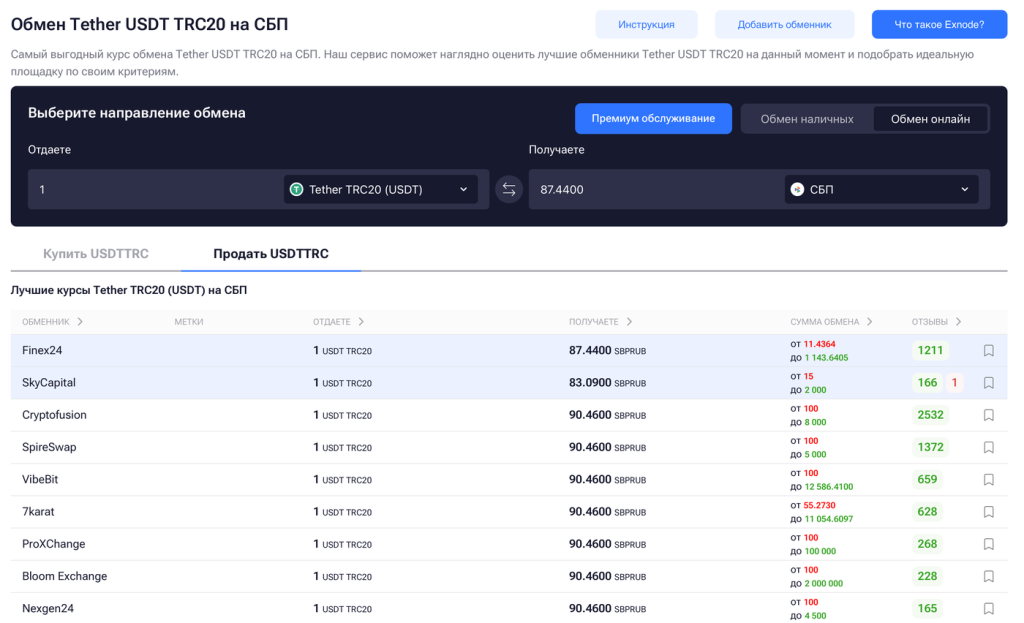
The key metric: how many rubles the user will receive for a specific amount of USDT after the order is executed.
If you’re only familiar with the token by name so far, it’s helpful to learn more about what USDT is, why its exchange rate typically hovers close to the dollar, and on which networks it’s issued.
Online Exchangers for Withdrawing USDT to a Card
As an example, let’s look at three online exchange platforms from Exnode’s monitoring: Finex24, FPS Moscow, and Exway.
For the purposes of this article, we’ll consider all three specifically as online exchange services. Even if a particular service supports cash transactions or in-person office visits, we’re interested here in remote USDT → RUB transactions followed by a payout to a bank card or via the SBP.
We’ll use an exchange rate of around 79–80 ₽ per USDT as a guideline for bank cards. Be sure to check the rate again before creating a request: the quote may change throughout the day depending on market conditions, reserves, and the terms for that specific currency pair.
1. Finex24
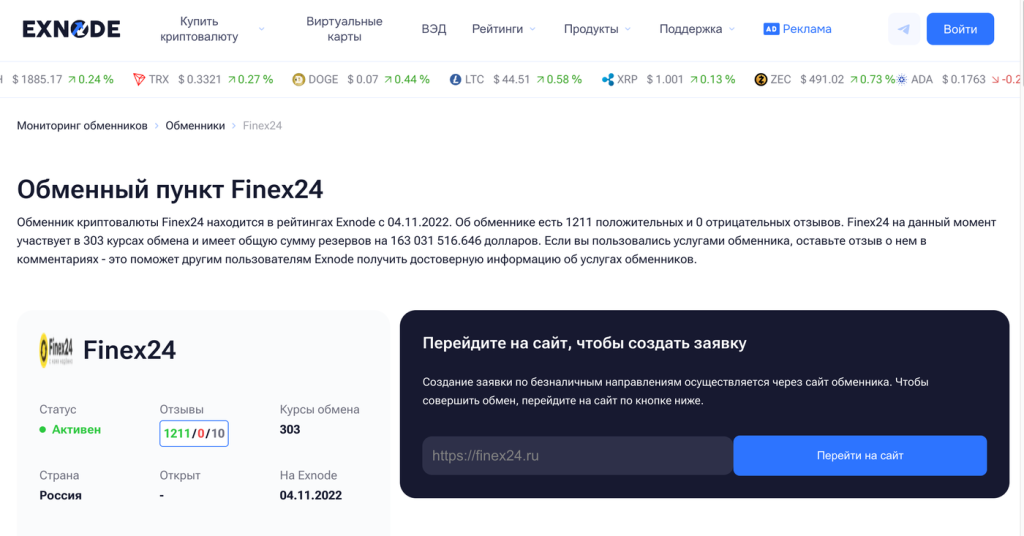
Finex24 can be considered one of the options for exchanging USDT for rubles with a non-cash payout.
-
Format: online.
-
You provide: USDT.
-
Receive: RUB.
-
Main focus of this article: USDT TRC20 → RUB.
-
Approximate exchange rate: about 79–80 ₽ per 1 USDT.
-
Reserve: In the snapshot used during preparation, it reached approximately 1 billion ₽ for certain ruble routes; check the current reserve immediately before submitting your request.
-
Receipt: bank card or SBP, depending on the selected route.
-
Banks: Certain routes to Russian banks are available; please check the current listing for a specific list.
-
AML/KYC: It’s best to review the verification requirements for a specific transaction before sending USDT.
On Finex24, it makes sense to first select your preferred method for receiving rubles, then compare the exchange rate and available balance. Routes to bank cards, the SBP, and specific banks may have different parameters.
For example, it may be more convenient for a user to select an SBP payout right away if the desired bank is connected to the system and the exchange offers that option. For large transactions, it makes sense to check the available balance specifically for the selected payout method.
2. FPS Moscow
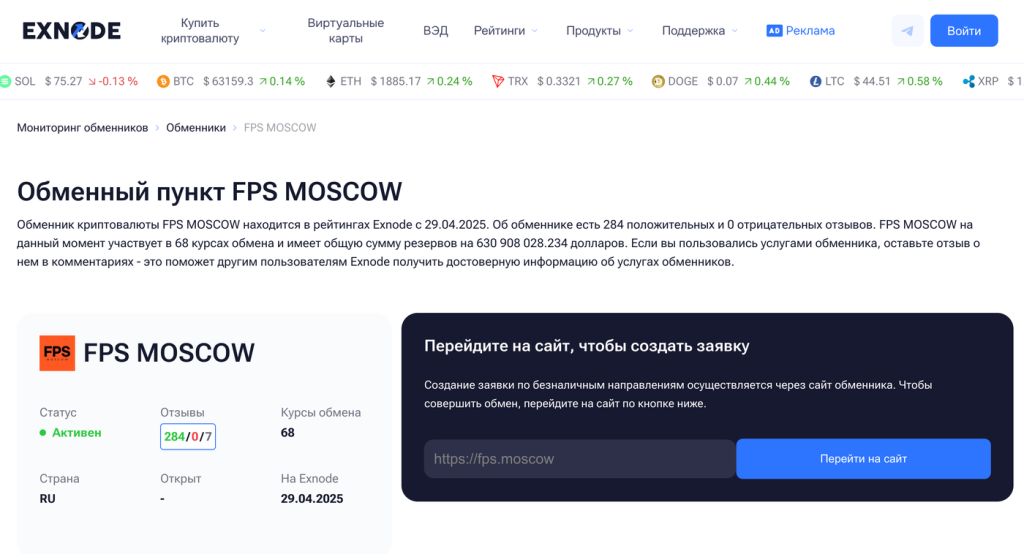
We also consider FPS Moscow as an online option for converting USDT to rubles.
-
Format: online.
-
You send: USDT.
-
Receive: RUB.
-
Main focus of the article: USDT TRC20 → RUB / SBP.
-
Approximate exchange rate: about 79–80 ₽ per 1 USDT.
-
Reserve: approximately 12 million ₽ in the selected segment; the reserve must be rechecked immediately before the exchange.
-
Receipt: SBP and bank transfers.
Required Information: For the SBP, the data requested in the specific application form must be provided.
AML/KYC: The service includes AML checks on transactions; it’s best to review the exact terms before submitting an application.
When choosing FPS Moscow, it makes sense to first decide how you want to receive the rubles: via SBP or by transfer to a specific bank. After that, you can compare the final amount with other offers.
For the same amount, the exchange rate for SBP and a transfer to a bank card may differ. The available balance may also vary.
3. Exway
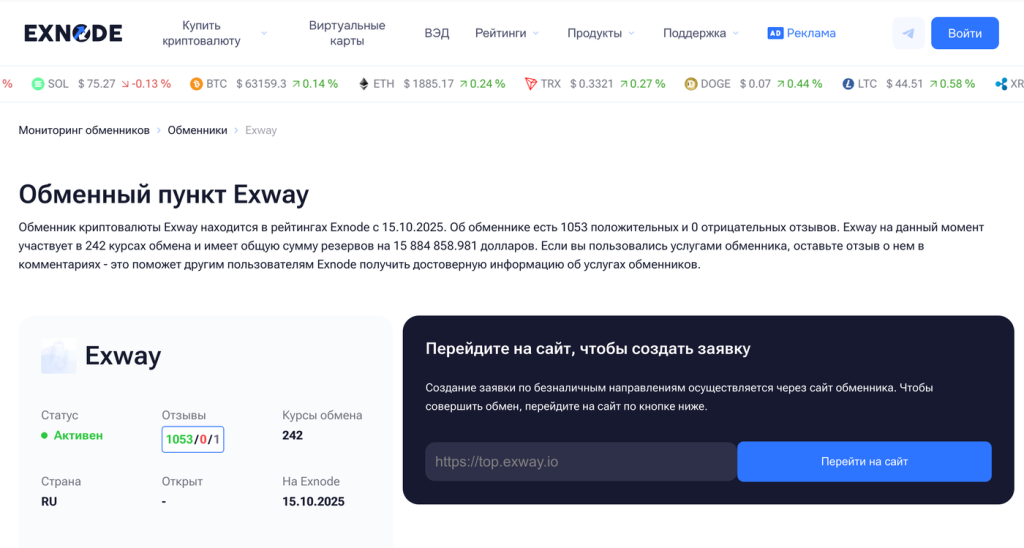
Exway is another online currency exchange service from our selection.
-
Format: online.
-
You deposit: USDT.
-
Receive: RUB.
-
Main focus of the article: USDT TRC20 → RUB.
-
Approximate exchange rate: about 79–80 ₽ per 1 USDT.
-
Reserve: approximately 5 million ₽ in the selected segment for card transfers; we verify the current value immediately before processing the request.
-
Receipt: bank card / SBP, depending on the route.
-
Banks: Select ruble routes are available; the list and terms are subject to change.
-
AML/KYC: It’s best to check the rules for a specific request before sending cryptocurrency.
When exchanging via Exway, it’s also more convenient to compare the total amount you’ll receive, rather than just the exchange rate.
If two exchanges show 79.4 and 79.6 ₽ per USDT, the difference seems small. But when exchanging 10,000 USDT, that’s already about 2,000 ₽. At the same time, a higher exchange rate alone does not guarantee a better result: you need to check both the exchange’s reserves and its rules for locking in the rate.
How to Compare Online Exchangers
Before placing an order, I would look at at least five factors:
-
the USDT/RUB exchange rate;
-
the total amount in rubles;
-
reserves;
-
USDT network;
How to obtain rubles.
For example, at a rate of 79.5 ₽ per USDT, the calculation for 1,000 USDT looks like this:
-
1,000 USDT.
-
Exchange rate: 79.5 RUB.
-
Total estimated amount: 79,500 RUB.
This is an estimated figure. The actual amount is determined by the terms of the order.
If one service shows:
-
Exchange A.
-
1,000 USDT.
-
79,500 RUB.
and another shows:
-
Exchange B.
-
1,000 USDT.
-
79,850 RUB.
It’s easier to compare the final result first, and then look at the reserve, network, and payment method.
The exchange rate of about 79–80 ₽ shown here serves as an example for this article. We take the actual rate directly from the monitoring screen before the exchange.
On which network can you withdraw USDT to a card?
USDT operates on several blockchains simultaneously.
This is one area where users need to be especially careful. The same USDT ticker may refer to a token on different networks, and the address and transfer fee depend on the selected blockchain.
Common options include:
-
USDT TRC20 — USDT on the TRON network.
-
USDT ERC20 — USDT on the Ethereum network.
-
USDT TON — USDT on the TON network.
-
USDT Solana — USDT on the Solana network.
-
USDT Avalanche — USDT on the Avalanche network.
-
USDT Aptos — USDT on the Aptos network.
-
Other networks supported by a specific exchange or wallet.
The main example in this article is USDT TRC20 to a card, because this is the specific method used on the selected Exnode monitoring page.
If you take a closer look at how the TRC20 network works, the logic behind the transfer becomes clearer.
The process is the same for different networks:
-
USDT TRC20 — TRON address.
-
USDT ERC20 — Ethereum address.
-
USDT TON — TON address.
-
USDT Solana — Solana address.
The network in your wallet or on the exchange must match the network specified by the exchange service.
For example, let’s say a request was created for USDT TRC20 → RUB.
In this case, when sending from the exchange, select:
-
Network.
-
TRON / TRC20.
If the request specifies USDT ERC20, select Ethereum.
The network determines the route of the blockchain transaction. The bank card appears in the next step, when the exchange receives the USDT and processes the ruble portion of the request.
How TRC20, ERC20, TON, and other networks differ
The exchange process itself follows the same principle, but the network parameters differ.
TRC20
USDT TRC20 operates on the TRON network.
This is one of the most common options on crypto exchanges and centralized exchanges. When withdrawing, the user selects TRON or TRC20 and sends USDT to the address of the corresponding network.
ERC20
USDT ERC20 operates on the Ethereum network.
An Ethereum address is used here. The fee is determined by the exchange’s or wallet’s terms and current network conditions.
TON
USDT on the TON network is also available in wallets and on exchanges.
When selecting this option, the recipient’s address must support USDT on the TON network.
Solana
USDT on Solana operates through the Solana infrastructure. As in other cases, the sending network and the destination network must match.
Other Networks
The set of available options depends on the platform. Therefore, when exchanging, refer to the actual list of networks displayed by the exchange, wallet, or selected exchange service.
The main rule: verify the network name before confirming the transfer.
How to Withdraw USDT to a Card via an Online Exchange
The process itself is fairly straightforward. You need to pay close attention when selecting the network, verifying the details, and calculating the amount to be received.
Step 1. Find a service using an exchange comparison site
The first step is to select the currency pair and review several available offers.
On Exnode, compare options for exchanging USDT TRC20 for rubles via the SBP.
Basic process:
-
Sending: USDT.
-
Network: TRON / TRC20.
-
Receive: RUB.
-
Receipt method: card / SBP.
Next, we compare the exchange rate, the final amount in rubles, and the reserve.
When exchanging 300 USDT and 10,000 USDT, the available options may differ: a large order is more dependent on the available reserve.
If you’re just getting started with cryptocurrency, it’s best to think of buying USDT and withdrawing cryptocurrency as two separate transactions. In this article, we’ll focus specifically on the second step.
Step 2. Check the USDT network
Before making a transfer, verify the network in two places.
-
In the exchange’s transaction form: USDT TRC20.
-
In your wallet or on the exchange: Network — TRON / TRC20.
For USDT ERC20, both fields should show Ethereum; for USDT TON, TON; and for Solana, Solana.
That’s why the process of withdrawing USDT TRC20 to a bank card starts with verifying the network. The bank card itself appears on the ruble side of the transaction.
There’s little point in rushing here. It’s easier to check the network and address before sending.
Step 3. Calculate the total amount
Let’s use an exchange rate of about 79.5 ₽ as an example.
-
Sending: 1,000 USDT.
-
Exchange rate reference: 79.50 RUB.
-
Estimated amount: 79,500 RUB.
This is an example to help you understand how it works.
The exchange will have its own quote. It may be close to the USD/RUB rate, higher, or lower, depending on demand, liquidity, the payment method, and the terms of the request.
Therefore, when requesting USDT to be converted to rubles and deposited to a card, the key indicator is the amount in the “Receive” field.
For example:
-
Exchange A: 1,000 USDT, 79,300 RUB.
-
Exchange B: 1,000 USDT, 79,650 RUB.
-
Exchange C: 1,000 USDT, 79,480 RUB.
Next, check the reserves and rules for each option.
Step 4. Create a request
After selecting an exchange, a transaction form opens.
Typically, the user will need to specify:
-
the USDT amount;
-
the selected network;
-
the method of receiving rubles;
-
bank account details or payment system credentials;
-
contact information, if required by the service.
The exact set of fields depends on the specific exchange.
Before confirming the request, verify:
-
the USDT amount;
-
the network;
-
the RUB amount;
-
bank details;
the validity period of the application;
the rules for fixing the exchange rate.
If the service displays the order number immediately after creation, it’s best to save it.
Step 5. Get the USDT address
After creating the order, the exchange displays the address to which you need to send USDT.
For example:
-
Network: TRON / TRC20.
-
Address: Txxxxxxxxxxxxxxxxxxxxxxxx.
-
Amount: 1,000 USDT.
The address in this article is for illustrative purposes only. You should only use the actual address from your specific transaction.
When sending, it’s convenient to copy it using the standard button in the interface.
After pasting, be sure to visually check the first and last characters.
Step 6. Transfer USDT
Now, the user opens their wallet or exchange and creates a withdrawal request.
Verify:
-
USDT token;
-
network;
-
address;
-
amount;
-
fee;
-
exchange request validity period.
After the submission is confirmed, a blockchain transaction is created.
It is assigned a TxID, also known as a transaction hash.
The TxID is one of the most useful identifiers for the entire transaction. It can be used to confirm that funds were sent and to locate the transaction on the blockchain.
After sending, save the following:
-
TxID;
-
the request number;
-
USDT amount;
-
date and time;
-
selected network;
-
recipient's address;
-
the page showing the transaction status.
Step 7. Wait for network confirmation
After submission, the transaction appears on the blockchain and receives confirmations.
In simple terms:
-
USDT has been sent.
-
The transaction has appeared on the network.
-
Confirmations received.
-
The exchange has detected the deposit.
-
The RUB payment is being processed.
The number of confirmations and the processing order depend on the network and the rules of the specific service.
While the transaction is pending confirmation, the exchange may display a status indicating that payment or blockchain confirmation is pending.
Step 8. Receive rubles
After processing the cryptocurrency portion, the exchange generates a ruble payment using the specified details.
We verify the actual amount received.
Then we save the bank transaction along with the request number and TxID.
This ensures a clear history of the entire transaction chain:
-
USDT.
-
Blockchain transaction.
-
Exchange.
-
Order.
-
RUB.
-
Bank account.
How to Withdraw USDT from Bybit to a Card
The process of withdrawing USDT from Bybit to a card using an exchange service consists of two related steps.
First, USDT is sent from Bybit to the address specified in the request. After receiving the cryptocurrency, the service processes the ruble payment.
The process of withdrawing funds from Bybit can be discussed in detail separately, but for an exchange service, the sequence is as follows:
-
Select an exchange service.
-
Create a USDT → RUB request.
-
Get the transfer address.
-
Initiate a USDT withdrawal on Bybit.
-
Paste the address.
-
Select the same network.
-
Enter the amount.
-
Check the fee.
-
Confirm the withdrawal.
-
Wait for the rubles.
For TRC20:
-
Exchange: USDT TRC20.
-
Bybit: Coin — USDT.
-
Bybit: Network — TRON / TRC20.
If the exchange provides an address for a different network, select that network in Bybit.
For example:
-
Exchange: USDT ERC20.
-
Bybit: Network — Ethereum.
or:
-
Exchange: USDT TON.
-
Bybit: Network — TON.
Before confirming the withdrawal, the user sees the fee and the total amount.
Fees and network availability vary, so it’s pointless to rely on information from an outdated guide. Check directly within the Bybit interface at the time of the transaction.
How to Withdraw USDT from Bybit via TRC20
For a separate search query, the process looks like this:
-
Bybit.
-
USDT.
-
Withdraw.
-
Exchange address.
-
TRON / TRC20.
-
Confirmation.
The exchange receives USDT.
RUB to a card.
The most important verification takes place before you click the withdrawal confirmation button:
-
Token: USDT.
-
Exchange network: TRC20.
-
Network on Bybit: TRON / TRC20.
-
Address: matches.
-
Amount: matches the request.
After sending, save the TxID.
Can USDT be withdrawn directly to a bank card?
The phrase “transfer USDT to a card” sounds as if the token is sent directly to the card number.
In practice, when using an online exchange, the process looks different:
-
USDT.
-
The exchange’s cryptocurrency address.
-
Request processing.
-
RUB.
-
Bank card or payment system.
In other words, the bank card is involved in the ruble portion of the transaction.
The user sends USDT to a cryptocurrency address and receives a fiat transfer in rubles.
This is precisely why two sets of details are verified simultaneously before the exchange.
Cryptocurrency details:
-
token;
-
network;
-
address;
-
amount.
Banking:
-
payment method;
-
bank;
-
card or payment system;
-
recipient’s account details.
Transferring USDT to a card via SBP
SBP is often used as a way to receive rubles.
In the request form, the user selects the appropriate option, after which the service requests the necessary information.
Scheme:
-
USDT TRC20.
-
Online exchange.
-
RUB.
-
SBP.
-
Account at the selected bank.
When selecting an offer, check the exchange rate and available balance specifically for SBP.
The exchange rate may differ depending on the card type and SBP.
How to Withdraw USDT to a Sberbank Card
The question of how to withdraw USDT to a Sberbank card comes up quite often.
The basic process remains the same.
The user selects a transfer option where rubles can be received via Sberbank or via SBP to a Sberbank account.
Scheme:
-
USDT.
-
Selected network.
Currency Exchanger.
RUB.
Sberbank.
The application form requires the details specified by the particular service.
If the option via SBP is available, the user selects a bank and enters the phone number linked to their bank account, provided that the form requires this specific set of information.
We verify the specific terms at the time of the request.
How to Withdraw USDT to a T-Bank Card
Search queries still often refer to “USDT to a Tinkoff card,” even though the bank is now called T-Bank.
The process is exactly the same:
-
USDT.
-
Exchange.
-
RUB.
-
T-Bank / SBP.
When selecting an exchange service, make sure the desired direction is available.
If a general transfer via SBP is offered, the user selects T-Bank from the list of banks when filling out the application, provided that the service supports this scenario.
What affects the USDT-to-ruble exchange rate for card transfers
USDT is pegged to the U.S. dollar, but the actual USDT/RUB rate at the exchange is determined separately.
The final result is influenced by:
-
the current USDT/RUB market;
-
the liquidity of the specific currency pair;
-
the exchange’s reserves;
-
the method of receiving RUB;
-
the transaction amount;
-
USDT withdrawal fee;
-
exchange rate fixing rules.
Therefore, it is convenient to use the Bank of Russia’s exchange rate as a reference, and to perform the final calculation based on the exchange platform’s specific quote.
Let’s say the reference rate is 79.5 ₽.
When exchanging:
-
100 USDT — approximately 7,950 RUB.
-
500 USDT — approximately 39,750 RUB.
-
1,000 USDT — approximately 79,500 RUB.
-
5,000 USDT — approximately 397,500 RUB.
-
10,000 USDT — approximately 795,000 RUB.
These are mathematical examples.
An actual transaction will take into account the exchange’s own rate and the fee charged by the exchange or wallet for sending USDT.
Why does the exchange rate differ from the dollar rate?
USDT aims to maintain its peg to the U.S. dollar, but the USDT/RUB market rate and the official USD/RUB rate are different indicators.
The exchange operates using its own liquidity.
The exchange rate is influenced by:
-
demand for USDT;
demand for RUB;
available reserve;
payment destination;
infrastructure costs;
transaction risks;
market conditions.
Therefore, comparing it to the official USD/RUB rate is a convenient way to quickly estimate the price range.
The exchange rate specified in the request is used for the transaction itself.
How to Choose a USDT-to-Card Exchange
For a practical comparison, I would follow this order.
1. Exchange rate
Check the actual number of rubles you’ll receive for a given amount of USDT.
For example:
-
I’m sending: 1,000 USDT.
-
I receive: 79,650 RUB.
This figure is more informative than the general banner “USDT = 79.65.”
2. Total Amount
If the exchange platform immediately displays the amount to be received, compare it across different services.
This figure specifically answers the user’s question about how many rubles they will receive once the request is completed.
3. Reserve
The reserve shows the amount of rubles available for the selected currency pair.
For example:
-
Request: 300,000 RUB.
-
Reserve: 5,000,000 RUB.
In terms of volume, this order fits within the current reserve.
This parameter becomes particularly important for large transactions.
4. Network
The sending network must match the request network.
For example:
-
TRC20 — TRC20.
-
ERC20 — ERC20.
-
TON — TON.
-
Solana — Solana.
5. Payment Method
Different bank cards and payment systems may have different terms and conditions.
Therefore, it’s best to choose the destination before creating the request.
6. Exchange Rate Fixing
The exchange’s terms determine when the rate is locked in.
For example:
-
when the request is created;
-
for a limited time;
-
upon receipt of USDT;
-
according to another predefined rule.
Be sure to read this section before sending funds.
7. AML/KYC
It’s also best to review the AML/KYC terms in advance.
A specific service may verify transactions according to its own rules.
8. Support
When contacting support, it’s helpful to have the following:
-
the ticket number;
-
TxID;
date;
amount;
the selected network.
What is an exchange’s reserve?
Reserve — the amount of a specific currency available for exchange in a given direction.
If the service displays:
-
Reserve: 5,000,000 RUB.
this means the amount of rubles available for that exchange direction at the time the data was updated.
The reserve is dynamic.
It may decrease after executing other users’ orders and increase after a replenishment.
Therefore, the data from this article is used as a guideline, and the current reserve is always verified immediately before a transaction.
What Is Rate Locking
There is a time lag between creating an order and receiving USDT.
During this period, the market price may change.
That’s why exchanges establish rate-locking rules.
For example:
-
12:00 p.m. — order created.
-
Exchange rate — 79.50 RUB.
-
12:06 p.m. — USDT received.
-
Market rate — 79.35 RUB.
The specific exchange rate used is determined by the service’s rules.
Before confirming the order, it’s a good idea to check how long the quoted rate is valid and when the recalculation takes place.
What Is a TxID and Why You Should Save It
TxID, or transaction hash, is a unique identifier for a blockchain transaction.
After sending USDT, the user receives a record that looks something like this:
-
Transaction ID.
-
xxxxxxxxxxxxxxxxxxxxxxxxxxxxxxxxxxxxxxxx.
You can use the TxID to verify:
-
whether the transaction was sent;
-
the network;
-
the sender’s address;
-
the recipient’s address;
-
the amount;
-
status;
-
confirmations.
When contacting the exchange’s support team, the TxID allows you to quickly locate a specific transaction.
Therefore, after withdrawing USDT, I would always save:
-
the transaction ID;
-
TxID;
-
the amount;
-
the date;
-
network.
What to Do After Sending USDT
After sending, you do not need to create a second transaction or resend the same amount.
Check three things.
Transaction status
The transaction should appear in the corresponding blockchain explorer.
Request Status
The exchange may display the processing stage.
For example:
-
Awaiting payment.
-
Payment received.
-
Processing.
-
Completed.
The exact wording depends on the service interface.
Bank deposit
After the request is processed, we verify the amount received in RUB.
What to Consider When Receiving Rubles on a Bank Card
Banks verify money transfers as part of their anti-fraud procedures.
Effective January 1, 2026, the Bank of Russia expanded the list of indicators of fraudulent transfers from 6 to 12. Among them is a transaction that differs from the customer’s usual transactions in terms of amount, frequency, or timing.
The Bank of Russia publishes an up-to-date list of indicators of fraudulent transfers.
Therefore, after making a transfer, it is helpful to keep a record of:
-
the transaction number;
-
TxID;
-
the USDT amount;
-
the date;
-
the order rate;
-
RUB amount;
-
confirmation of bank deposit.
The Bank of Russia also publishes guidelines on the blocking of bank cards and online banking.
If a bank requests information about a transaction, it is easier to respond using saved data.
Using multiple cards, splitting transactions to circumvent controls, and other similar schemes have no place in proper transaction documentation. It is much more practical to maintain a clear record of fund movements.
What documents to keep after an exchange
After completing a transaction, it’s helpful to keep:
-
the application number;
-
a screenshot or the order page;
-
TxID;
-
the date the USDT was sent;
-
amount of USDT;
-
network;
-
USDT destination address;
-
order rate;
-
RUB amount;
-
bank confirmation;
-
history of USDT purchases.
This information may be useful when contacting support, dealing with bank-related issues, or for tax purposes.
Taxes When Exchanging USDT for Rubles
Receiving rubles on a bank card and the tax base are related but distinct issues.
For tax purposes, the circumstances under which the digital currency was received, its acquisition cost, and the financial result of the specific transaction are all relevant.
The Federal Tax Service treats digital currency in accordance with the relevant tax regulations.
Starting in 2025, Russia will have a progressive personal income tax scale. Therefore, for individuals who conduct significant cryptocurrency transactions, it is advisable to retain documentation not only for the withdrawal of rubles but also for the initial purchase of USDT.
The following information must be recorded:
-
the date of purchase of USDT;
-
the amount;
-
purchase price;
-
commission;
-
date of subsequent sale;
-
amount received;
-
related documents and supporting evidence.
The Federal Tax Service publishes the current personal income tax rules for individuals.
The specifics of accounting for cryptocurrency transactions are also outlined in the Federal Tax Service’s guidance on cryptocurrency taxation.
It is also helpful to have internal materials on cryptocurrency taxes in Russia, since the specific calculation depends on the circumstances of the asset’s acquisition and sale.
What Russian Law Says
The circulation of digital currency in Russia is regulated by Federal Law No. 259-FZ.
Article 14 of Federal Law No. 259-FZ regulates the circulation of digital currency and sets forth related rules and restrictions.
A separate advertising regime applies to the public promotion of such services.
Article 7 of Federal Law No. 38-FZ “On Advertising” includes digital currency, as well as goods, works, and services intended to facilitate its circulation or the circulation of digital currency, in the list of items subject to restrictions under the law.
The corresponding amendments were introduced by Federal Law No. 221-FZ of August 8, 2024.
For commercial publications, sponsored content, and ratings of specific services, it is best to verify the legal classification of the format separately.
For the average user, the practical takeaway is simpler: it makes sense to keep records of digital currency transactions just as carefully as you would for other financial transactions.
How to Withdraw Money from USDT to a Card: A Complete Example
Let’s say you have 1,000 USDT TRC20 in your wallet.
The user wants to receive rubles via the SBP.
1. Select the destination
-
USDT TRC20.
-
RUB.
-
SBP.
2. Compare offers
For example:
-
Exchange A — 79,300 RUB.
-
Exchange Service B — 79,650 RUB.
-
Exchange Service C — 79,480 RUB.
3. Check the reserve
Let’s say:
-
Exchange B.
-
Reserve: 12,000,000 RUB.
This is enough for our request.
4. Create an order
Specify:
-
1,000 USDT;
-
TRC20;
-
SBP;
-
bank;
-
phone number.
The exact set of fields is determined by the service.
5. Get the address
The exchange displays the TRC20 address.
6. Open your wallet or exchange
Select:
-
USDT.
-
Withdraw.
-
TRON / TRC20.
7. Enter the address
Check the first and last characters.
8. Check the fee
It is displayed before confirming the withdrawal.
9. Send USDT
Get the TxID.
10. Wait for confirmation
The transaction goes through TRON.
11. The exchange receives USDT
The request status changes.
12. We receive RUB
The rubles are credited via the selected payment method.
13. Save the data
-
Request number.
-
TxID.
-
1,000 USDT.
-
Exchange rate.
-
Amount received in RUB.
-
Bank transaction.
This completes the transaction chain.
Exchanging USDT for rubles to a card from another wallet
For Trust Wallet, a hardware wallet, or another self-custody solution, the process is essentially the same.
Only the sending interface changes.
-
Select an exchange.
-
Get a USDT address.
-
Open your wallet.
-
Select "Send."
-
Select a network.
-
Send USDT.
-
Get the TxID.
-
Wait for the RUB payout from the exchange.
The most significant difference from a centralized exchange relates to the network fee and how it is paid.
The terms depend on the specific blockchain and wallet.
USDT TRC20 to a bank card: a brief overview
For the most popular scenario described in this article:
-
Select USDT TRC20.
-
Open the exchange tracker.
-
Select an offer.
-
Create a request.
-
Get the exchange’s TRON address.
-
Send USDT.
-
Save the TxID.
-
Wait for TRON confirmations.
-
Receive RUB.
-
Receive the money on your card or via a payment system.
Before sending, check four things:
-
USDT.
-
TRC20.
-
Address.
-
Amount.
Before creating a transaction:
-
Exchange rate;
-
reserve;
-
payment method;
-
fixing terms.
After:
-
TxID;
-
application number;
-
bank deposit.
What are the most common errors when withdrawing USDT?
A different network was selected
In a TRC20 request, a different network was selected during the transfer.
Therefore, check the network name before confirming.
A different address was copied
The recipient’s address must be taken directly from the active transaction.
The request has expired
If the service imposes a time limit on the exchange rate or the transaction itself, this must be taken into account before sending.
Withdrawal fee not accounted for
When withdrawing from an exchange, the fee may reduce the actual amount sent or be charged separately according to the platform’s rules.
An exchange with insufficient reserves was selected
For large transactions, reserves are checked in advance.
TxID not saved
If a transaction is delayed, it is more difficult for support to identify the transaction without the hash.
How to Withdraw USDT to a Card in Rubles: A Quick Guide
The entire process can be broken down into one simple sequence:
-
Select the destination.
-
Compare exchange services.
-
Check the exchange rate and available balance.
-
Select a network.
-
Create a request.
-
Send USDT.
-
Save the TxID.
-
Receive RUB.
For USDT TRC20, the network must be TRON on both sides. For ERC20, use Ethereum; for TON, use TON; for Solana, use Solana.
Before the transaction, you can check the current USDT TRC20 exchange rate against the ruble, view the reserve, and compare several offers.
The rate of approximately 79–80 ₽ used in this article serves as a general guide. The final figure is always taken from the specific transaction.
After the exchange, save the order number, TxID, and the bank deposit confirmation.
Questions and Answers
Can a USDT transfer be canceled after it’s sent?
A confirmed blockchain transaction is executed to the specified address. The address and network are therefore verified before the transfer is confirmed. The possibility of taking further action after an erroneous transfer depends on the actual recipient, the network used, and the transaction status.
Why did the USDT exchange rate change after I created the order?
Services have different rules for fixing exchange rates. One exchange may lock in the rate at the time the order is created for a specific period, while another may apply the rate after the USDT is received, according to its own rules. The specific procedure is outlined in the terms of the transaction.
What should you keep after exchanging USDT for rubles?
The order number, TxID, USDT amount, exchange rate, date, network, amount of rubles received, and bank confirmation. For tax purposes, it’s also helpful to keep a record of the initial purchase of USDT and related expenses.
What should you do if the USDT has already been sent but the rubles haven’t arrived yet?
Check the transaction’s blockchain status, the number of confirmations, and the status of the order itself. When contacting support, provide the order number and TxID: this information allows them to identify the specific transaction.