

To fund your crypto wallet, you need to buy the cryptocurrency of your choice and specify the address where it should be sent. In Russia, you can pay for your purchase in rubles from a bank account, a card, or via the Fast Payment System. For a one-time transaction, it’s more convenient to use an online crypto exchange: the user sees the exchange rate in advance, enters their wallet address, pays for the order, and receives the coins directly into their wallet.
Before conducting the transaction, it’s important to compare the exchange rate, available reserves, limits, and the total amount to be received. You can do this by monitoring Exnode’s online crypto exchanges for the RUB → USDT TRC20 route. In this article, we’ll walk through the entire process: from selecting the coin and network to verifying the received transaction.
Top 4 Online Crypto Exchanges for Funding Your Crypto Wallet
Online services vary in terms of supported currencies, networks, minimum amounts, and payment methods. In one scenario, the user pays for a pre-filled order and immediately receives the cryptocurrency at their personal address. In another, the user first tops up their platform balance, purchases the desired asset, and then withdraws it to an external wallet for storing cryptocurrency.
Exchange rates fluctuate throughout the day. Therefore, you should use a list of crypto exchanges to make your selection and check the rate, available balance, and limits immediately before making a payment.
1. Maze Broker
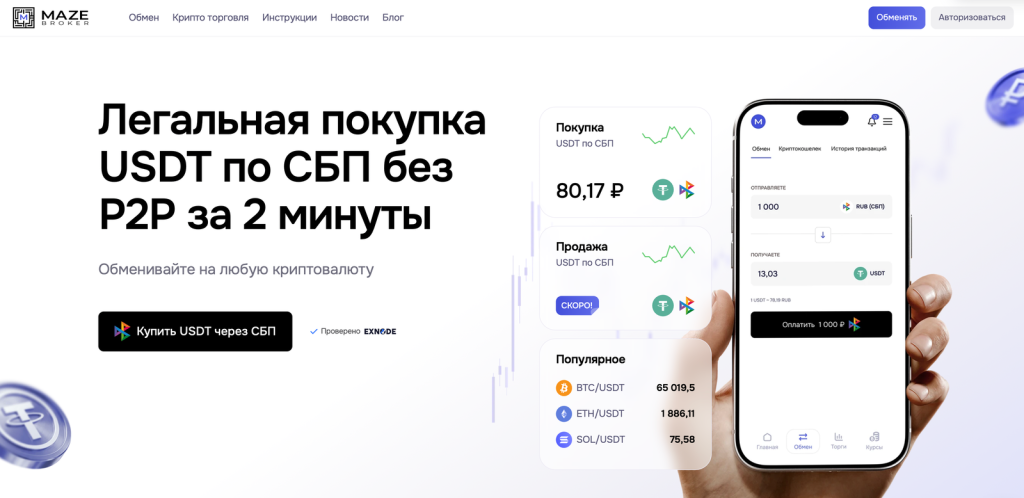
Maze Broker is suitable for users who prefer to conduct transactions through their personal account. First, the customer registers and undergoes identity verification; then, they top up their ruble balance via the Secure Payment System (SPS), purchase USDT or another available asset, and withdraw it to an external crypto wallet.
This process differs from a typical one-time order on an exchange. The user receives a separate balance within the platform and confirms the withdrawal independently. Before sending, you must select the coin, network, and recipient’s address. The network fee and total amount are displayed before the transaction is confirmed.
For more details on registration, funding your account, and buying cryptocurrency, read our Maze Broker review.
2. FPS Moscow
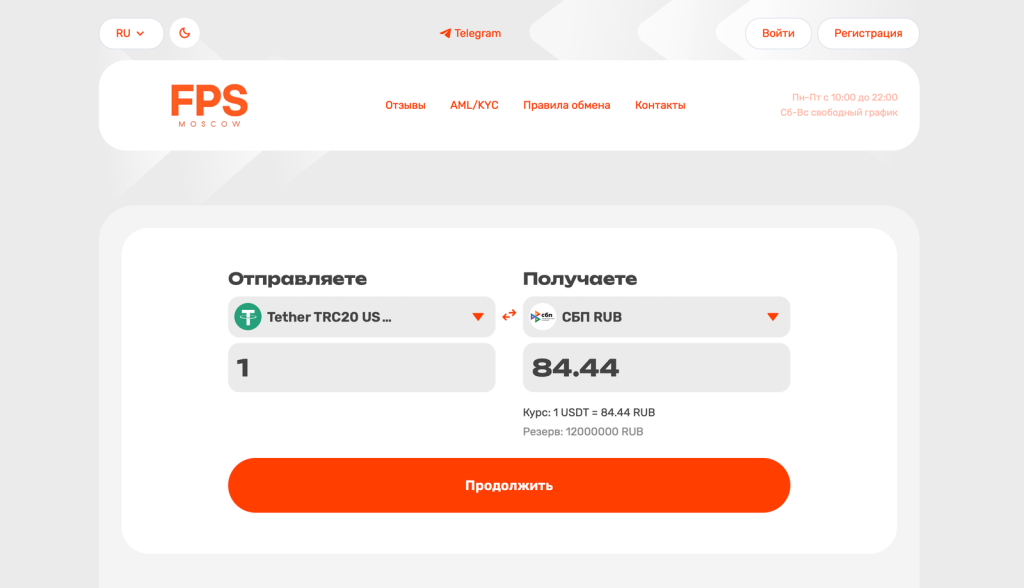
FPS Moscow is listed on Exnode as an electronic exchange service offering cashless transactions. On the service page, you can check current exchange rates, available balances, reviews, and transaction options.
Registration and KYC may be required to use certain features of the service. Before creating a request, you should verify the availability of the desired cryptocurrency, network, and payment method, as well as the operator’s business hours. You should only enter your wallet address after verifying the receiving network in the app.
3. Finex24
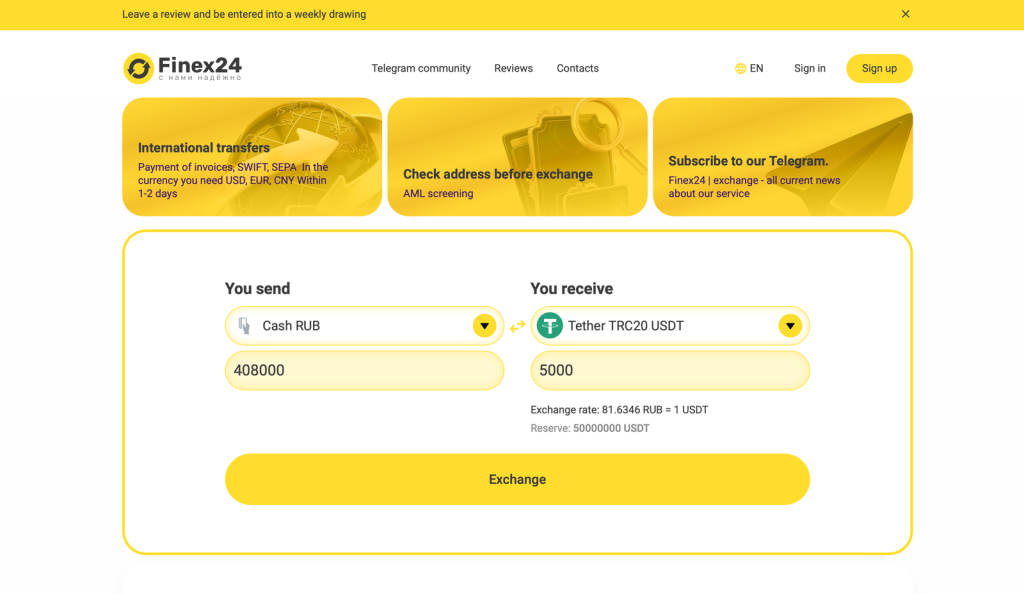
Finex24 is a good option for exchanging rubles for popular digital assets. The exchange’s page in the monitoring tool displays current trading pairs, reserves, and user reviews.
Before making a payment, check the minimum amount, how the exchange rate is locked in, and the order’s validity period. If the fee isn’t listed on a separate line, it may be included in the exchange rate. Therefore, you should compare not the advertised amount, but the exact amount of BTC, USDT, or other currency that will be sent to your wallet.
4. Exway
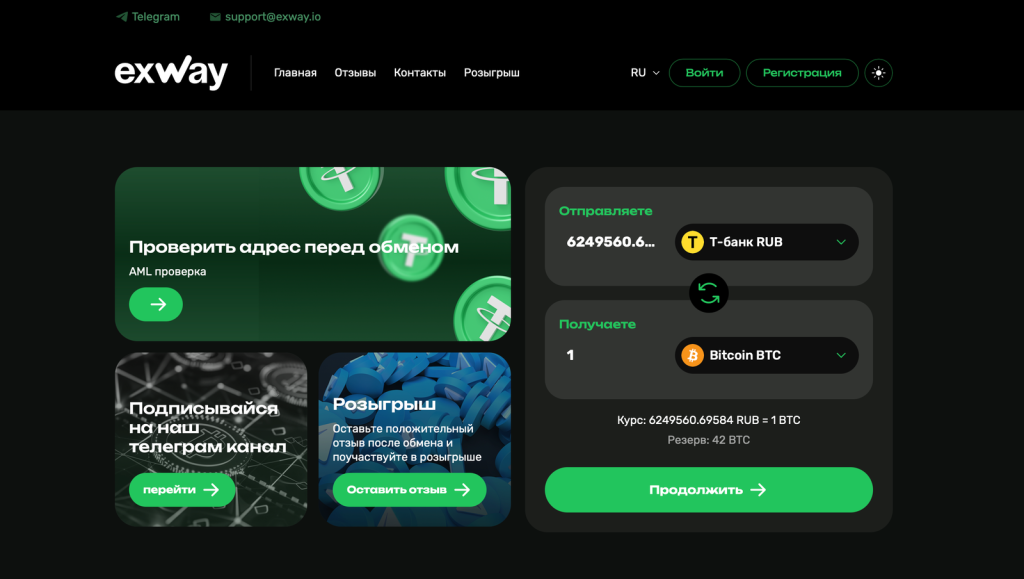
Exway supports both cryptocurrency and fiat currency transfers. Using the service’s dashboard, you can check whether your preferred payment method is available, which network is used for the transfer, and whether there are sufficient reserves for the selected amount.
Before submitting a request, it’s important to review the AML verification rules, refund policy, and support contact procedures. If the service offers multiple networks for a single coin, choose the one supported by the recipient’s wallet.
Important: A service’s position in the list does not guarantee that it will offer the best exchange rate at the time of the transaction. Be sure to check the final amount you’ll receive, your balance, transaction limits, any identification requirements, and the rules for making ruble payments.
How to Fund a Crypto Wallet Through an Online Exchange
The general procedure applies to most services. Field names may vary, but in any case, the user must select the payment currency, the cryptocurrency to be received, the network, and their wallet address.
- Open your crypto wallet. Go to the “Receive Coins” section and select the asset you want to buy. For example, USDT, BTC, ETH, or TON.
- Select a network. For USDT, this could be TRC20, ERC20, BEP20, TON, or another network supported by the app.
- Copy the address. Do not retype the long string of characters by hand. After copying, check the beginning and end of the address.
- Select the exchange direction. Specify rubles, a bank card, or a payment system as the currency you’re sending. Select the desired cryptocurrency on the appropriate network as the currency you’re receiving.
- Compare offers. Consider the exchange rate, available balance, minimum amount, reviews, processing time, and whether KYC is required.
- Fill out the request form. Enter the amount, wallet address, email, and any other information requested by the service.
- Verify the information. The coin, network, and address in the request must match the details shown in your wallet.
- Pay for the request. Transfer the exact amount using only the payment details provided after you created the request.
- Wait for the transfer to be processed. The time required depends on the bank transfer processing time, the exchange’s operations, and the number of confirmations on the blockchain.
- Verify the deposit. After the transfer is sent, the service may provide a transaction hash, which can be used to verify the transfer in a blockchain explorer.
For example, a user can open a RUB → USDT TRC20 exchange request on Exnode, specify the amount, and compare available offers. After selecting an exchange, all that’s left is to copy the USDT TRC20 address from your wallet, fill out the request form, and complete the payment.
Critically important: The network specified in the exchange request must match the network of the address in the crypto wallet. You cannot send USDT TRC20 to an address intended only for USDT ERC20. An erroneous blockchain transaction cannot be reversed through a bank.
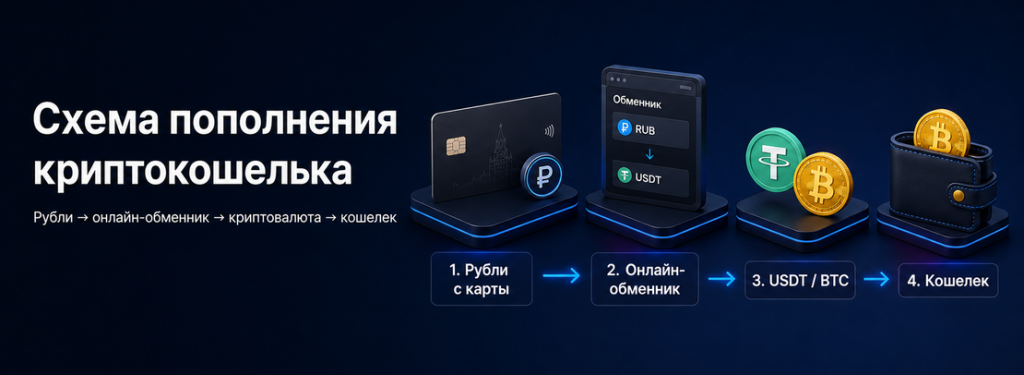
How to Fund a Crypto Wallet with a Bank Card
The phrase “top up a crypto wallet with a card” doesn’t always mean paying through a standard form with a card number, expiration date, and CVC code. In practice, online exchanges may use several methods to accept rubles:
- transfer using a bank card number;
- payment via the SBP system using a phone number;
- transfer via QR code;
- payment using bank account details;
- a separate form for accepting bank cards.
The specific option depends on the exchange service and the selected destination. Before submitting a request, check which payment method is available and from which bank account payment is permitted.
How to Fund a Cryptocurrency Wallet Using a Sberbank Card
To pay from a Sberbank account, the most common methods are a transfer via the SBP system or using the bank details provided by the exchange service.
- Select the RUB → desired cryptocurrency pair.
- Check to see if Sberbank or SBP is listed among the payment methods.
- Enter the amount and wallet address.
- Get the payment details or QR code within the request.
- Open your banking app and transfer the exact amount.
- Save the receipt until the cryptocurrency is received.
Do not transfer money using details from a third-party Telegram account or private messages. Use only the information shown on the active request page.
How to Fund a Crypto Wallet with a “Mir” Card
A “Mir” card can be used as a source of rubles if the service supports payments from a Russian card, transfers using bank details, or the SBP payment system. When paying via SBP, the bank account matters, not the payment system indicated on the physical card.
Before making a transaction, check the selected bank, the transfer limit, and the service’s rules. The availability of the RUB → USDT route does not mean that the exchange accepts payments by any method or from any sender.
How to Choose a Coin and Network for Deposits
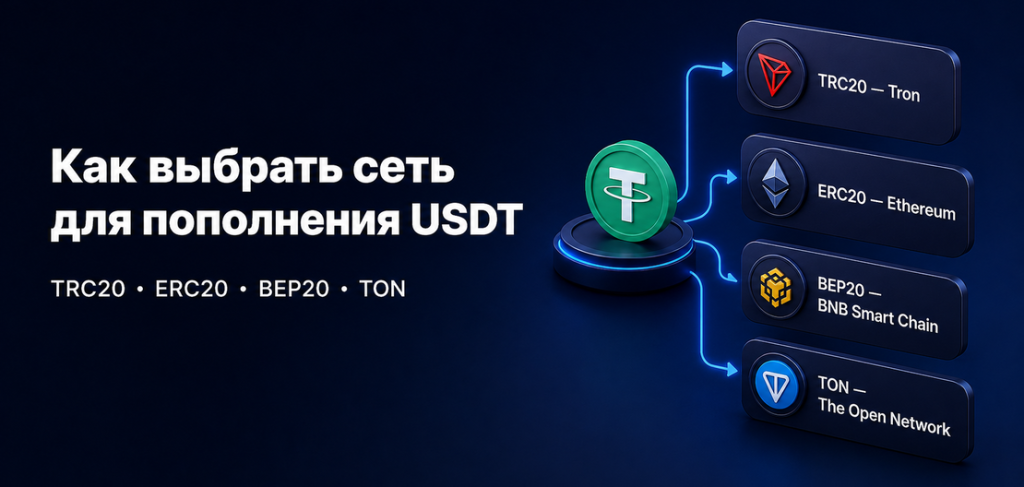
The cryptocurrency and the transfer network are different parameters. For example, USDT is a token that operates on multiple blockchains simultaneously. Common options include TRC20, ERC20, BEP20, and TON.
When receiving USDT, you must first open the correct network in your wallet and then copy the address. If the exchange sends the asset via a different network, your wallet may not recognize the deposit.
- USDT TRC20 operates on the Tron network.
Don’t choose a network just because of low fees. First, make sure it’s supported by your wallet and the service where you plan to send your cryptocurrency.
If you haven’t created a wallet yet, follow our guide on how to create a crypto wallet in Russia.
Other Ways to Fund a Crypto Wallet
In addition to online exchanges, you can buy cryptocurrency through an exchange, a P2P platform, or an offline exchange. The choice depends on the amount, the user’s experience, and how frequently they conduct transactions.
| Procedure | How the Surgery Is Performed | What to Keep in Mind |
|---|---|---|
| Online Exchange | The user creates a request, transfers rubles, and receives cryptocurrency at the specified address. | Be sure to check the service, exchange rate, network, reserves, and payment terms. |
| Crypto exchange | Funds or cryptocurrency are deposited into your exchange account. The user then purchases the asset and withdraws it separately. | You’ll need an account, verification, familiarity with the trading interface, and will have to pay a withdrawal fee. |
| P2P | The buyer transfers rubles to another user, and the platform temporarily locks the seller’s cryptocurrency. | You must select a counterparty and strictly adhere to the terms of the specific transaction. |
| Offline exchange | The transaction is arranged in advance, after which the payment is processed at the office. | You must visit the office in person and check the address, hours of operation, and terms in advance. |
An exchange is convenient for regular trading, but it involves extra steps for a single deposit. After the purchase, the asset remains in your exchange account, so you’ll still need to withdraw it to your personal wallet and pay the network fee.
With P2P, the user deals directly with an individual seller. You need to consider the seller’s rating, limits, bank, and payment terms. The mechanism is explained in more detail in the article “What Is P2P in Cryptocurrency?”
For a beginner who needs to fund their personal wallet just once, an online exchange is usually simpler. Exnode also features offline crypto exchanges for cash transactions and in-person deals at a physical office.
What Factors Determine the Cost of a Top-Up
Fees aren’t always shown as a single line item. They may be split between the exchange rate, the payment system, and the blockchain.
- Exchange rate difference. The purchase price at an exchange may differ from the exchange rate on a cryptocurrency exchange.
- Service fee. This is shown separately or is already included in the exchange rate.
- Bank fee. Depends on the bank and the transfer method.
- Network fee. This is charged for sending a transaction on the blockchain.
You should compare offers based on the total amount. If the exchange rate at one service appears lower but an additional transaction fee is charged, the final result may turn out to be less favorable.
When buying USDT, also consider your next steps. A network with a low fee for the first deposit may not be supported by the platform to which you plan to send funds.
Rules for Safely Funding Your Crypto Wallet
- Check the website address. A phishing page may completely mimic the design of the exchange.
- Do not disclose your seed phrase. Only your public wallet address is needed to receive a transfer.
- Check the network. It must match the one listed in your wallet and in the transaction request.
- Use your own bank account. A payment from someone else may trigger additional verification.
- Do not change the payment details outside of the request form. Support should not send new details from a personal account via messenger.
- Keep track of the time. Do not pay for the request after the deadline has passed.
- Keep your documents. The application number and bank receipt will be useful if you contact support.
- Start with a small amount. A test transaction helps verify the address and the selected network.
For long-term storage of large amounts, it’s also important to properly secure your private keys. Read our separate article on how and where to store cryptocurrency.
What to Do If Your Cryptocurrency Hasn't Arrived
A delay doesn’t always mean you’ve lost your funds. A bank transfer may still be processing, the operator may not have confirmed the request yet, or the blockchain may be waiting for the required number of confirmations.
- Open the transaction page and check its status.
- Make sure the funds have actually been debited by your bank.
- Check to see if the request has expired before payment.
- Find the hash of the cryptocurrency transaction you sent.
- Check it in the explorer for the corresponding blockchain.
- Make sure the correct network is selected in your wallet.
- Provide support with the request number, amount, receipt, and transaction hash.
Do not make a duplicate transfer if the first payment has already been debited. First, wait for a response from support and confirm the status of the transaction.
Frequently Asked Questions
Can I fund my crypto wallet with rubles?
Rubles are not credited to a standard blockchain wallet as a fiat currency. Users pay with rubles to purchase BTC, USDT, ETH, or another cryptocurrency, after which the selected asset is sent to their address.
How do I fund my crypto wallet from a bank card?
You need to select the option to exchange rubles for the desired cryptocurrency, specify the address and network, obtain the payment details, and pay for the transaction. Depending on the service, the payment is made using the card number, via the SBP system, a QR code, or bank details.
Can I top up a crypto wallet using a Sberbank card?
Yes, if the selected exchange supports Sberbank, bank transfers, or the SBP system. You should check the payment options and restrictions before submitting your request.
Can I top up my crypto wallet using a “Mir” card?
Yes, if the service accepts rubles from Russian bank accounts or supports SBP. When paying via SBP, the sender’s bank is the key factor, not the card’s payment system.
What should I enter in the “wallet address” field?
You must enter the public address of the selected cryptocurrency on the appropriate network. Do not enter your seed phrase, private key, PIN, or app password.
Which network is best for depositing USDT?
There is no one-size-fits-all network. It must be supported by your wallet, the exchange, and the service to which you plan to transfer USDT later. You should also consider the network fee.
How long does a deposit take?
The time depends on the processing of the ruble payment, the exchange’s operating mode, and the blockchain’s load. An automated transaction may go through quickly, but manual verification or high network load will require more time.
Is identity verification required?
Requirements depend on the exchange, the amount, the payment method, and the results of an internal review. The service may request documents, bank card verification, or information about the source of funds.
Which is cheaper: an exchange service, a cryptocurrency exchange, or P2P?
You need to compare the final amount after all fees have been deducted. This includes the exchange rate, the service’s commission, bank transfer fees, and the cost of withdrawing cryptocurrency to your personal wallet.
Conclusion
To fund a crypto wallet in Russia, first select a coin and a supported network, then copy the public address. Next, compare online exchanges, check the exchange rate, available balances, and requirements, create a transaction request, and pay for it from your bank account.
Before transferring rubles, you can double-check the available options via Exnode. The main rule: the asset, network, and address in the request must exactly match the information in your wallet.
This material is for informational purposes only and does not constitute financial, investment, or legal advice. Exchange rates, reserves, limits, and requirements of exchange services are subject to change. Please verify the terms and conditions immediately before conducting a transaction.