


The Bybit Card is a Mastercard cryptocurrency card that allows you to make purchases at international online stores, pay for subscriptions, and withdraw cash abroad directly from your crypto account on the exchange. For Russians in 2026, this is one of the few functional tools for international payments.
Below is an honest breakdown: who can get a Bybit Card, how a Russian citizen can apply for one, and what works and what doesn’t.
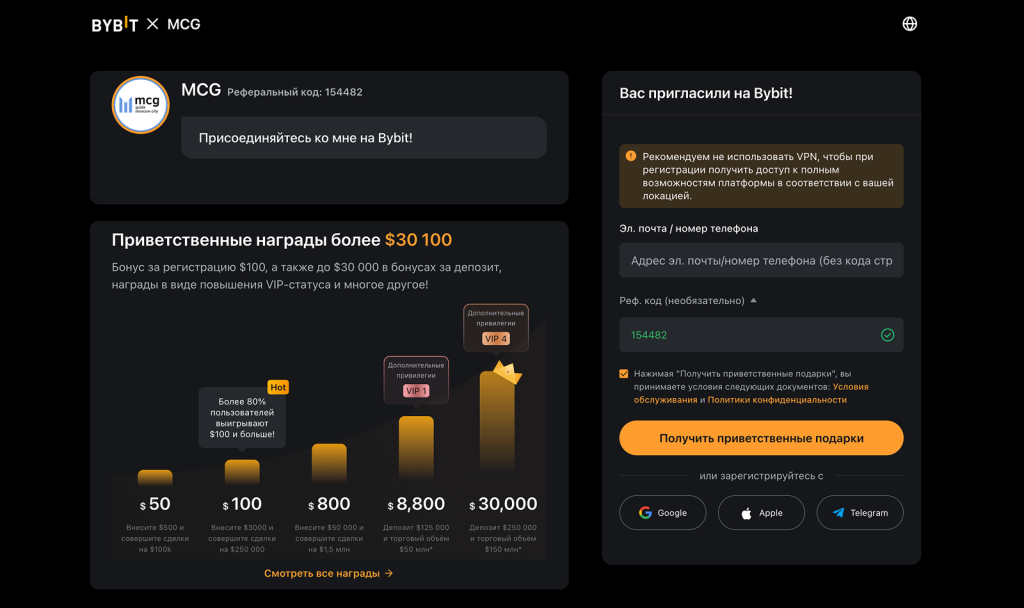
Register on ByBit before applying for the card: https://partner.bybit.com/b/154482, referral code 154482 will be automatically applied.
Key features of the ByBit card for Russians
Before reading the instructions, here are the key facts:
- Officially, Russia is not on the list of regions supported by the Bybit Card.
- In practice, Russians apply for the card through Georgia or Kazakhstan—this is a working method used by thousands of users from the Russian Federation.
- A Russian passport is sufficient for Level 1 KYC verification; a foreign passport is not required.
- To apply, you need a VPN with a Georgian or Kazakhstani IP address and a foreign phone number.
- Offline payments do not work within Russia, as Visa and Mastercard have withdrawn from the Russian market.
- Abroad and online, the card works fully: international stores, subscriptions, and ATMs.
- The Georgian card supports Apple Pay, while the Kazakhstani card supports Google Pay and Samsung Pay.
- Issuing a virtual card is free, with a processing time of 1–3 business days.
What is the Bybit Virtual Card and how does it work
The Bybit Card is a Mastercard debit card linked to your Funding wallet on the Bybit exchange. With each payment, cryptocurrency is automatically converted into the currency of the purchase: dollars, euros, tenge, or lari. You don’t need to hold fiat on the card; conversion occurs at the time of the transaction at the payment system’s exchange rate plus a commission of about 0.9%.
Bybit is a major cryptocurrency exchange that has been operating since 2018 and serves over 60 million users worldwide. The Bybit Card is an additional product offered by the exchange for those who want to spend crypto in their daily lives without having to first convert it to rubles.
How Russians actually use the Bybit Card:
- paying for subscriptions: ChatGPT Plus, Spotify, Adobe, Netflix, GitHub, Notion;
- shopping at international online stores: Amazon, AliExpress (international), eBay;
- booking hotels and flights on international platforms;
- withdrawing cash from ATMs outside Russia;
- making payments at physical locations abroad via Google Pay or Apple Pay.
Is the ByBit Card available to Russians in 2026?
Officially, no. Russia and Belarus are excluded from the list of regions supported by the Bybit Card. Bybit issues cards to residents of EEA countries, the UK, as well as Georgia, Kazakhstan, and several other CIS countries.
In practice, yes, through a workaround. Users from Russia are applying for the card en masse by selecting Georgia or Kazakhstan as their region when submitting their application. The region is determined by IP address when filling out the form, so a VPN is required at this stage. Once the card is issued, a VPN is not needed for everyday use.
Two options and the difference between them:
- The card via Georgia supports Apple Pay, with the primary transaction currency being USD or EUR.
- The card via Kazakhstan (AIFC/Global) supports Google Pay and Samsung Pay and can convert to tenge.
The choice depends on which payment service you use more often.
How to apply for a Bybit card in Russia: step-by-step guide
- Sign up for Bybit if you don’t have an account yet. Follow the link partner.bybit.com/b/154482; referral code 154482 will unlock a welcome bonus upon registration.
- Complete Level 1 KYC verification. A Russian domestic or international passport will work. Verification takes 15–30 minutes in automatic mode.
- Get a foreign phone number ready. You need a number from a carrier outside of Russia or Belarus. The easiest way is to rent a virtual number through specialized services; it costs from 50 rubles.
- Enable a VPN with an IP address from Georgia or Kazakhstan, depending on the selected region on the map.
- Open the "Card" section on the bybit.com website or in the Bybit mobile app.
- Select the issuing region—Georgia or Kazakhstan—and fill out the form. The region must match your VPN’s IP address.
- Wait for approval. The virtual card is issued within 1–3 business days. The card details (number, expiration date, CVV) will appear in the “Card” section of the app.
- Top up your Funding wallet. Transfer USDT or another cryptocurrency from your trading account to your Funding wallet; funds are deducted from this wallet when making payments.
- Link it to Apple Pay or Google Pay if desired; the card details are entered manually in the payment app.
The Bybit Virtual Card and How It Differs from a Physical Card
A Bybit virtual card is a card without a physical plastic card. It has all the standard details: a 16-digit number, expiration date, and CVV. With a Bybit virtual card, you can:
- pay for purchases at any online store that accepts Mastercard;
- link it to Google Pay or Apple Pay for contactless payments;
- use it for online subscriptions and reservations.
The physical Bybit card is a plastic card that is delivered to you. Through partner services, you can receive it in Russia in about 2–3 weeks. It is needed for withdrawing cash at ATMs and making offline payments abroad without a smartphone. For most everyday tasks, the virtual card is sufficient.
How to add a Bybit card to Google Pay
Applicable to the Kazakhstani version of the Bybit card. Steps:
- Open the Google Pay app on your smartphone.
- Tap “Add Card,” then “Debit or Credit Card.”
- Enter your Bybit virtual card details: number, expiration date, and CVV. This information is available in the "Card" section of the Bybit app.
- Confirm the link using the code that will be sent to the phone number provided when you registered the card.
Once linked, you can use your Bybit card for contactless payments at any terminal abroad that supports Google Pay.
The Truth About Fees and Limits for the Bybit Virtual Card in 2026
- Issuing a virtual card is free.
- Maintenance is free with a monthly turnover of $100 or more; for lower turnover, the fee is $1 per month.
- The conversion fee for payments is approximately 0.9% of the transaction amount.
- ATM cash withdrawals start at 1.5 USD or 1.5%, depending on the card type; the first withdrawals may be free for active users.
- Daily limit up to 5,000 USD.
- Monthly limit up to $50,000.
Which cryptocurrencies does the Bybit card support?
Funds are debited from the Bybit Funding wallet. With each payment, any asset is automatically converted into the purchase currency. Supported cryptocurrencies:
- USDT and USDC — most convenient as the primary balance on the card;
- BTC, ETH, XRP, BNB, and others—more than 8 coins in total;
- There is no need to store fiat on the card; conversion occurs automatically at the time of the transaction.
Where the Bybit Card works and where it doesn’t
The Bybit Card works:
- at online stores and services worldwide that accept Mastercard;
- for paying for subscriptions — ChatGPT, Spotify, Netflix, Adobe, GitHub, and others;
- when booking on international platforms—Booking, Airbnb, Expedia;
- for cash withdrawals at ATMs abroad;
- for offline payments outside Russia via Google Pay and Apple Pay.
The Bybit card does not work:
- for offline payments within Russia, as Visa and Mastercard have suspended operations in the Russian market;
- in sanctioned jurisdictions—Iran, North Korea, Cuba, and Syria.
Do you need a promo code when registering to get a Bybit card?
The Bybit card is available to all verified users; no promo code is required to obtain it. However, when registering, you should enter the referral code 154482: it unlocks a 20 USDT coupon for trading fees and a welcome bonus package of up to 30,100 USDT.
These bonuses are not directly applied to the card itself. But most users eventually start trading on Bybit or using P2P to fund their accounts. In this case, the commission coupon will save you real money starting with your first trades. You can only claim the bonus during registration or within the first 14 days after creating your account, so it’s best not to wait.
Register with code 154482: https://partner.bybit.com/b/154482
Frequently Asked Questions
Can I apply for a Bybit card without a VPN?
No, your region is determined by your IP address when you submit your application. You only need a VPN when filling out the application form. Once the card is issued, you can use it without a VPN.
What is “A Bank Bybit” and why do I need to specify it?
A Bank is Bybit’s partner bank, which issues cards in several regions. This field on the form refers to your card’s issuing bank. For standard applications via Georgia or Kazakhstan, it is filled in automatically; there is no need to specify a branch.
Does the Bybit card work offline in Russia?
No. Within Russia, the Bybit card does not work at offline terminals: Visa and Mastercard have suspended operations in the Russian market. The card is intended for online payments and use abroad.
What type of passport is required for Bybit KYC?
A Russian internal passport or a foreign passport is acceptable. Level 1 KYC is completed automatically within 15–30 minutes. A document confirming your foreign address is not required for Level 1.
Can I get a physical Bybit card in Russia?
You can order a physical Bybit card through partner intermediary services with delivery within Russia. Delivery takes about 2–3 weeks. For most purposes, a virtual card is sufficient.
What services can I pay for with a Bybit card?
Any services that accept Mastercard: ChatGPT Plus, Spotify, Adobe, Netflix, GitHub, Notion, Amazon, Booking, Airbnb, and other international platforms. The card works for online payments worldwide.
Conclusion
The Bybit card for Russians in 2026 is a practical tool that’s easy to obtain. There’s no official way to get it through Russia, but via Georgia or Kazakhstan, the virtual card can be issued in 1–3 days. You’ll need a Russian passport, a VPN, and a foreign phone number. The card serves a specific purpose: to pay with crypto where Russian cards are not accepted, on foreign services, when making reservations, and while traveling.
Register on Bybit before applying for the card: partner.bybit.com/b/154482
Read also
- Bybit sign-up bonus — how to get 20 USDT and a welcome package
- Bybit promo code and referral code 2026 — what they offer and how to use them
This material is for informational purposes only. Bybit Card issuance terms and regional availability are subject to change; please check the official website bybit.com for the latest information. Cryptocurrency transactions involve the risk of losing funds.