
Signing up for Bybit from Russia in 2026 takes 2–3 minutes—the site opens without a VPN, the interface is in Russian, and Russian passports are accepted for verification. But there are details that determine whether you’ll receive bonuses, whether verification will go through on the first try, and whether you’ll lose your data on a phishing site. Let’s break it down step by step.
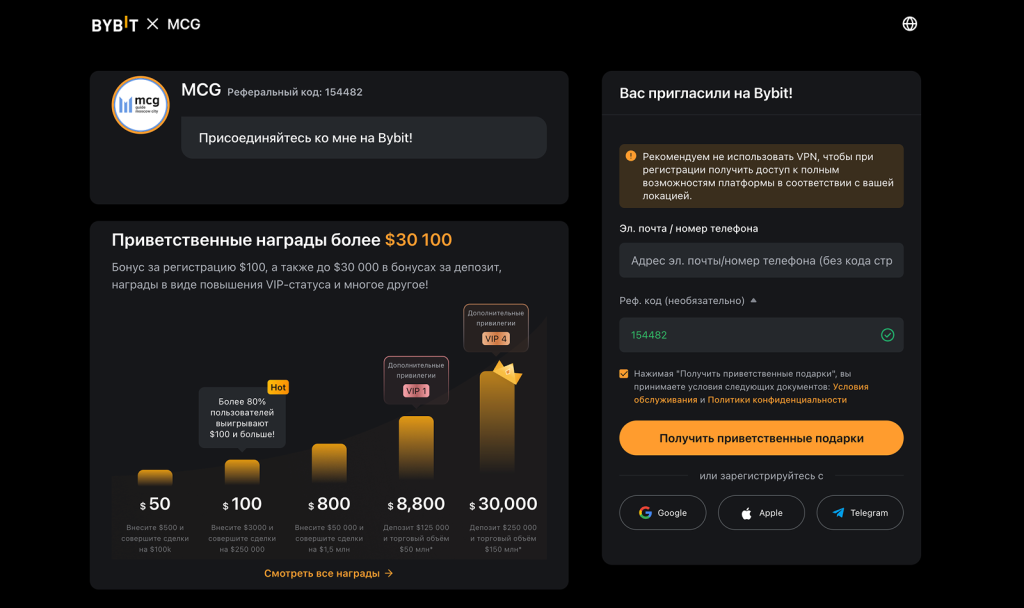
Register on ByBit with bonuses: https://partner.bybit.com/b/154482 — this is the page of ByBit’s official partner; referral code 154482 will be automatically entered and activate the welcome bonuses.
Important before registering on ByBit:
- The Bybit website can be accessed from Russia without a VPN; using a VPN during registration may cause errors.
- Register via email or phone number — email is more reliable; you can lose a phone number.
- Do not use Mail.ru or Rambler—verification codes often do not get delivered. Gmail or Yandex are better options.
- Enter referral code 154482 during registration to unlock a 20 USDT coupon and a bonus package worth up to 30,100 USDT.
- Level 1 KYC is required for P2P, trading, and withdrawals — Russian passports are accepted without restrictions.
- Phishing sites in 2026 have become indistinguishable from the originals—check the domain before entering any data.
- One person — one account. Two accounts using the same information — both will be banned.
Phishing Protection
In 2026, Bybit phishing clones became visually indistinguishable from the original. People enter their data, lose access to their accounts and funds. You must verify this before entering your email and password.
The exchange’s only official domain is: bybit.com
All other variants are phishing or scams:
- bybit-ru.com, bybit-ru.net, and any variations ending in “-ru”
- bybit-global.com, bybit-global.net
- byblt.com — the letter “i” is replaced with “l”
- bytbit.com — letters rearranged
- bybit.com.ru, bybit.online, bybit.pro, and any other domains
How to protect yourself: bookmark bybit.com in your browser and only access it from there.
Do not click on links from Telegram, VKontakte, or messaging apps—even if the sender looks familiar.
Important! Country selection and your future ByBit card
If you plan to apply for a ByBit card to pay for subscriptions, make purchases abroad, or link it to Apple Pay and Google Pay — be aware of one important detail in advance. Russia is not officially included in the regions supported by ByBit Card. Users from the Russian Federation apply for the card through Georgia or Kazakhstan—this is done separately after registration, using a VPN and a foreign phone number.
The account registration itself, however, proceeds as standard using a Russian passport. The card is applied for later as a separate product and does not affect the account creation process. Detailed information on how a Russian citizen can get a Bybit card for free, with actual figures on fees, limits, and cashback up to 10%: Bybit Card — Apple Pay, Google Pay, and cashback up to 10%.
How to register on Bybit via the website:
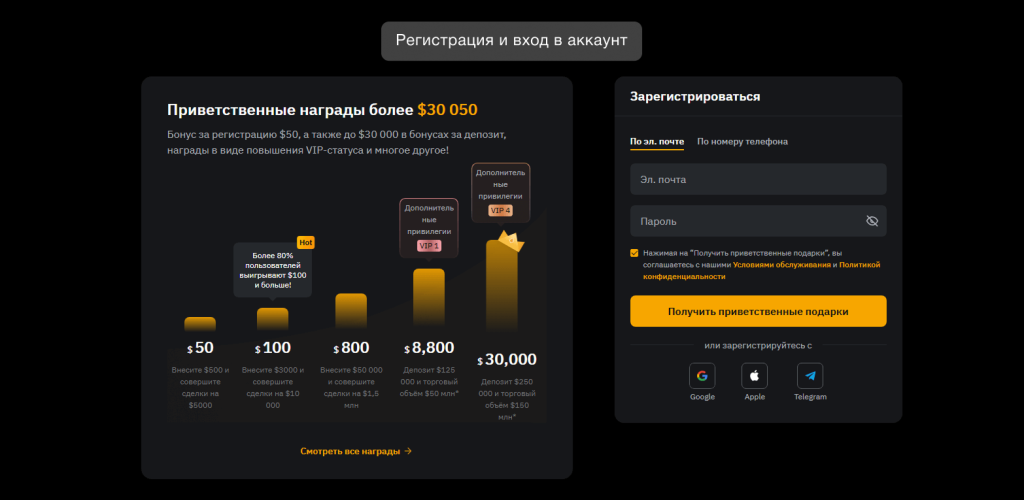
- Click the affiliate link partner.bybit.com/b/154482 — it takes you to the official Bybit website via an affiliate account; the referral code 154482 will be automatically entered and activate bonuses upon registration.
- Click “Sign Up” in the top right corner of the page.
- Choose a registration method: via email or phone number. Email is preferable—a phone number can be changed or lost, and it’s easier to recover access via email.
- Enter your email address. Use Gmail or Yandex — they consistently deliver verification codes. Mail.ru and Rambler often block emails from Bybit.
- Create a password between 8 and 30 characters. Required: uppercase and lowercase letters, numbers. Do not use a password from other services.
- In the “Referral Code” field, make sure it says 154482 — when you click the affiliate link, it’s filled in automatically. This field unlocks welcome bonuses.
- Agree to the terms and conditions and complete the CAPTCHA.
- Enter the confirmation code from the email. If you haven’t received the code, check your “Spam” folder and wait 2–3 minutes.
Your account has been created. The next step is to set up security and verification.
How to register on Bybit via the app
The Bybit app works on iOS and Android. Registration in the app is exactly the same as on the website, but there are some nuances regarding installation.
- iOS: Download from the App Store. If the app is unavailable in the Russian App Store, switch to an account with a different region (Kazakhstan, Georgia, or any other country).
- Android: Download from Google Play. If unavailable, go to bybit.com via your smartphone’s browser and download the official APK file by clicking the “Download App” button on the website. Only from the official website, not from third-party sources.
After installation, tap “Sign Up,” enter your email, password, and referral code 154482.
KYC verification on Bybit: three levels and what each unlocks
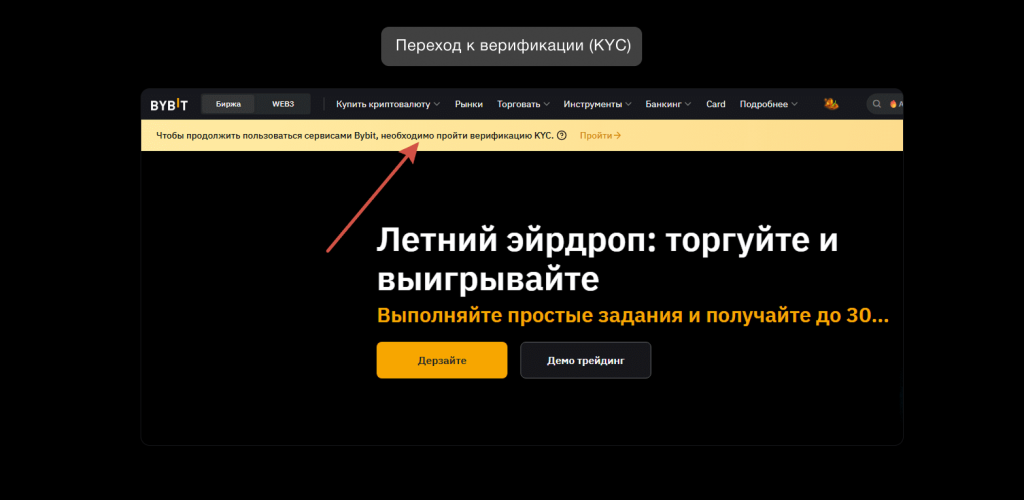
After registration, Bybit will prompt you to complete verification. A notification will appear at the top of the screen. Manual path: profile icon → “Account” → “Verification.”
Bybit uses three KYC levels:
| KYC Level | Requirements | What it unlocks |
|---|---|---|
| Level 1 | Passport + selfie | P2P, spot, futures, withdrawals up to 1 million USDT/day |
| Level 2 | Address verification (bank statement, lease agreement) | Withdrawals up to 2 million USDT/day, advanced features |
| Level 3 | Video call with a representative | Maximum limits, institutional features |
For most Russians, Level 1 is sufficient—it unlocks P2P, trading, and withdrawals without restrictions for standard volumes.
How to complete Level 1 KYC verification
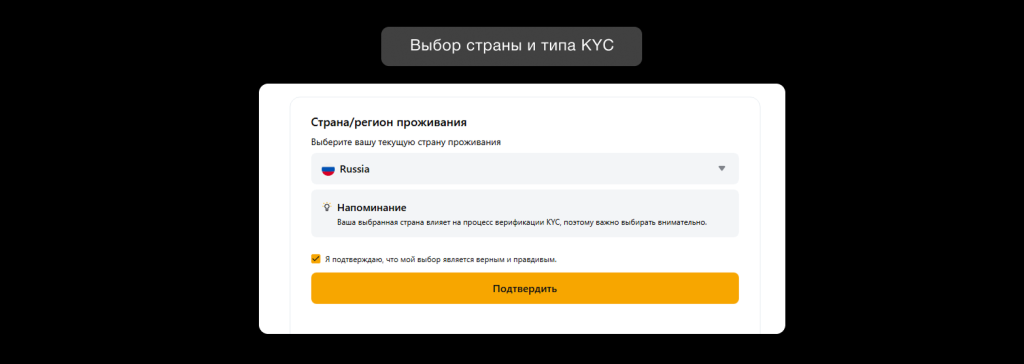
- Select your country of residence — Russia. Enter your details exactly as they appear on your passport. Any discrepancies will result in a resubmission.
- Select the document type. Bybit accepts passports, ID cards, residence permits, and driver’s licenses. Tourist visas and foreign passports are not accepted. For Russians, a Russian internal passport is suitable.
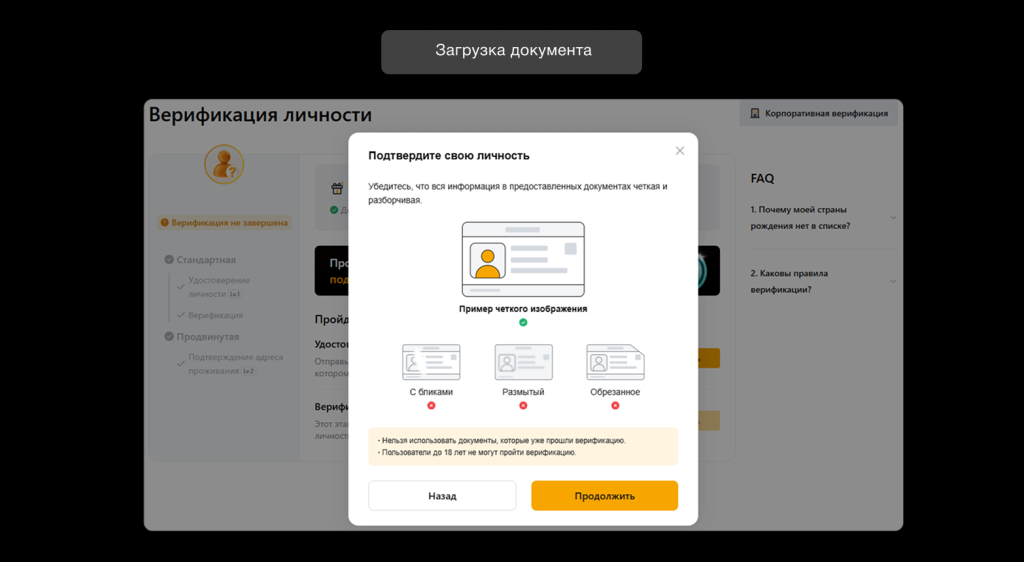
- Take a photo of the document. All four corners must be in the frame, and the text must be clear, without glare or shadows. Blurry photos are the most common reason for rejection.
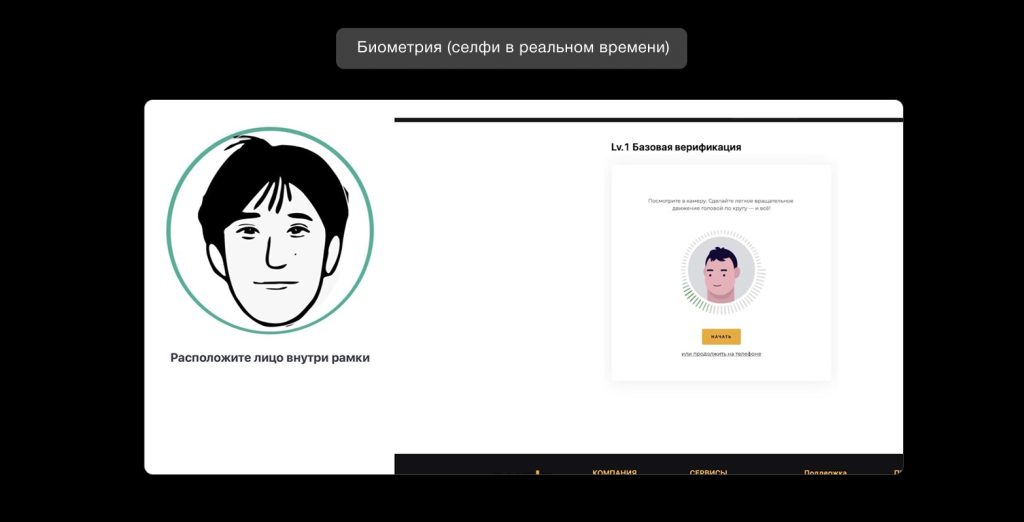
- Complete the biometric verification—a real-time selfie via the camera. No filters or masks. Neutral background, good lighting, VPN turned off.
- Wait for the result. In most cases, this takes 10–30 minutes. During peak periods, it may take up to a day. If your application is rejected, the reason will be stated in the notification; please re-photograph the document and resubmit it.
Security settings after registration
Very few people do this, and they’re missing out.
Setup takes 5 minutes and protects your account from hacking and phishing.
- Two-factor authentication (2FA). Path: Profile → "Security" → "Authenticator." Connect Google Authenticator or Authy. Without 2FA, your account is vulnerable even with a strong password.
- Anti-phishing code. A unique word or phrase that appears in all official Bybit emails. If the email doesn’t contain this code, it’s a fake. Path: Profile → “Security” → “Anti-phishing code.”
- Device binding. Bybit remembers the devices you log in from. When logging in from a new device, confirmation is required—this protects against unauthorized access.
- Do not store seed phrases or passwords in messaging apps—Telegram, VKontakte, and WhatsApp are not as secure as you might think.
Bybit referral code during registration: where to enter it and what it gives you
The referral code is entered once, during registration in the “Referral Code (optional)” field.
When clicking the affiliate link partner.bybit.com/b/154482, the code 154482 is already entered automatically — check the field before completing registration.
If you registered without a code, you can add it within 14 days. Path: Profile → “Referral Program” → “Join Partner Community” → enter 154482.
What does code 154482 unlock on ByBit:
- A 20 USDT coupon for trading fees — activated in the Rewards Hub, valid for 7 days. Covers fees for your first trades.
- Welcome package up to 30,100 USDT — task system: deposit funds, make your first spot trade, open a futures position. Each task unlocks the next bonus level.
- Bonuses for the first deposit — a tiered system starting at 100 USDT, 500 USDT, and 1,000 USDT.
Bonus USDT are trading credits and cannot be withdrawn directly. Profits earned using them are withdrawn in the usual manner.
Common mistakes when registering on Bybit
- You didn’t receive the verification code. Check your “Spam” folder. If you use Mail.ru or Rambler, switch to Gmail or Yandex and try again.
- Error registering with a VPN. Bybit may block registration from certain VPN addresses. Disable your VPN and try again—registration works directly for Russian users.
- KYC rejected on the first attempt. The most common reasons: a blurry photo, cropped edges of the passport, glare on the document, or a mismatch between the name used during registration and the name on the passport. Re-take the photo in good lighting.
- Forgot to enter the referral code. You can add it within 14 days of registration via the “Referral Program” section in your profile.
- Two accounts with the same information. Bybit detects duplicates and blocks both. One account per person.
- You visited a phishing site. If you entered your information on a third-party domain, immediately change your password on the real bybit.com and enable 2FA.
Frequently Asked Questions
Do I need a VPN to register on Bybit from Russia?
No. The bybit.com website opens without a VPN. Using a VPN during registration may cause errors—disable it while creating your account.
Which email is best to use when registering?
Gmail or Yandex — they consistently deliver emails and codes from Bybit. Mail.ru and Rambler often block emails from foreign services.
Can I create two accounts on Bybit?
No. One person — one account. If Bybit detects duplicate accounts, it will block both.
How long does KYC verification take?
On average, 10–30 minutes in automatic mode. During periods of high traffic, up to 24 hours. If a day has passed, contact support via the chat on the website.
What should I do if verification fails?
Check the photo quality: all corners of the passport must be in the frame, no glare, and the text must be clear. Resubmit your biometric data in good lighting without a VPN. If it’s rejected again, contact support in Russian via chat.
When are the bonuses activated after entering the referral code?
The 20 USDT coupon appears in the Rewards Hub within a few hours of registration. Welcome package tasks are activated after your first actions on the exchange. If nothing appears after 24 hours, contact support.
Conclusion
Registering on Bybit from Russia in 2026 works without a VPN and takes 2–3 minutes. A Russian passport is accepted for Level 1 KYC—it unlocks P2P, trading, and withdrawals. Key points: use the affiliate link to get bonuses, use a reliable email address, verify that the referral code 154482 is entered, and immediately set up 2FA and an anti-phishing code.
Sign up for Bybit with bonuses: partner.bybit.com/b/154482
Read also
- Bybit Registration Bonus — How to Get 20 USDT and a Welcome Package
- Bybit promo code and referral code 2026 — what they offer and how to use them
- Free Bybit Card — Apple Pay, Google Pay, and up to 10% cashback
- Does Bybit work in Russia — an honest review 2026
This material is for informational purposes only. Bybit’s registration terms and bonus program terms are subject to change—please check the official website bybit.com for the latest information. Cryptocurrency trading involves the risk of losing funds.