A smart contract is a program on a blockchain that performs actions defined in its code: transferring tokens, recording collateral, issuing a digital asset or counting votes. Users interact with it through an application or a blockchain explorer. When a transaction is included in a block, the network checks it against its shared rules and records the outcome.
Smart contracts are used in cryptocurrency swaps, lending, NFTs and project governance. A single “Swap” button can trigger calls to several programs. Before confirming, it helps to understand which contract receives the request, what it is authorised to do and how your assets may change.
We explain how smart contracts work through practical examples, then examine the real UNI contract on Etherscan. You will see where to find its address, published code and read functions, how a token spending approval differs from a transfer, and what you can inspect without connecting a wallet.
What is a smart contract? A plain-language explanation
The program has an address on a particular network, a set of functions and stored data. A function defines an action, while the data represents the current state: for example, how many tokens belong to an address or who may spend a specified quantity. To execute an operation, the caller must supply the required parameters and satisfy the conditions in the code.
| Element | Meaning | Where you will find it |
|---|---|---|
| Network | The blockchain on which the program is deployed | The wallet’s network selector and the explorer’s name |
| Contract address | The program’s identifier on the selected network | Project documentation, the token page and transaction details |
| Source code | A readable description of the program’s rules, if published | The Contract tab and Code section |
| Function | An action you can request from the program | Names such as balanceOf, transfer and approve |
| State | Data stored after operations have executed | Balances, permissions and protocol parameters |
| Transaction | A signed request that can change the network’s state | Wallet history and the transaction page identified by its hash |
| Gas | A measure of computational work on Ethereum | The fee estimate before confirmation |
A vending machine makes a useful first comparison: it dispenses the selected product when certain conditions are met. A blockchain program has broader capabilities, and a coding error can affect every interaction with it. It executes the rules as written, including rules that were poorly designed.
The project’s website helps construct a request and display the result in a convenient form. The contract itself continues to exist on the network whether or not the browser tab is open. If the website stops working, the program may remain accessible, although interacting without the familiar interface requires specialist knowledge. We explain the basics of storing records in our blockchain guide.
How a smart contract works: from request to result
Suppose a user wants to swap one token for another through a decentralised application. The interface estimates the result, constructs a request to the appropriate contract and passes it to the wallet. The next steps depend on the protocol, but the general sequence is as follows.
- Choose an action. The user selects the asset, amount and swap conditions. The application displays the expected result and permitted limits.
- Check the approval. To spend a conventional ERC-20 token, the application may need an allowance granted in advance. Some protocols use other mechanisms, including authorisation by signature.
- Confirm the request. The wallet shows the network, destination, parameters and estimated fee. The user signs the specific operation presented.
- Inclusion in a block. The network processes the transaction in a particular order relative to other operations. The pool’s state can change between the interface’s estimate and execution.
- Execute the functions. Contracts check balances, permissions and swap limits. If the conditions are met, the token records are updated.
- Check the result. The transaction hash lets you inspect its status, gas usage and associated token movements. The application then updates the displayed balance.
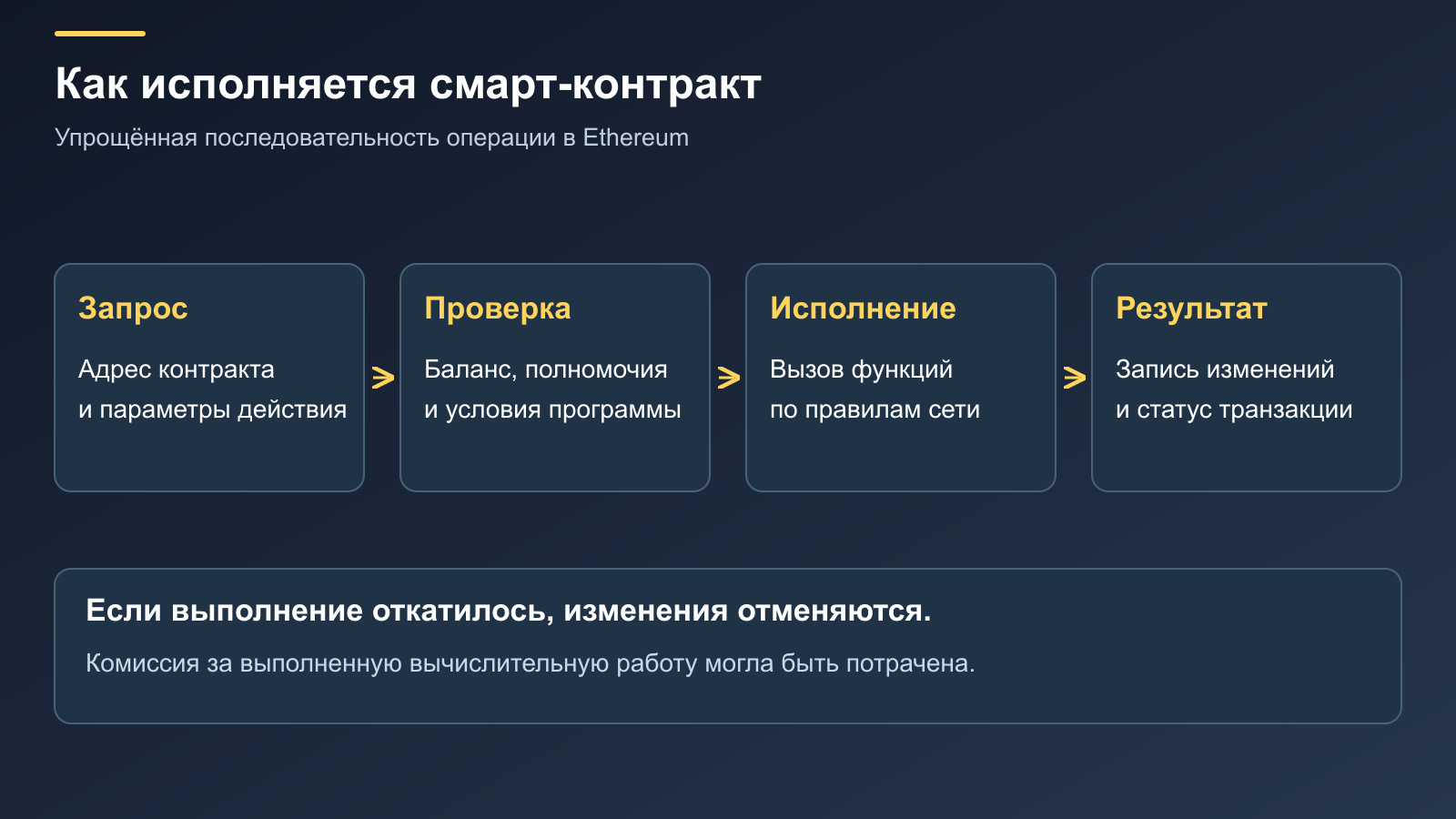
A swap normally specifies a minimum amount of the asset to receive. If conditions have moved beyond the permitted limit by execution time, the relevant check can stop the operation. A quote displayed on a website therefore does not mean a swap has already taken place at that price.
One transaction can call several contracts. A router, for example, may interact with different pools to complete a swap. If execution reverts, state changes within that transaction are rolled back, although computational work may already have been performed and paid for. A separate, earlier approve transaction remains in the history and may leave its approval in place.
Reading data and changing state
You can check a public address’s token balance with a normal request to a node. Reading it through an explorer generally requires no wallet connection, signature or network fee. The program returns information without changing the token ownership records.
A transfer, swap or approval changes network state and usually requires a transaction. On Ethereum mainnet, fees are calculated in ETH; individual applications may offer different ways of paying them. The network and its native coin are covered in our guide to Ethereum and ETH.
Information from the outside world reaches a contract through designated sources such as oracles. Blockchain code does not independently learn the weather, a price on an arbitrary website or whether a parcel was delivered. Such conditions require a separate arrangement for who supplies the information and how its reliability is checked.
Where smart contracts are used
The underlying principle is similar, but the records maintained and the risks involved differ. Here are several common uses a crypto wallet user may encounter.
Issuing and transferring tokens
A contract tracks units of an asset by address and defines the available operations. Wallets retrieve balances through a specified interface, allowing multiple tokens to appear in the same application.
- What is automated: balance accounting, transfers and approvals within the token’s capabilities.
- What to check: the address on the correct network, decimal places, minting permissions and transfer restrictions.
Several entirely different contracts can use the same ticker. A name and icon help you locate an asset in the interface, but its authenticity must be established from documentation and the full address.
Swapping cryptocurrencies
The program executes a swap according to the protocol’s rules and the current available liquidity. The user supplies parameters, and the network checks whether execution is possible.
- What is automated: calculations and asset transfers along the selected route.
- What to check: the contract, token recipient, minimum output and existing approvals.
A familiar button label does not prove that a website is calling the genuine protocol. A counterfeit interface can propose a different address or function.
Collateralised lending
An application may track deposited collateral, outstanding debt and liquidation conditions. Price data and risk parameters affect whether a position can remain open.
- What is automated: collateral accounting, accruals and enforcement of specified limits.
- What to check: the price source, liquidation terms, withdrawal availability and the powers of controlling addresses.
These applications are covered more fully under decentralised finance, or DeFi. The presence of a smart contract alone does not determine a service’s returns or resilience.
NFTs and digital access rights
A contract can record the owner of a unique token and the rules governing its transfer. The associated image or description may sometimes be stored outside the blockchain.
- What is automated: token issuance, ownership records and the operations the contract supports.
- What to check: the collection’s authenticity, where metadata is stored and whether it can be changed.
Rights to the token and rights to the object it depicts need separate consideration. An NFT ownership record does not automatically explain every condition governing use of the work.
Voting and project governance
Programs help record votes, check support thresholds and execute approved proposals. Some systems impose a delay between a decision and its implementation.
- What is automated: counting votes, checking conditions and making permitted parameter changes.
- What to check: delegation rules, quorum, execution delays and emergency intervention powers.
How to inspect a smart contract on Etherscan
Consider UNI on Ethereum mainnet. Uniswap’s official documentation identifies its address as 0x1f9840a85d5aF5bf1D1762F925BDADdC4201F984. This is the token program’s address, used here for analysis. Do not use it instead of your personal wallet or exchange deposit address.
Start with the project’s documentation: select the appropriate network and open the explorer it identifies. Searching only by token name is less reliable because it may return unrelated assets with identical names. Compare the entire address, not just its first and last characters.
The address, Contract tab and published code
The UNI page includes a Contract tab. Its Code section shows Source Code Verified, the qualification Exact Match, the name Uni and the compiler version. The source code appears below. These fields help establish which program the explorer displays and how the published source relates to the deployed code.
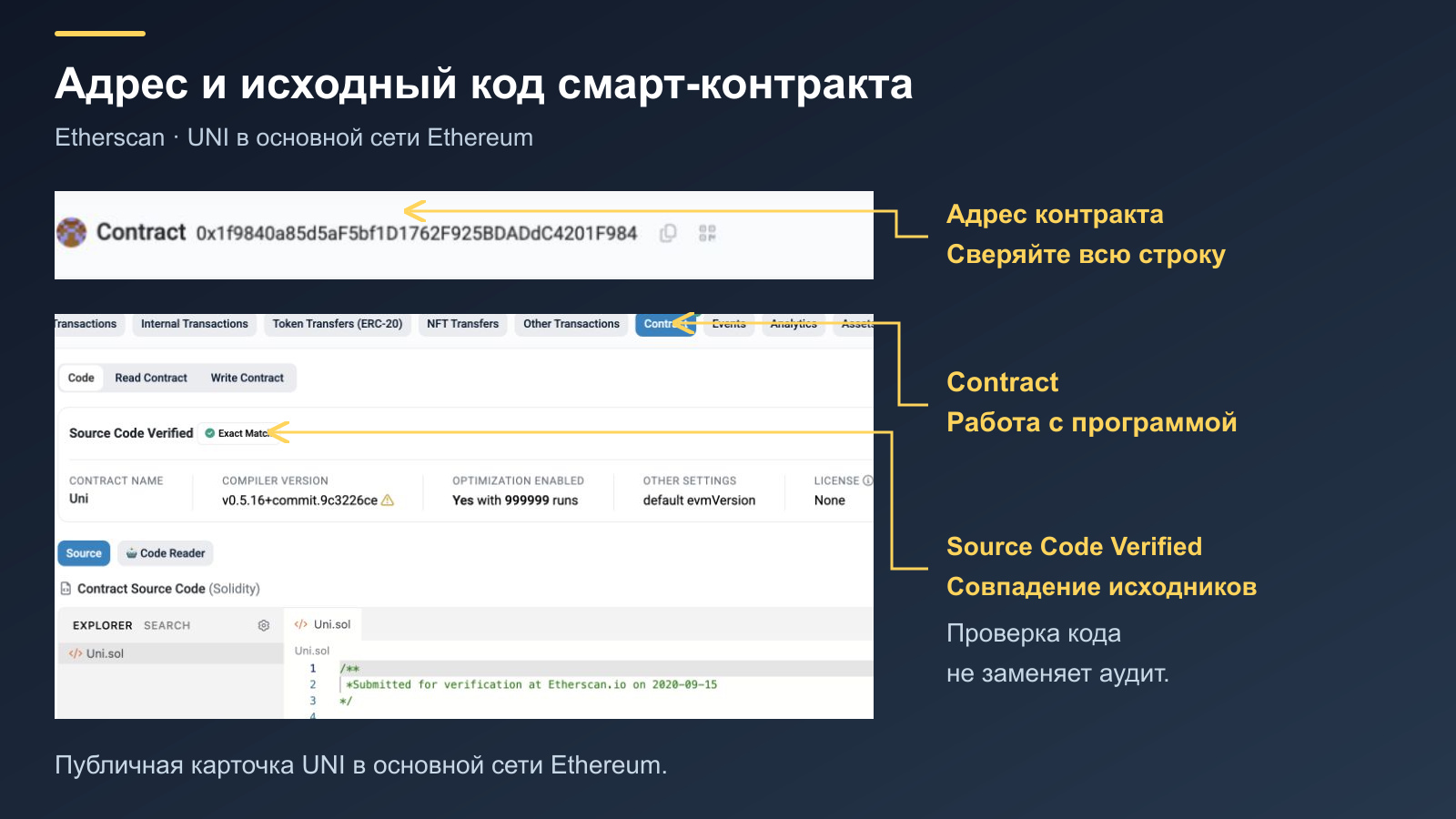
Source verification indicates that code was matched under the explorer’s verification rules. It does not mean independent specialists have examined every possible bug, the economic model or administrative powers. An audit requires a separate report identifying its date, version and the parts of the system reviewed.
Read Contract: what information can you request?
The Read Contract tab provides reading functions. UNI includes balanceOf for an address’s token quantity and allowance for authorised spending. In the interface shown, allowance takes two fields: account, the owner’s address, and spender, the address receiving the approval.
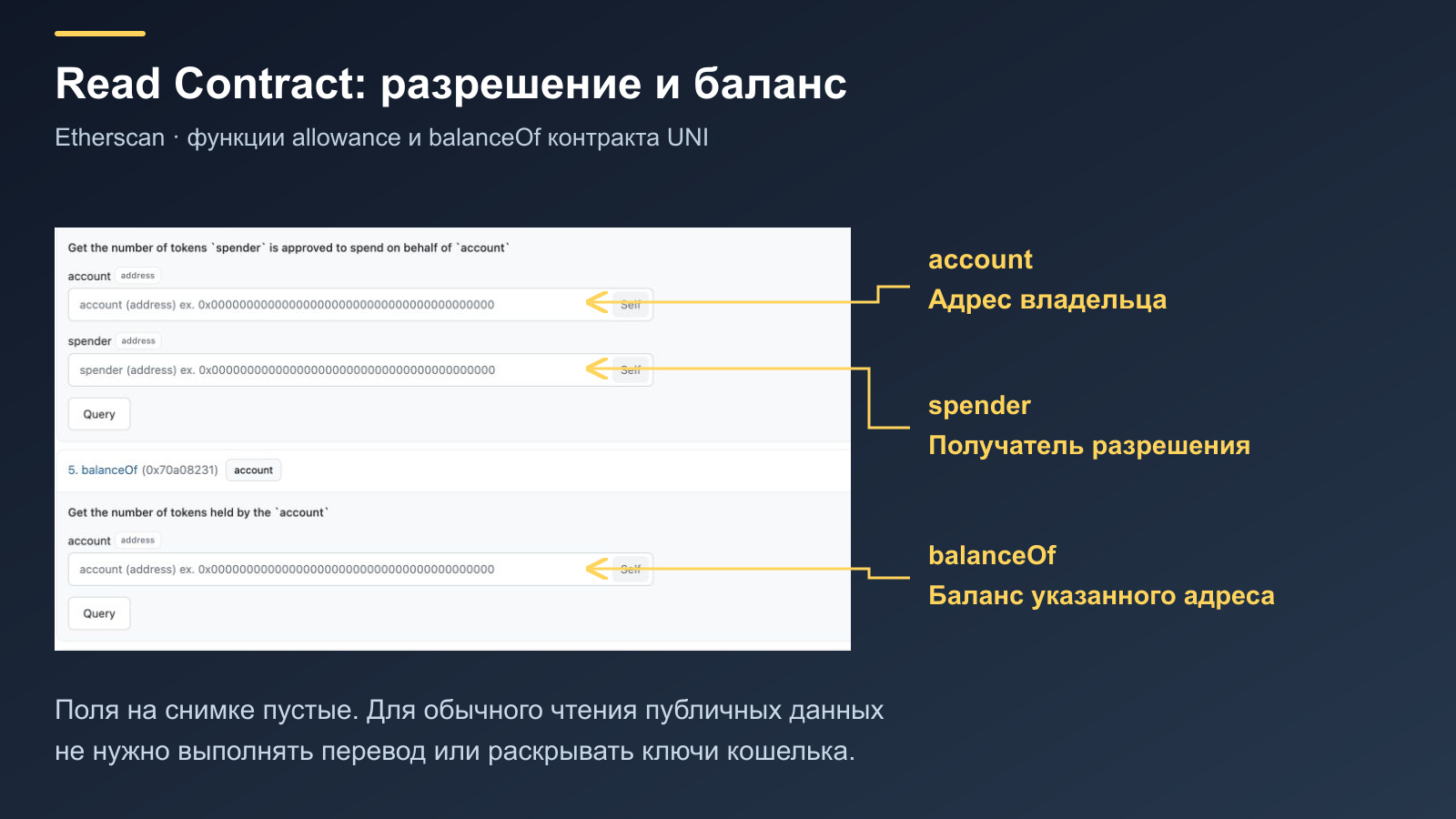
- balanceOf: requests the UNI balance of the specified public address.
- allowance: shows how much UNI a particular spender may spend on behalf of account.
- decimals: helps interpret the token’s integer values. UNI specifies 18 decimal places.
- Query: runs the selected function’s query. Where required, fill the empty fields with valid public addresses.
The screenshot deliberately leaves these fields empty to show the parameters requested by the interface. No separate operation involving a user’s funds is needed for this demonstration. A wallet connection button may appear on the page, but its presence does not turn a normal public balance query into a transfer.
A function’s raw result may be expressed in the smallest units. If the token has 18 decimal places, 1018 represents one whole unit. The account balance and the allowance for an account/spender pair answer different questions: the approval can exceed the current balance.
What to consider with upgradeable contracts
Some systems use a permanent address that forwards execution to another program, called the implementation. This arrangement is known as a proxy. If the implementation can be upgraded, checking it means identifying the current destination and who can change it. Some explorers provide separate tabs for reading through a proxy.
This is a general mechanism, not a claim that every token uses a proxy. Do not assume one contract has the same architecture as another. Basic program properties and further technical references are collected in the Ethereum documentation.
What a token spending approval means
Conventional ERC-20 tokens often use approve together with transferFrom. An owner authorises a particular address to spend a limited quantity of tokens, after which the approved spender can use the corresponding transfer mechanism. These powers apply to the specific token and its contract’s rules.
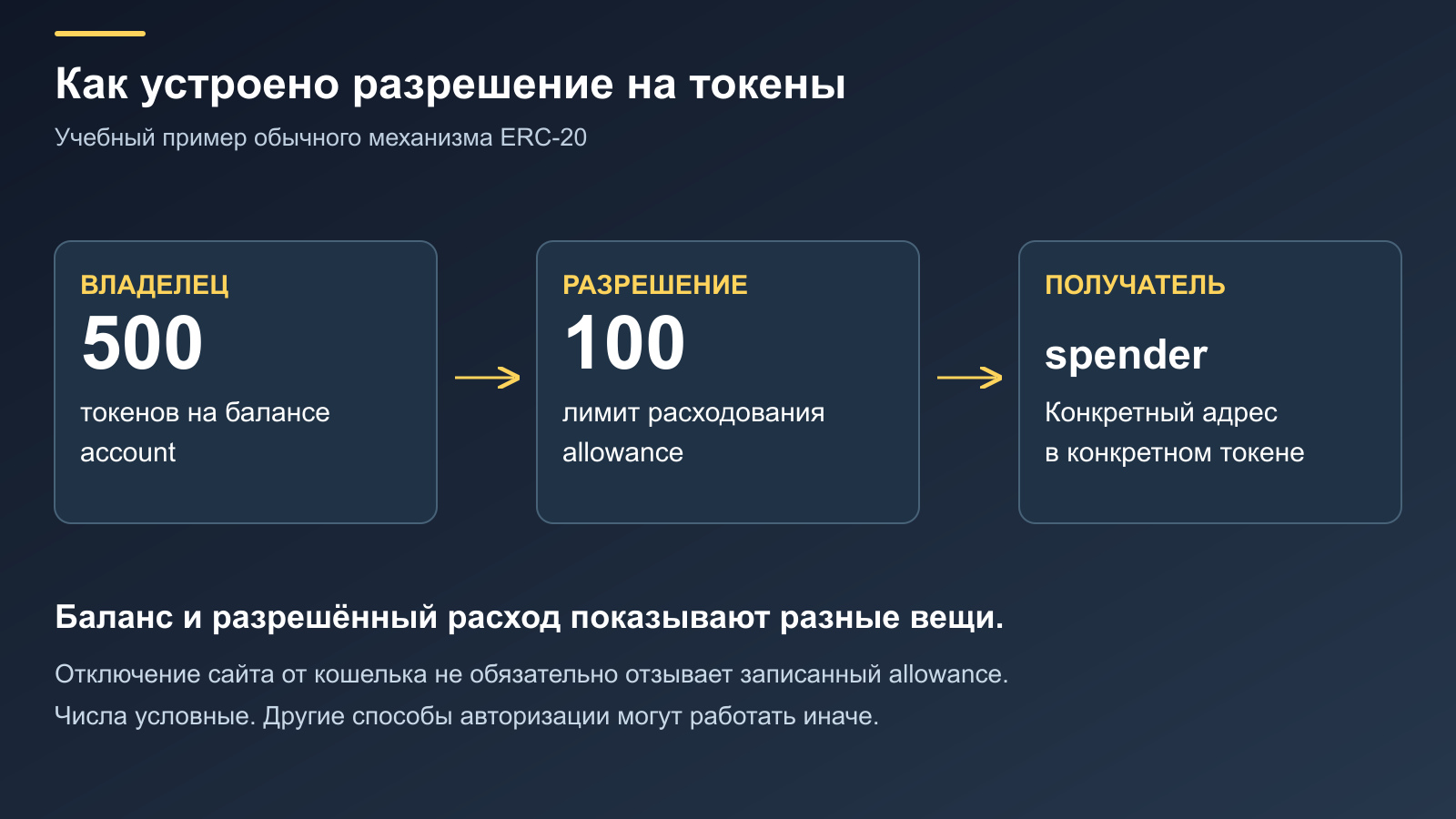
In our illustrative example, the owner holds 500 tokens and the application may spend 100. The balance and the allowance are distinct. Granting a very large limit instead of 100 can also expose future deposits of that token while the approval remains valid. Check the unused allowance separately from the completed swap history.
| Wallet action | What usually happens | What to check |
|---|---|---|
| Connecting a website | The application can see the selected public address and propose requests | The domain and selected account |
| Signing a message | The owner confirms particular data; the signature can have consequences without an immediate transaction | The text, purpose and scope of authorisation |
| Approve | An allowance is recorded for a spender to use the token within specified limits | The token, network, spender and limit |
| Transfer or swap | A specific action involving assets is executed | Amounts, recipient, limits and fees |
Approve does not disclose the private key to the application. Nevertheless, the approval is sufficient for actions supported by the contract within the authorised limits. A request that does not ask for a seed phrase can still require careful review before confirmation.
Disconnecting a website in the wallet and revoking an on-chain approval serve different purposes. Disconnection stops normal interaction between the app and wallet, but an allowance already recorded may remain. Changing that allowance usually requires a separate transaction and a fee. Other authorisation mechanisms, including signed approvals, must be assessed according to their own rules.
A practical explanation of approve fields appears in MetaMask’s documentation. Backup secrets serve a separate purpose: a seed phrase restores keys and should never be entered on an application’s website to swap or claim a token.
What risks remain with a smart contract?
Gather several independent pieces of information. An authentic address, open source code, a published audit and clearly explained administrative powers complement each other. A familiar logo or verification badge does not replace the other checks.
| What to examine | Question to ask | Limits of the check |
|---|---|---|
| Source code | Does the published source correspond to the deployed program? | Open code can still contain logic errors |
| Audit | Which version and components were reviewed? | A report does not guarantee the absence of every vulnerability |
| Upgrades | Who can change the implementation or parameters? | Conditions may differ after an upgrade |
| Administrator | Can operations be paused, tokens minted or access changed? | The existence of a power does not explain how it will be exercised |
| External data | Where do prices and other information come from? | A faulty source can affect code that executes correctly |
| Interface | Where is the request actually sent? | A genuine protocol can have a counterfeit website |
The terms of the operation add to the technical risk. Code can execute without a bug while producing an unfavourable result because of low liquidity, the chosen price tolerance or an unclear application fee. Review both the program and the economic meaning of the action you are confirming.
Dependencies deserve separate attention. A protocol may rely on another token, oracle, bridge or custody contract. A reliable main program does not eliminate the limitations of external components. Read warnings about the specific operation, and do not treat checking one address as an audit of the entire chain of interactions.
What to check before interacting with a smart contract
Follow the order in which you prepare the operation. If something does not match at one step, resolve it before returning to confirmation.
- The application’s official address. Open it from verified documentation or a saved bookmark. Advertisements and messages from strangers need additional scrutiny.
- Network and token. Compare the selected network with the one for which the contract address is published. Establish which asset the operation uses.
- Request destination. Inspect the full address in the wallet’s request. It should match the expected protocol component.
- Meaning of the action. Check whether you are confirming a transfer, swap, approval or message signature. The website’s button label may be too general.
- Access limits. Compare the token, spender, amount and expiry where the mechanism supports a time limit.
- Cost and restrictions. Check the fee, minimum output and available balance to pay for the operation.
- Result after submission. Keep the transaction hash and check its status before trying again. A delayed website update does not prove that the first operation failed to happen.
If you cannot explain the request’s contents, stop and find the function’s description in the documentation. Signing merely to “see the next screen” can already have consequences. An explorer’s public data is enough to start learning how a contract works.
Smart contract FAQ
Can a contract start itself on a particular date?
On Ethereum, a date arriving does not normally create a call by itself. The code may contain a time condition, but changing state requires a transaction from a user or a designated automation service. A “run later” function therefore needs both a time condition and a triggering mechanism to be examined.
Why did the operation fail while a fee was still charged?
The fee pays for processing and computation. If a transaction was included in a block but execution stopped at a condition check, some gas may already have been used. Inspect the status and actual fee in the explorer. An application error before submission and failed execution within a block have different consequences.
Can the contract developer reverse an accidental transfer?
That depends on the system’s capabilities and control over the recipient address. Blockchains have no universal undo button. The existence of a project team does not mean it can change any balance. First identify the network, contract, transaction hash and available powers, then ask official support about the procedure.
Do identical addresses on different networks mean the same contract?
The same string can occur on different EVM-compatible networks, but their states are independent. Different programs, or no code at all, may exist at that address. Check the combination of network and address, not just the sequence of characters.
Is a smart contract always a legal agreement?
The technical term describes a program and a method of enforcing rules. Its legal treatment depends on the parties’ relationship, the agreement’s terms and applicable law. For a particular transaction, an explorer address alone is insufficient: documents, evidence of authority and an analysis of the obligations undertaken may also be needed.